AESFill AF1C Machine Manual 50/58 Networking Multiple AF1s Together
Figure 12-2: 19 Pin Automation Kit Connection Cable
12. Networking Multiple AF1s Together
AF1s are wonderful stand-alone units for liquid filling but once production increases you may need to add more fillers together in
order to fill faster. The AF1 is equipped with the ability to network together so that the start signal will start all of the AF1s that are
networked at the same time. Up to 4 AF1’s can be networked together.
When networking AF1 machines together, you will need a 5 pin to 19 pin cable. This cable is not supplied with the machine, but can
be purchased through our spare parts department.
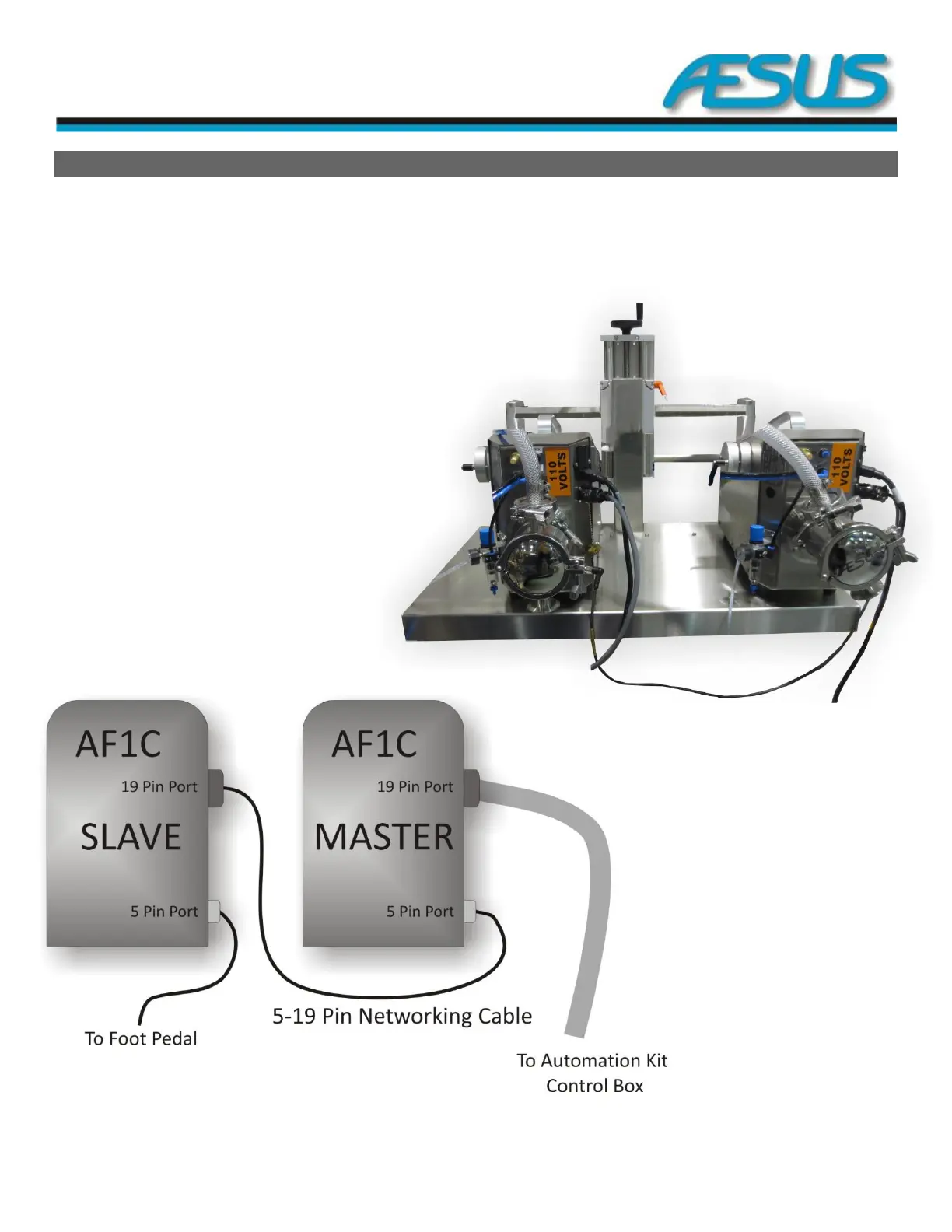
Connect the machines together using the 5 to 19 pin cable.
On the machine with the empty 5 pin port connects the
foot switch pedal. The machine that has the empty 19 pin
port (or the 19 pin port used for the automation kit),
this machine is considered the Master AF1.
All other AF1s should have the Slave Option turned ON.
If you have an optional automation kit, connect the
automation kit with the provided 19 pin cable to
the empty 19 pin port.
Figure 12-1: 5 to 19 Pin Cable


 To Next Page