AESFill AF1C Machine Manual 30/58 Screens
Home screen / Run screen 7.1
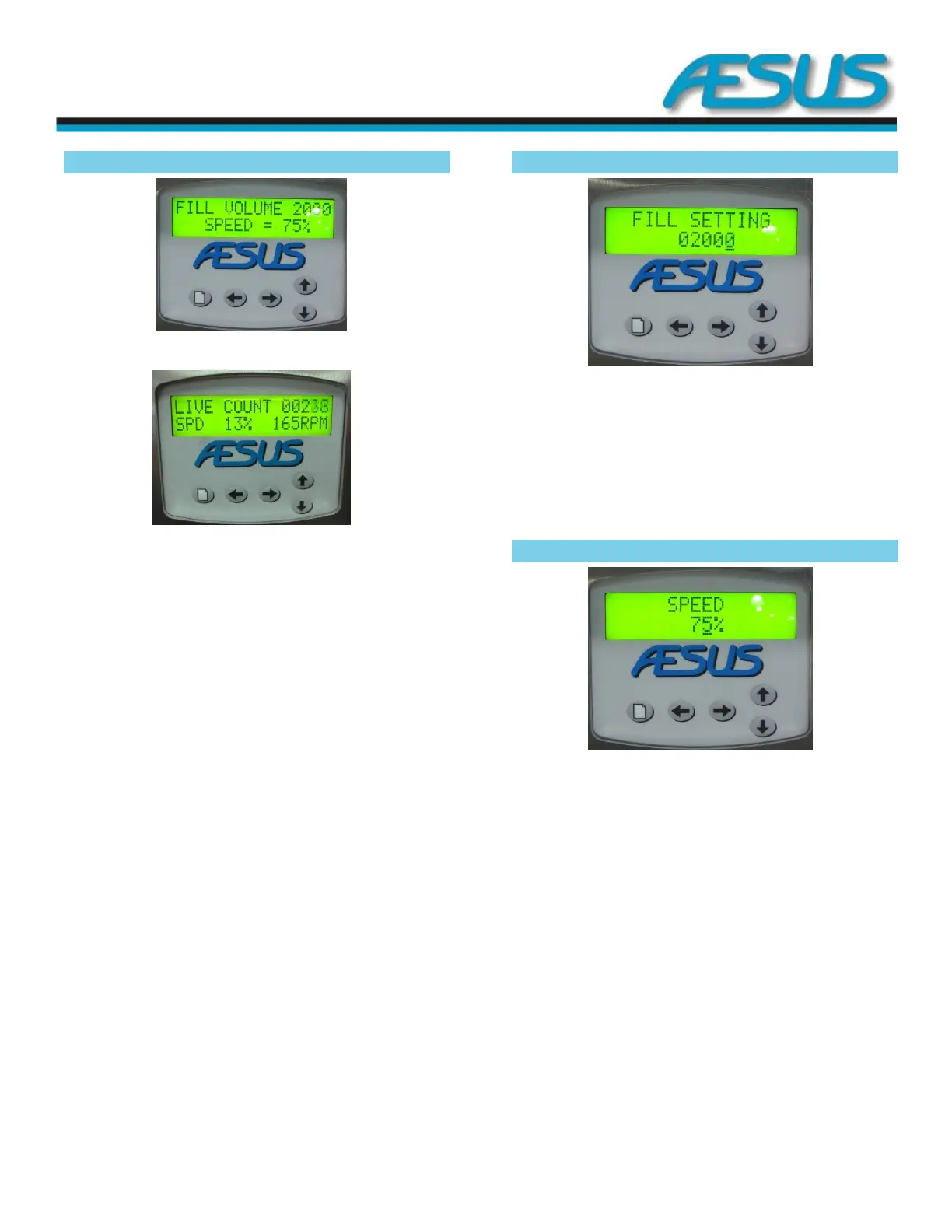
Figure 7-2: Home Screen
Figure 7-3: Run Screen
You see the programmed fill volume and the set filling speed.
When running the screen shows the Live Count, the Current
Speed % and the current RPM of the motor.
Press the menu key to access settings. By pressing the Menu
Key when inside different screen levels, it will return you to
the previous level’s next parameter.
Press the Up & Down arrow keys simultaneously to manually
start a cycle. Press the Up & Down arrow keys simultaneously
to stop the cycle.
In order to do a Master Reset to the factory default settings,
push and hold the 4 arrow keys at the same time. All
programmed values will be Reset to Off and/or to their
default setting.
Fill Setting 7.2
Figure 7-4: Fill Screen
Use left and right keys to change digits, up and down keys to
change setting. Keep fingers pressed for rapid action. Change
is instantaneous.
Press the Menu key to access more Settings
Speed 7.3
Figure 7-5: Speed Screen
Use up and down keys to adjust percentage of full speed
(1700 RPM). Keep fingers pressed for rapid action. Change is
instantaneous.
Press the Menu key to access more Settings


 To Next Page