Troubleshooting
i3070 Series 5i Help 6-5
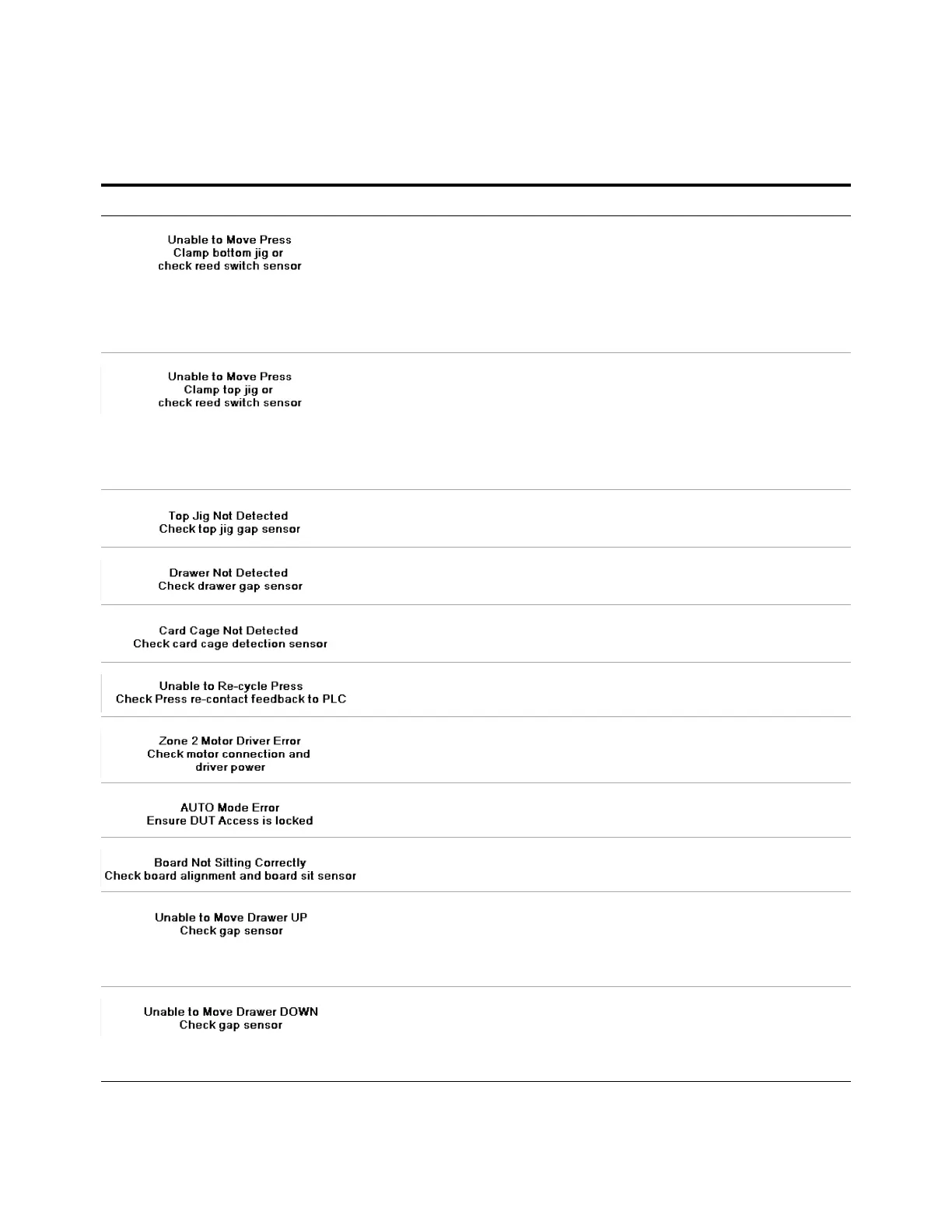
1 Install the bottom fixture if it is not present.
2 Check that the air supply is turned on.
3 Check the clamping cylinders and replace if faulty.
4 Check the reed switches on the fixture’s locking cylinders (front:
RS-5 and RS-7; rear: RS-7 and RS-9). They should not turn on when
the bottom fixture is clamped. Replace if faulty.
1 Install the top fixture if it is not present.
2 Check that the air supply is turned on.
3 Check the locking cylinder for the top fixture and replace if faulty.
4 Check the reed switch on the fixture’s locking cylinder (RS-3). It
should not turn on when the top fixture is clamped. Replace if
faulty.
• Check the Top Jig Detect Fully In Detect sensor (PHS-19).
• Ensure that the top fixture is installed properly.
• Check the Bottom Jig Fully In Detect sensor (PHS-11).
• Ensure that the drawer is pushed all the way into the system.
• Check the Engine Fully In Detect sensor (PHS-9).
• Ensure that the testhead is pushed all the way into the system.
• Check the re-contact feedback to PLC .
• Check the Zone 2 motors and driver.
For systems with optional DUT access feature enabled.
• Ensure that the Zone 2 door is locked.
For systems with optional Board Sit feature implemented.
• Check the board alignment at Zone 2 conveyor.
1 Check that the air supply is turned on.
2 Check the drawer cylinders and replace if faulty.
3 Check the drawer Up sensors (PHS-20 and PHS-22). They should
turn on when the drawer is moved up. Replace if faulty.
1 Check that the air supply is turned on.
2 Check the drawer cylinders and replace if faulty.
3 Check the drawer Down sensors (PHS-21 and PHS- 23).They should
turn on when the drawer is moved down. Replace if faulty.
Table 6- 2 Error Messages
Error Message Cause/Action


 To Next Page
 Loading...