Chapter 4 Settings and Test
26
STOP
START
2
3
1
AC220V-240V 50/60Hz
700VA MAX
FUSE AC250V T10A
MAKE SURE TO CONNECT THE PROTECTIVE
GROUNDING
ONLY FUSE WITH THE SAME TYPE AND
RATINGS CAN BE USED
REFER SERVICING TO QUALIFIED PERSONNEL
WARNNING
NC
NC
N
L
AC 300V
50/60Hz
25A MAX
DUT
POWER
EXT-COM
COM
SIGNAL OUTPUTSIGNAL INPUT
SCN2SCN3 SCN1 SCN0
S
T
B
P
M
1
P
M
0
P
M
2
N
C
C
O
M
GPIBLAN
EXT-PLC-B EXT-PLC-A
PLC
ALARM REMOTE
BAR CODE INPUT
H.V./L H.V./N
HIGH VOLTAGE
5.0kV AC MAX
6.0kV DC MAX
CURRENT-
SENSE-SENSE+
CURRENT+
MAX 10A MAX 16A
TESTING FIXTURE-16A
Ainuo
DUT
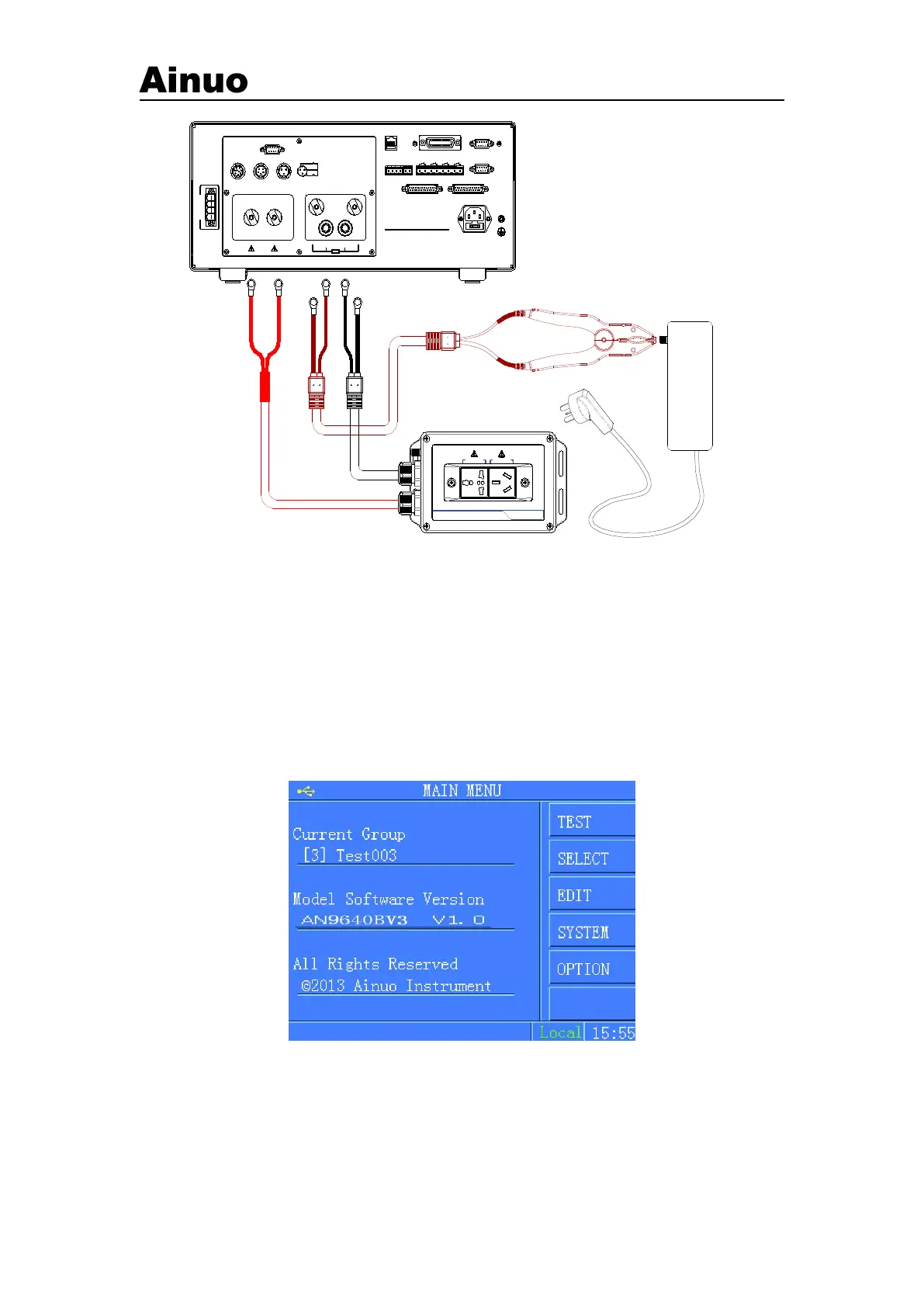
Figure 4-1-4 DUT wire connection
Note: Connect DUT with the test box and the GB clamp.
4.2 Power On
After finish wiring connections, turn on the power switch on the front panel to start the
instrument.
4.2.1 Function Selection
After finishing start, it will enter into function selection screen, shown in Figure 4-2-1.
Figure 4-2-1 Selection of Function
In the Function Selection screen, press F menu button to select the corresponding function, as
shown in the following:



 To Next Page