Chapter 4 Settings and Test
27
Enter into test standby page
Enter into Group selection module to select and call the group
Enter into Parameters setting module to set the current selected group
Enter into System setting module to set system parameters
Enter into Extended Function module to set barcode,U-disk, channel scan,
print, PLC etc information
Enter into Calibration module to make calibration or reset factory settings
etc.
For first power-on, it is recommended to set the analyzer as the following sequence.
4.3 System Settings
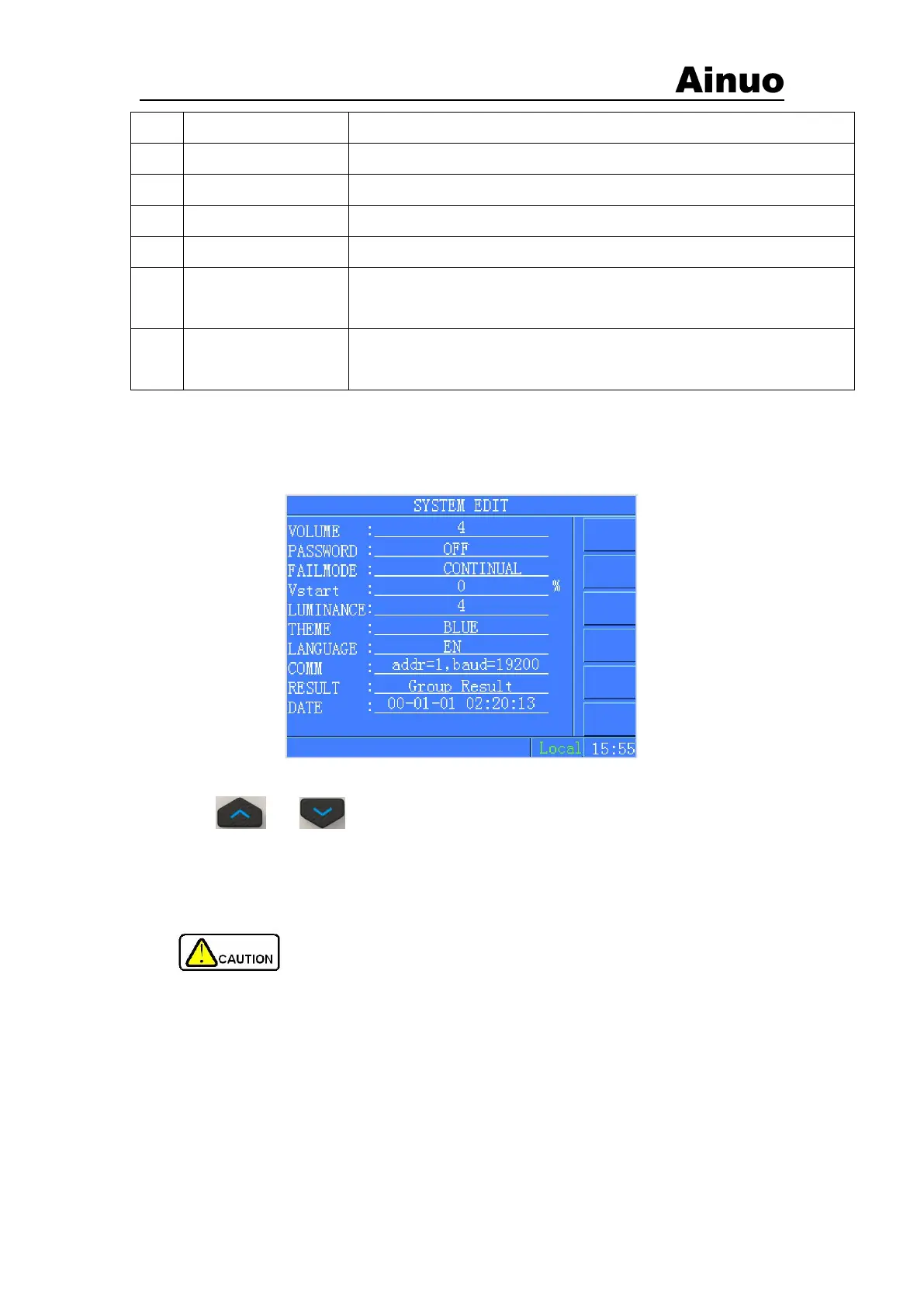
System setting screen is as shown in Figure 4-3-1.
Figure 4-3-1 Analyzer Settings
Press or to move the cursor, press F menu button and numeric key to set
parameters in system setting page.
After finishing settings, press Exit to return main page, select “Save” or “Cancel” current
settings and return to the main page.
Caution! Be careful to change the settings of the instrument.
The settings of various parameters are described in the following sections.
4.3.1 Alarm Volume
To set the buzzer alarm sound, including 1 to 9 levels. Level-0: closed.
4.3.2 Password
1) Password function: ON/OFF. If the password is set to ON, before enter into Parameters
Settings page, System Settings and Extended Function in the Function Selection page, the



 To Next Page