Chapter 2 Overview
7
1. Cancel current input under edit mode.
2. Exit current screen under non-edit mode.
1. Conform current input under edit mode.
2. Move the cursor to the next line under non-edit mode.
Input letter or figure at the cursor position.
(6) Status LED: TESTING (yellow), FAIL(red), PASS(green).
(7) USB port: external U disk interface for import/export of testing file and data storage;
Note: restrictions of this tester on U disk:
USB2.0 protocol, format FAT32, capacity not greater than 16GB;
U disk other than system U disk (those which can be used for operating system
restoration);
Less other files in the U disk as possible. Too many files will affect the speed of
recognition.
2.4 Rear Panel
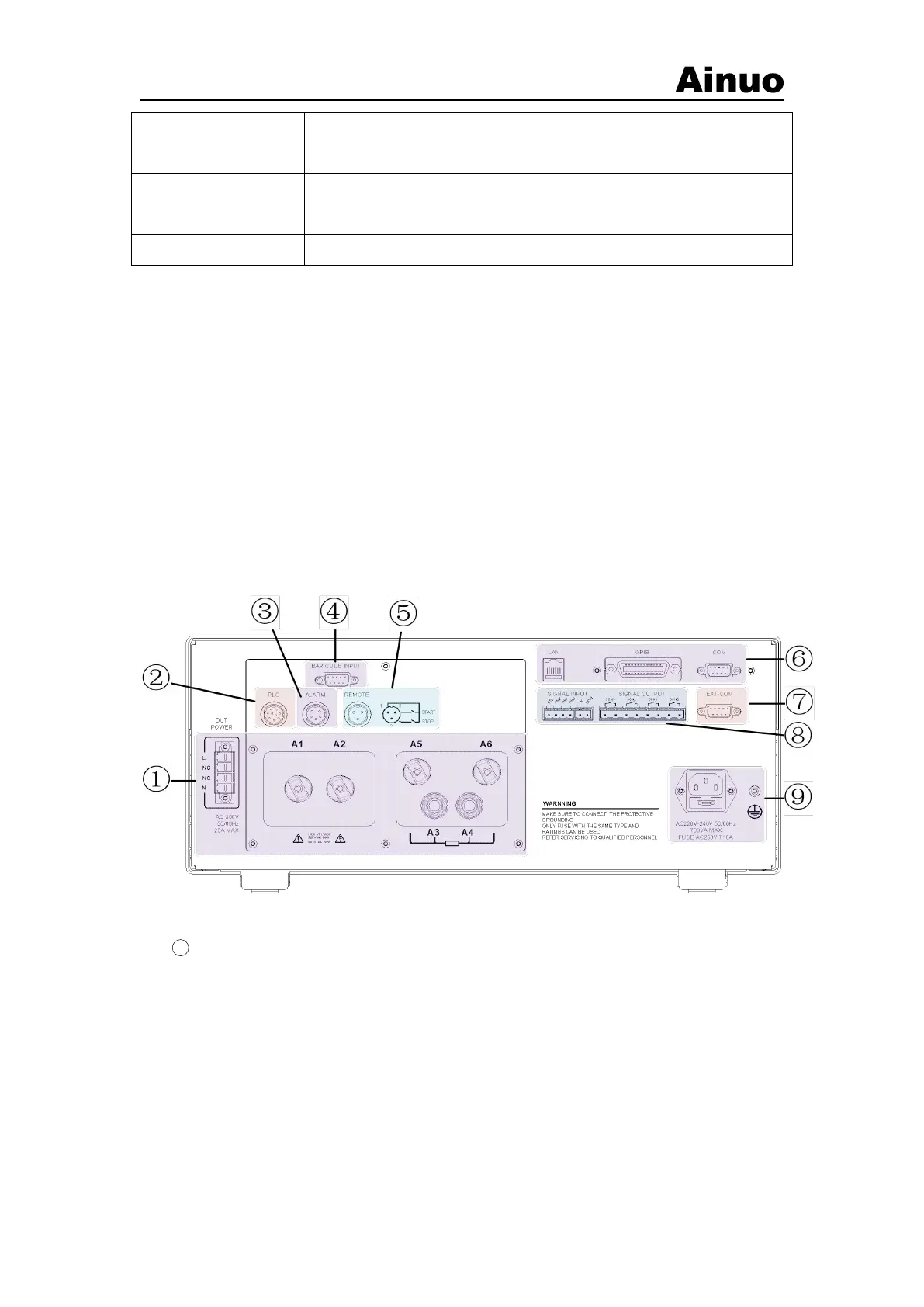
On the rear panel, terminals and interfaces are shown in Figure 2-4-1.
Figure 2-4-1 Interfaces on the rear panel
1 Terminal area:The detailed functions are as follows,
A1: High voltage L line;
A2: High voltage N line;
A3: GB voltage sampling positive;
A4 GB current output;
A5: Measurement loop;
A6: GB current circuit;
L: L end of the power input line;



 To Next Page