Chapter 4 Settings and Test
28
password screen will pop up, to prevent unauthorized change to the settings of the instument.
Figure 4-3-2 Password screen
2) Password range: 0000~9999. the factory default password: OFF.
4.3.3 FAIL Mode
Including two types: Stop and Continue:
Abort the whole test process immediately in case of failed test. Press START
again to re-start the test process.
Abort the current step immediately in case of failed test and go on to the next
test step.
4.3.4 Starting voltage
Starting voltage value of ACW/DCWoutput is set by the percentage of the setting value,
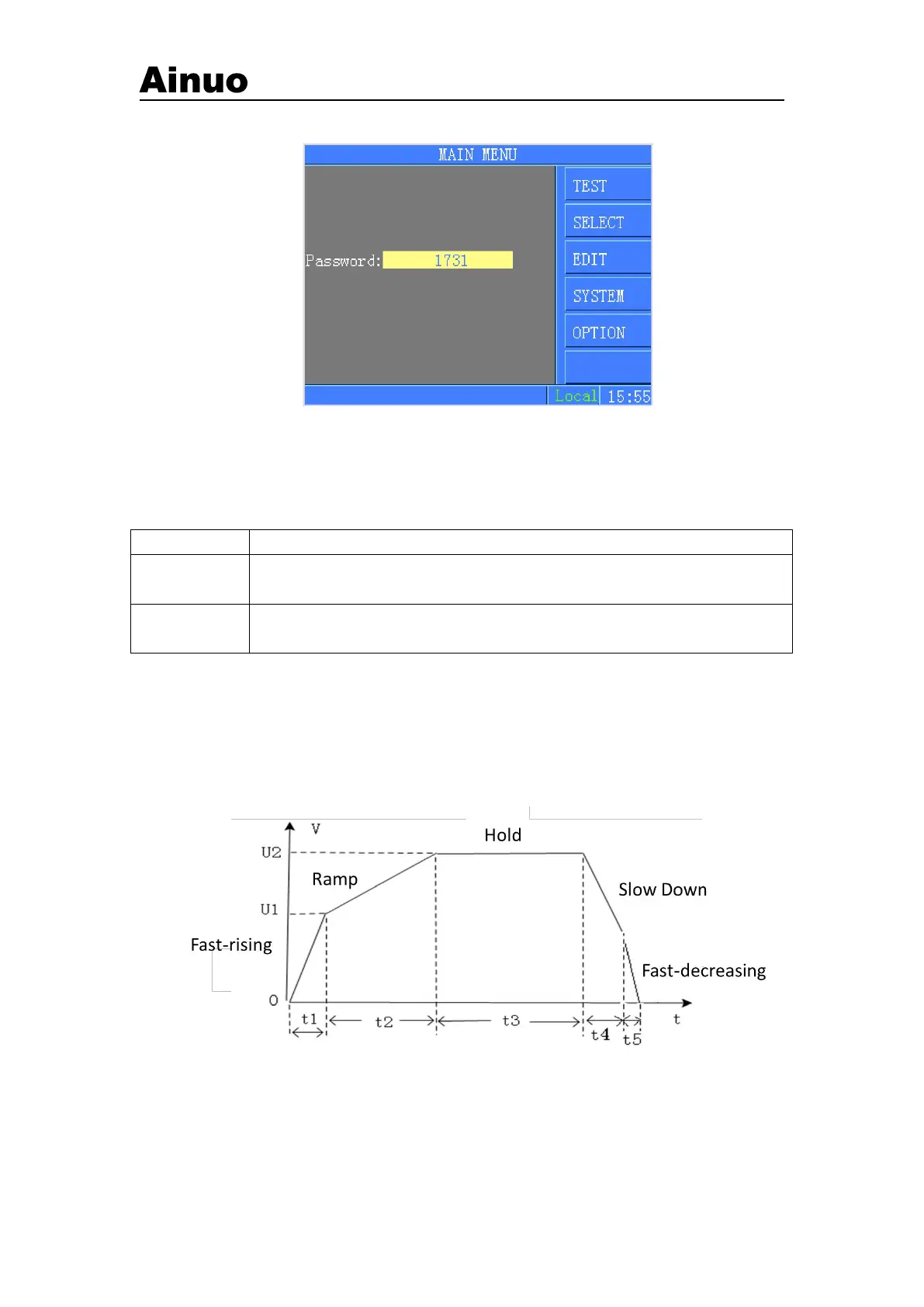
range: 0~50%. The wave of output voltage was distributed into 5 stages: Fast-rising, Ramp
up, Hold, Ramp Down and Fast-dropping. 5 stages and the judgements are as shown in the
following figure:
Figure 4-3-3 Fast-rising, Ramp up, Hold, Ramp Down and Fast-dropping
Where:
a) t1: Fast-rising, time is 0.1s maximum.



 To Next Page