Page 22
LCD display and programming keys
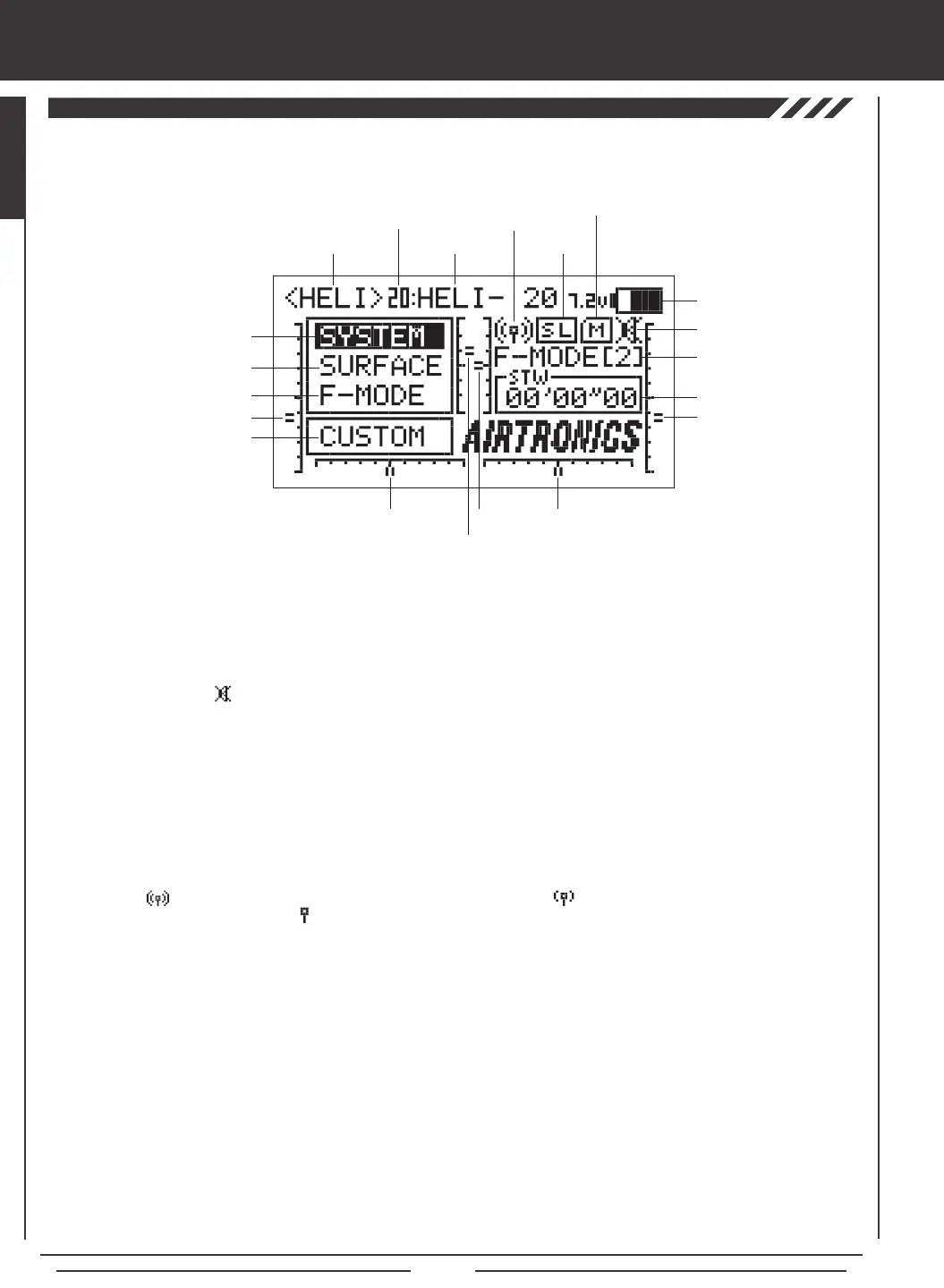
Active Flight Mode: Displays the currently active Flight Mode.
Flight Mode Menu Selection: Displays the Flight Mode menu programming options for each of the ve programmable Flight
Modes. Flight Mode menu programming options vary depending on the Model Type selected.
Key Mute Status: Displays the current status of the Key Mute function. When active an audible tone will sound with each
key-press. When disabled the audible tone will be muted with each key-press.
Memory Card Status: Displays when the Memory Expansion Card is installed in the transmitter.
Model Name: Displays the name of the currently selected model.
Model Number: Displays the number (1-20) of the currently selected model. Models saved to the Memory Expansion Card are
displayed with an 'M'. Models saved to the transmitter and to the Memory Expansion Card can be accessed independently.
Model Type: Displays the currently active Model Type loaded into memory, either AERO, GLID, or HELI.
RF Output Status: Displays the current RF Output Status of the transmitter. When the transmitter is turned ON and transmitting
a strong signal is displayed. When the signal is low or otherwise degraded is displayed. When the transmitter is turned
OFF, but the LCD Display is turned ON is displayed.
Shortcut Menu Selection: Displays a shortcut to any single System or F-Mode menu or to the Custom menu (default).
Surface Menu: Displays the Control Surface menu programming options. Surface menu programming options vary depending on
the Model Type selected.
System Menu: Displays the System menu programming options. System menu programming options are the same for each of
the three Model Types.
Timer / Stick Monitor: Displays the currently active Timer. Can also display the currently active Stick Monitor.
Trainer Status: Displays when the transmitter Trainer function is active. If the transmitter is in Master mode, MS will be displayed.
If the transmitter is in Slave mode, SL will be displayed.
Trim 1-6: Displays the current position of the specic trim switch [T1 Elevator, T2 Aileron, T3 Throttle, T4 Rudder, T5 Hovering
Throttle (HELI Model Type only), and T6 Hovering Pitch (HELI Model Type only)]. When each of the trim switches are moved to
center (zero), an audible tone will sound.
Voltage: Displays the current voltage of the transmitter battery. When the voltage reaches 6.7 volts, a low voltage alarm will sound.
Model Number
Model Type
Shortcut Menu Selection
Trim 3
Trim 4
Trim 1
Trim 2
Trim 6
Trim 5
System Menu Selection
Surface Menu Selection
Model Name
Timer / Stick Monitor
Active Flight Mode
Voltage
RF Output
Status
Trainer
Status
Key Mute Status
Memory Card
Status
Flight Mode Menu Selection
Use the diagram below to familiarize yourself with the layout and different indicators that make up the LCD Display.



 To Next Page