Page 41
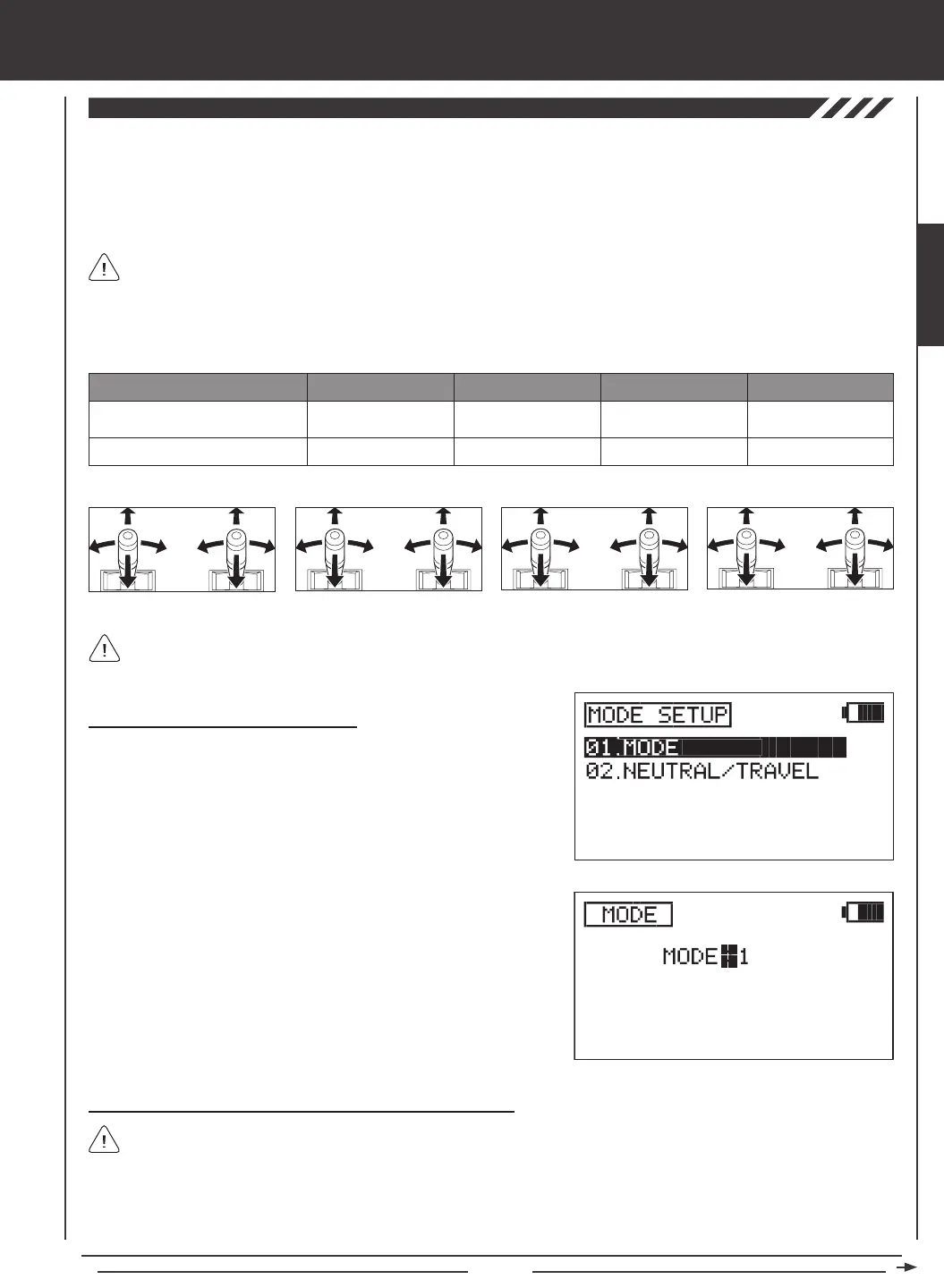
Changing Transmitter Operating Modes
1) Press the Navigation Pad
56
to highlight MODE SETUP, then press
the ENTER key to display the MODE SETUP menu. The MODE
sub-menu will be highlighted by default.
2) Press the ENTER key to display the MODE menu. The cursor will
default to MODE>2.
SYSTEM MENU
3) Press the YES/+ or NO/- keys to change the transmitter Operating
Mode. Use the table and diagrams above to choose the Operating
Mode you desire, for example, MODE>1.
4) Press the END key to return to the MODE SETUP menu.
Changing Throttle Ratchets and Spring for Mode 1 and Mode 3
If you've changed your transmitter to Mode 4 from Mode 2, it's not necessary to change the throttle ratchet and spring. Skip
to the Control Stick Calibration - User Option section on page 43.
If you change the transmitter Operating Mode to Mode 1 or to Mode 3, the throttle ratchet and the spring must be swapped, in
addition to making the MODE programming change described above. This will ensure correct control stick behavior.
The following tools will be required: # 1 and # 2 Phillips head screwdrivers, small needle nose pliers, and a 1.5mm hex wrench.
Left-Side Control Stick
Right-Side Control Stick
CONTROL STICK MODE 1 MODE 2
MODE 3
Rudder/Elevator
Throttle/Aileron
Throttle/Rudder
Elevator/Aileron
Elevator/Aileron
Throttle/Rudder
MODE 4
Throttle/Aileron
Elevator/Rudder
MODE 1
Rudder/Elevator Throttle/Aileron
MODE 2 MODE 3 MODE 4
Throttle/Rudder Elevator/Aileron Elevator/Aileron Throttle/Rudder Throttle/Aileron Elevator/Rudder
Mode 1 and Mode 3 require swapping the throttle ratchets and spring. Mode 2 and Mode 4 do not.
The Mode Setup function allows you to change the SD-10G transmitter's Operating Modes. Four Operating Modes are available as
shown in the table below. The Mode Setup function also includes a Neutral/Travel function that allows you to calibrate the control
sticks to ensure accurate control centering, regardless of servo brand used. The Travel function allows you to adjust the servos to
move 100% of their maximum travel if you choose to limit the movement of the control sticks. For example, if you limit the throttle
control stick to move only 50% of it's maximum movement, the throttle servo will move only 50% of its maximum travel. The Travel
function will allow you to calibrate the servo to move 100% of its maximum travel with only 50% control stick movement.
In the default conguration, the transmitter is set to Mode 2, which is most commonly used in North America.
If you y using Mode 1, Mode 3, or Mode 4, you can change the Operating Mode without needing to send the transmitter for
service. Changing the Operating Mode requires changing the Mode Setting, swapping the throttle ratchets and spring on the
control sticks, then recalibrating the neutral and end-point positions of the control sticks.
SYSTEM



 To Next Page