Page 49
SYSTEM MENU
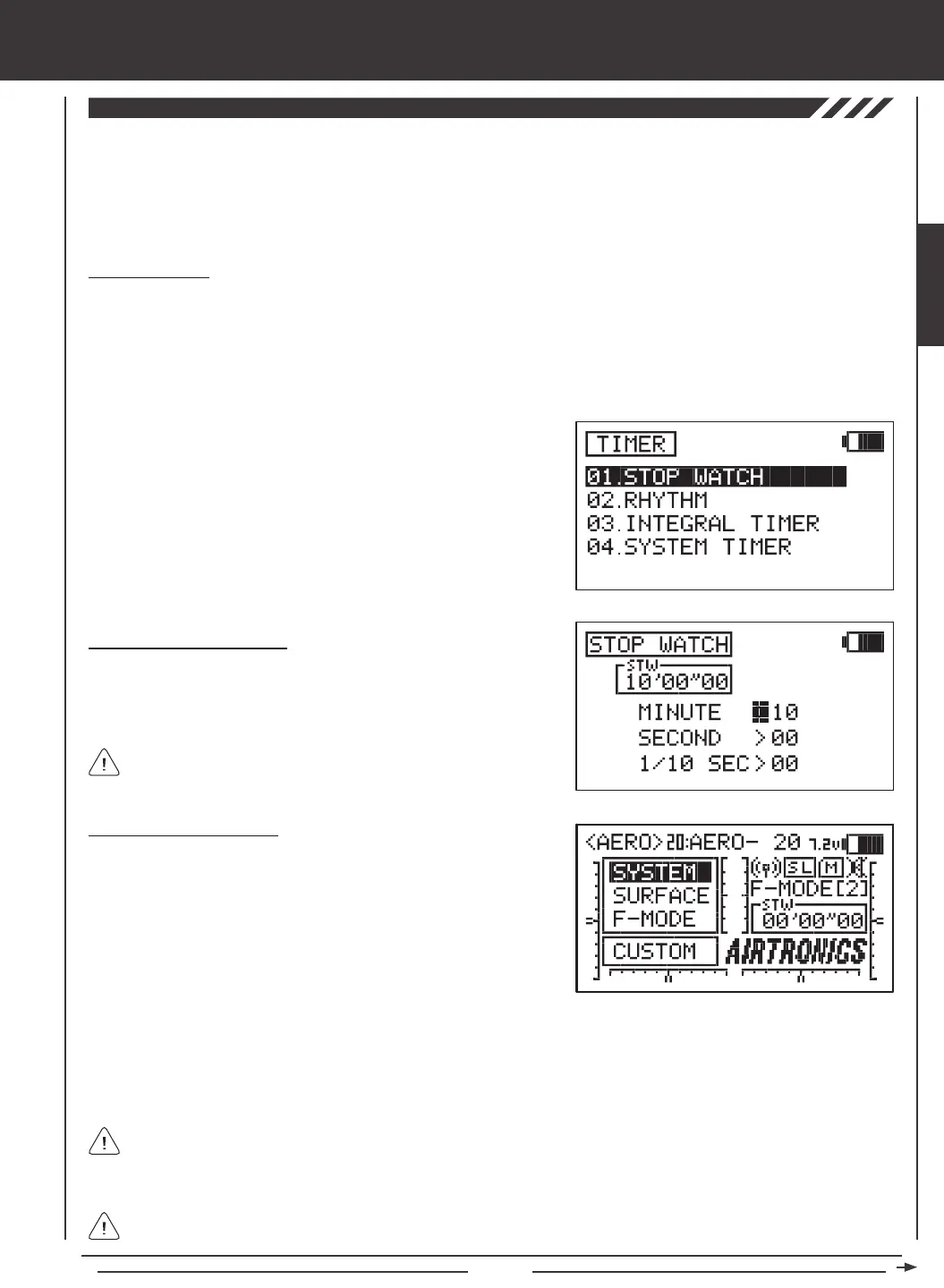
The Timer function consists of four different types of timers. A Stopwatch timer, a Rhythm timer, an Integral timer, and a System
timer. The Stop Watch timer and the Rhythm timer can be programmed separately for each individual model. The Stop Watch
timer, the Integral timer, and the System timer status can each be displayed on the Top menu. The Stop Watch and the three
individual Rhythm timers can each be controlled by their own switch. The Stop Watch can also be controlled directly from the
Top menu using the YES/+ and NO/- keys so that you don't need to enter the TIMER menu each time you need to use it.
1) Press the Navigation Pad
56
to highlight TIMER, then press the
ENTER key to display the TIMER menu. The STOP WATCH sub-menu
will be highlighted by default.
2) Press the ENTER key to display the STOP WATCH menu. The cursor
will default to MINUTE>00.
Setting the Stop Watch Timer
1) The Minute, Second, and 1/10 Second times can be set independently.
Press the Navigation Pad
56
to highlight the time interval you would
like to program, then press the YES/+ or NO/- keys to set the desired
Start time. The Start time will be displayed in the STW dialog box.
Using the Stop Watch Timer
1) By default, the Stop Watch timer is displayed in the Timer Display
(STW) on the Top menu. In this conguration, the Stop Watch timer
can be controlled using the YES/+ and NO/- keys.
START - Press the YES/+ key to Start the Stop Watch timer.
STOP - Press the YES/+ key again to Stop the Stop Watch timer.
RESET - Press the YES/+ and NO/- keys at the same time to Reset the
Stop Watch timer to the programmed Start Time.
Stop Watch Timer
The Stop Watch timer is used to either count down from a programmed Start time (Count Down mode) or to count up from zero if
no Start time is programmed (Count Up mode). In Count Down mode, an audible tone will sound in 1 second intervals when the
Stop Watch reaches 10 seconds from zero. When zero is reached, a long audible tone will sound and the Stop Watch will begin
to count up. In Count Up mode, an audible tone will sound at 1 minute intervals to remind you that the count down time (zero) has
been surpassed. The Stop Watch timer can be utilized for a number of different uses, but one of the more popular uses is to use it
as a fuel usage indicator to remind you to land within an allotted amount of time to ensure that your model doesn't run out of fuel.
The Stop Watch timer is displayed in Minutes, Seconds, and
1/10 Seconds. 00' (Minutes) 00" (Seconds) 00 (1/10 Seconds).
2) The Stop Watch timer can be assigned to a switch, which can make it more convenient to control. For more information, see
page 45. To turn the Stop Watch timer ON and OFF, assign the same Switch Position Number for both the START and the
STOP functions in the SW ASSIGN menu. For example, assign both the START function and the STOP function to Switch
Position 33. Pressing the push-button switch 33 once will Start the Stop Watch timer and pressing it again will Stop the Stop
Watch timer.
In order to control the Stop Watch timer using the YES/+ and NO/- keys, the Stop Watch timer MUST be displayed
on the Top menu as indicated by the STW dialog box. If the Stop Watch timer is assigned to a switch, the Stop
Watch timer can be controlled by the switch even if it's not displayed on the Top menu. In this situation, if you need to
Reset the Stop Watch timer, you would need to do so through the STOP WATCH menu.
The Stop Watch timer can be used in Count Up mode by starting the Stop Watch timer from zero.
SYSTEM



 To Next Page