Page 26
fail safe
The Fail Safe function automatically sets the servos to a predetermined position in the event that the signal between the transmitter
and the receiver is interrupted, whether due to signal degradation or to a low transmitter battery. The Fail Safe function can be set
to Hold the servos in the last position they were in when the signal was lost, or each of the servos can be set to move to a custom
position when the signal is lost. For example, for a model aircraft, the Fail Safe can be set so that the throttle servo returns to low,
the elevator moves slightly up, and the ailerons move slightly right or left, to result in a shallow downward decent.
IMPORTANT In the default conguration, all Fail Safe settings are INHIBITED. In this conguration, if the signal between
the transmitter and the receiver is interrupted, whether due to signal degradation or to a low transmitter battery, the servos will
stay in the last position they were in when the signal was lost. The Fail Safe will not function if power to the receiver is lost.
This section describes the Fail Safe function setup for the 92104 FHSS-3 receiver included with the SD-10G radio
control system. For Fail Safe function setup for use with Airtronics 2.4GHz FHSS-1 aircraft receivers, see page 38.
IMPORTANT Make sure that the control surfaces are moving the correct direction when the Fail Safe function is Activated.
Changing Fail Safe Settings
1) Turn the transmitter ON. Verify that SYSTEM is highlighted, then press the ENTER key to display the System menu. If
SYSTEM is not highlighted, press the END key until SYSTEM is highlighted.
2) Press the Navigation Pad
6
to highlight FAIL SAFE, then press the ENTER key to display the FAIL SAFE menu. The cursor
will default to EL>INH.
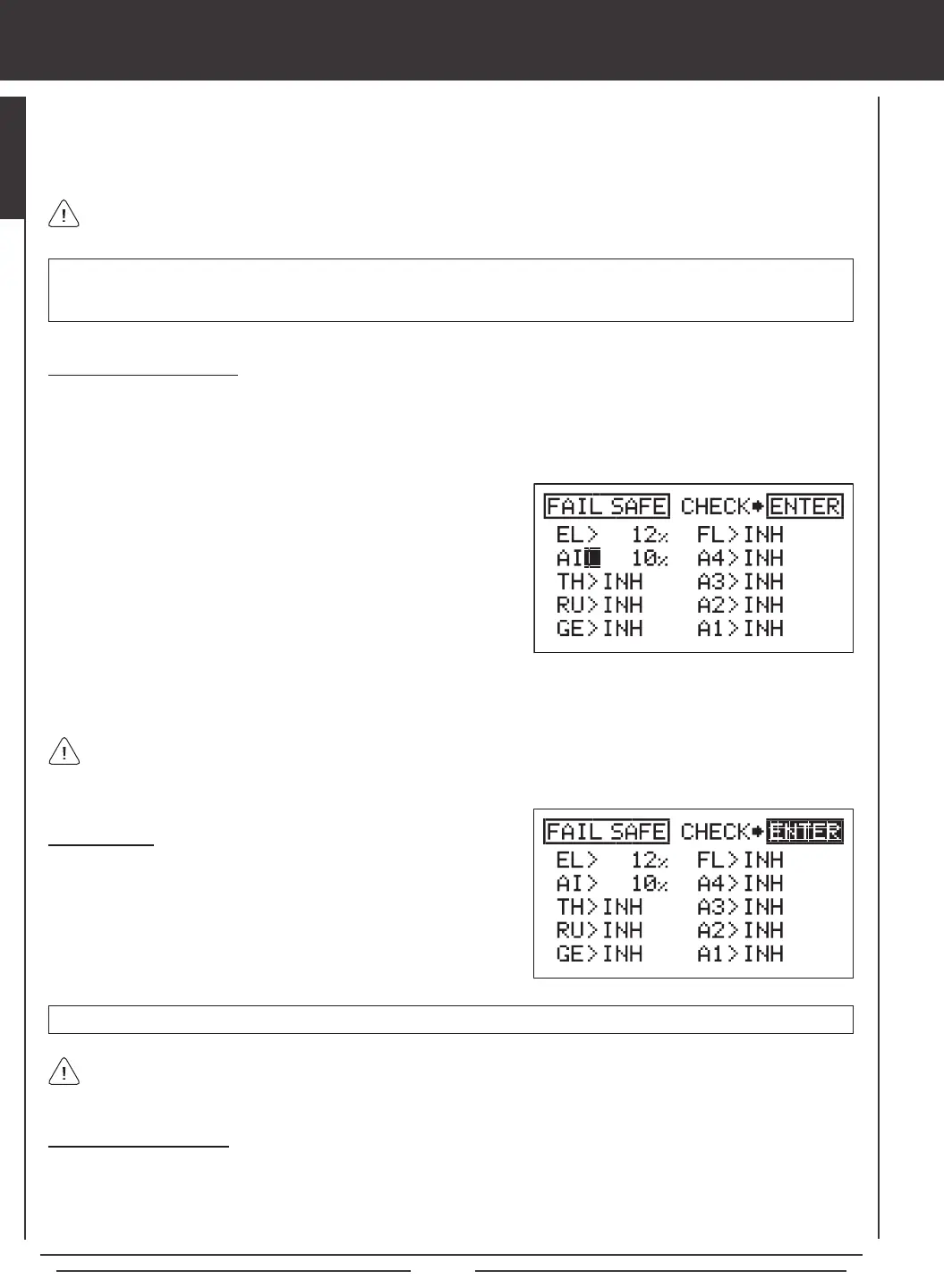
3) With the cursor next to EL>INH move the elevator control stick in the
direction and the amount you want the elevator to move to when the
Fail Safe activates.
4) While holding the elevator control stick in position, press the YES/+ key
to set the elevator Fail Safe position. A percentage value will be displayed.
5) Press the Navigation Pad
6
to move the cursor to AI>INH, then follow
the same procedures to set the pre-programmed aileron Fail Safe
position.
6) Repeat the same procedures to set the custom Fail Safe positions for the desired remaining channels. After setting the Fail
Safe positions, check the Fail Safe settings by following the procedures in the Fail Safe Check section below.
The percentage value is the percentage the servo will move. The percentage value will be either negative or positive and is
determined by the REV/NOR status of the channel. Regardless of the REV/NOR setting, the control surface will move the
same direction the control stick is moved. If you change a servo direction AFTER setting the Fail Safe values, you should reset
that Fail Safe value to ensure that the servo moves the correct direction.
Fail Safe Check
1) With the cursor anywhere in the FAIL SAFE menu, press the ENTER
key to check the Fail Safe settings. The servos will move to the
predetermined positions for ~5 seconds, then return to normal.
2) After verifying correct operation, press the END key two times to return
to the Top menu.
Fail Safe settings are specic to each model. For example, you can have certain Fail Safe settings for Model 1 and different
Fail Safe settings for Model 2, and so on. The Fail Safe settings will be retained even if the transmitter loses power or if
the transmitter and receiver must be paired again.
Clearing Fail Safe Settings
1) In the FAIL SAFE menu, press the Navigation Pad
3456
to move the cursor to the desired channel you would like to clear
the Fail Safe setting from.
2) To reset the Fail Safe setting to INH, press the YES/+ and NO/- keys at the same time, then repeat these procedures to reset
the Fail Safe setting for the desired remaining channels. Press the END key two times to return to the Top menu.


 To Next Page