Page 70
surface MENU
The Swash function allows you to control a number of different functions related to the swashplate. Using the Swash function, you
are able to reverse individual elevator, aileron, and pitch functions. For example, even if you select the correct Swashplate Type
for your particular helicopter there may be a situation where instead of the swashplate rising for positive collective it may be
necessary for the swashplate to fall for positive collective. Instead of 'fooling' the swashplate by selecting the opposite Swashplate
Type and swapping the aileron and pitch channels in the receiver, then adjusting the servo Reversing, the Swash function
allows you simply reverse the pitch function by changing PI Master/PI Slave Adjustment Value opposite to what is displayed
(e.g., change 100% to -100% to change the direction of travel for the pitch function). In addition, the Swash function also allows
you to control the overall throw of the elevator, aileron, and pitch functions by increasing or decreasing the Adjustment Values.
The Swash function also allows you to mix elevator, aileron, and pitch functions together without the need to use a separate
mixer. For example, if you do a loop and the helicopter wants to roll out in one direction or another, you can change the Mixing
Adjustment Values of the Elevator Master to the Aileron Slave at either the low or the high collective stick to trim out this tendency.
When using either CP4A or CP4X Swashplate Types, EL2 Slave values will be displayed in addition to the EL, AI,
and PI values.
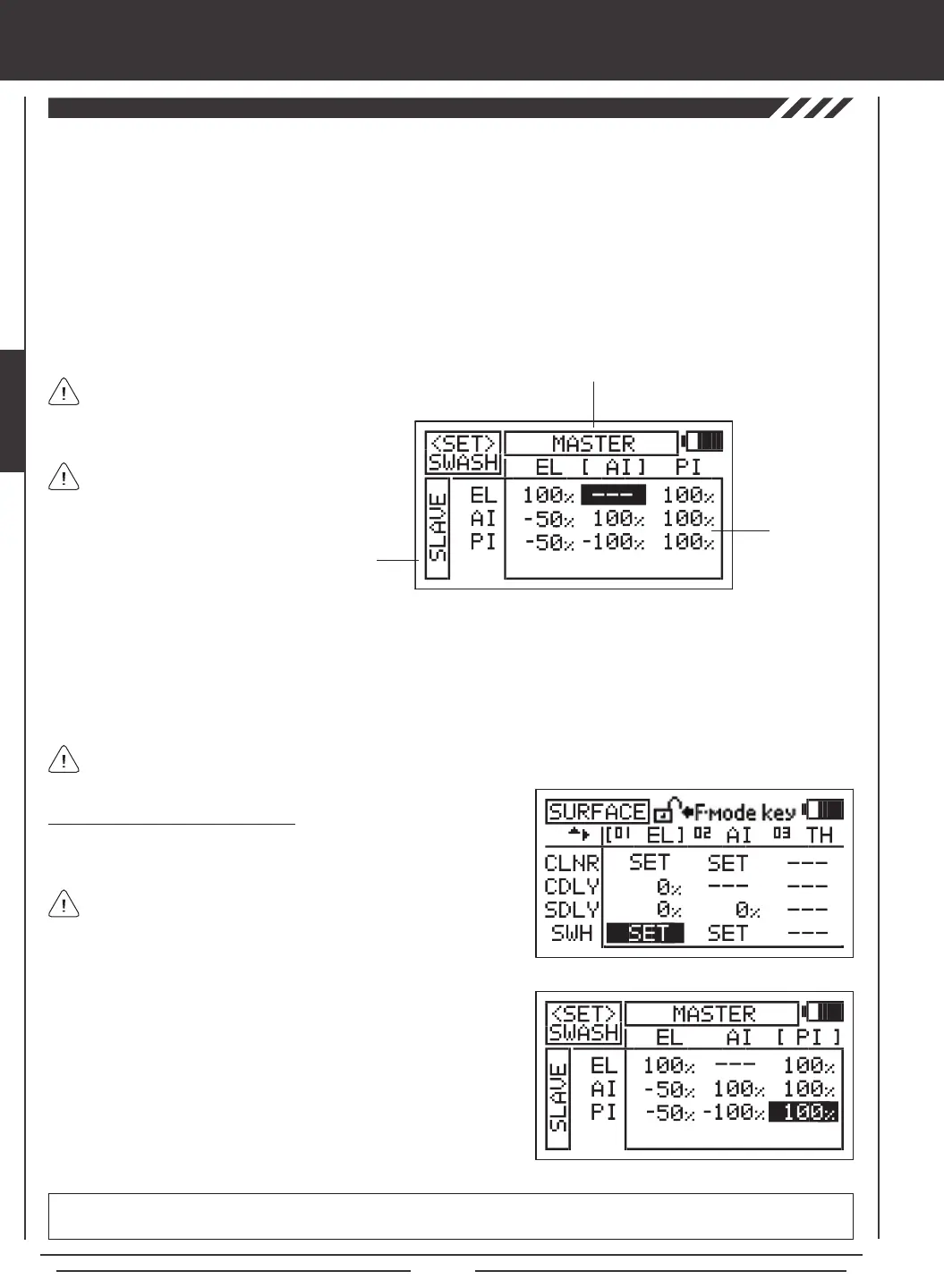
The <SET>SWASH menu consists of a row of MASTER functions along the top and a column of SLAVE functions along the left
side. In all cases, the MASTER function controls the SLAVE function. For example, if you want to increase the servo travel of the
aileron function when the throttle control stick is moved forward, increase the PI MASTER/AI SLAVE Adjustment Value.
If you want to change the rotation of servo travel for a function, for example, the pitch function, highlight PI MASTER/PI SLAVE
and change the Adjustment Value to the opposite of the current Adjustment Option Value (e.g., 100% to -100%).
SLAVE Functions
Adjustment
Values
MASTER Functions
2) Press the ENTER key to display the <SET>SWASH menu. The cursor
will default to EL MASTER/EL SLAVE.
3) Press the Navigation Pad
3456
to highlight the Adjustment Value
you would like to change, then press the YES/+ or NO/- keys to change
the Adjustment Value.
4) Adjust the desired remaining <SET>SWASH menu Adjustment Values
using the same techniques.
<SET>SWASH menu setting range varies based on Swashplate Type currently selection. To display the default Adjustment
Values, highlight a specic Adjustment Value and press the YES/+ and NO/- keys at the same time.
Changing Swash Adjustment Values
1) Press the Navigation Pad
3456
to highlight the SWASH SET option
for either the elevator, aileron, or pitch channel.
SWH values can be changed for the elevator, aileron, and pitch
channels at the same time, regardless of which SWASH SET option
you highlight.
Depending on your model's specic setup, it may
be necessary to decrease the Adjustment Value
to keep from over-driving the servos.
In the default conguration, the <SET>SWASH
menu displays the default Adjustment Value for
the current Swashplate Type.


 To Next Page