Page 79
aero Flight Mode Menu
The Throttle Curve function allows you to vary the amount of servo travel in relation to the movement of the throttle control stick
at different points throughout the entire range of deection. Nine custom-programmable Points ensure an extremely precise
Throttle Curve to suit any situation. For example, many glow and gas engines are very non-Linear, meaning that when the throttle
control stick is at half, the engine is not at half power. In addition, many times the difference between three-quarter power and
full power is almost indistinguishable. By adjusting the Throttle Curve, you can change the way the engine reacts to power based
on the position of the throttle control stick. For example, you can change the Throttle Curve so that three-quarter stick feels like
three-quarter throttle.
The Throttle Curve function is also extremely useful when setting up a twin-engine aircraft. In a twin-engine aircraft, it can
be difcult to achieve the exact same throttle response for both engines. The SD-10G transmitter allows you adjust the Throttle
Curve for the Right and Left engines separately. For example, you can change the Throttle Curve on one engine to match the
response of the other engine, from idle all the way to full throttle.
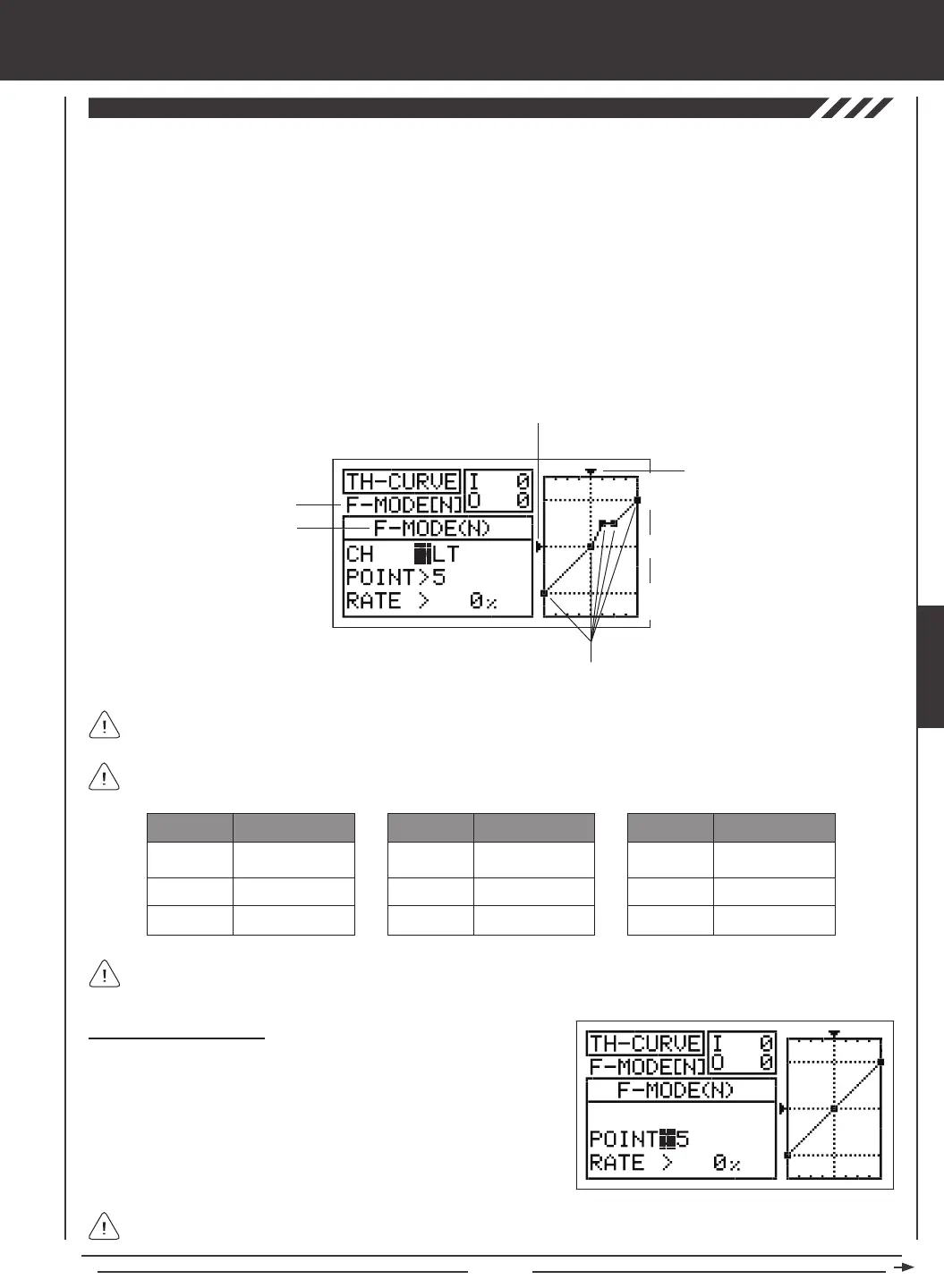
The Throttle Curve function can be programmed separately for each of the ve Flight Modes. An Input and Output display,
along with a graph, help with programming visualization.
Transmitter F-MODE
Programming F-MODE
Stick Input (I)
Function Output (O)
150%
100%
100%
150%
0%
Point Positions
Transmitter F-MODE refers to the Flight Mode that the transmitter is currently operating in. Programming F-MODE refers
to the Flight Mode that you would like to change the programming for.
Choosing the Flight Mode
1) Press the Navigation Pad
56
to highlight TH-CURVE, then press the
ENTER key to display the TH-CURVE menu. The cursor will default to
POINT>5.
2) Press the F-MODE key to choose the F-MODE number you would like
to program the Throttle Curve function for. Choose from N, 1, 2, 3, or 4.
The F-MODE (N) display will change, indicating which Flight Mode you
are programming the Throttle Curve function for.
When Model Type Setting Option THROTTLE>2 is chosen, the cursor will default to CH>LT
The tables below show the default Point and Rate values. Settings shown in parentheses are the default percentage
values when those Points are Activated by the user.
1
2
3
-100%
INH (-75%)
INH (-50%)
POINT
DEFAULT RATE
7
8
9
INH (50%)
INH (75%)
100%
POINT
DEFAULT RATE
4
5
6
INH (-25%)
0%
INH (25%)
POINT
DEFAULT RATE
In the default conguration the Throttle Curve is Linear. For example, when you move the throttle control stick from 0% to
100%, the servo will travel from 0% to 100%, too.
AERO



 To Next Page