Page 50
SYSTEM MENU
Rhythm Timer
The Rhythm timer can be programmed to provided a selected sequence of audible tones, which can be used for pacing aerobatics
or for practicing precision landings. Three separate Rhythm timers can be programmed and each Rhythm timer can be turned ON
separately by assigning them to different switch positions. Each Rhythm timer features ve programmable Types. Within each
Type, the Start time, the Interval time, the Sound, and the Count can be programmed individually. This allows for a near innite
combination of audible tones to suit nearly any situation.
1) Press the Navigation Pad
56
to highlight TIMER, then press the
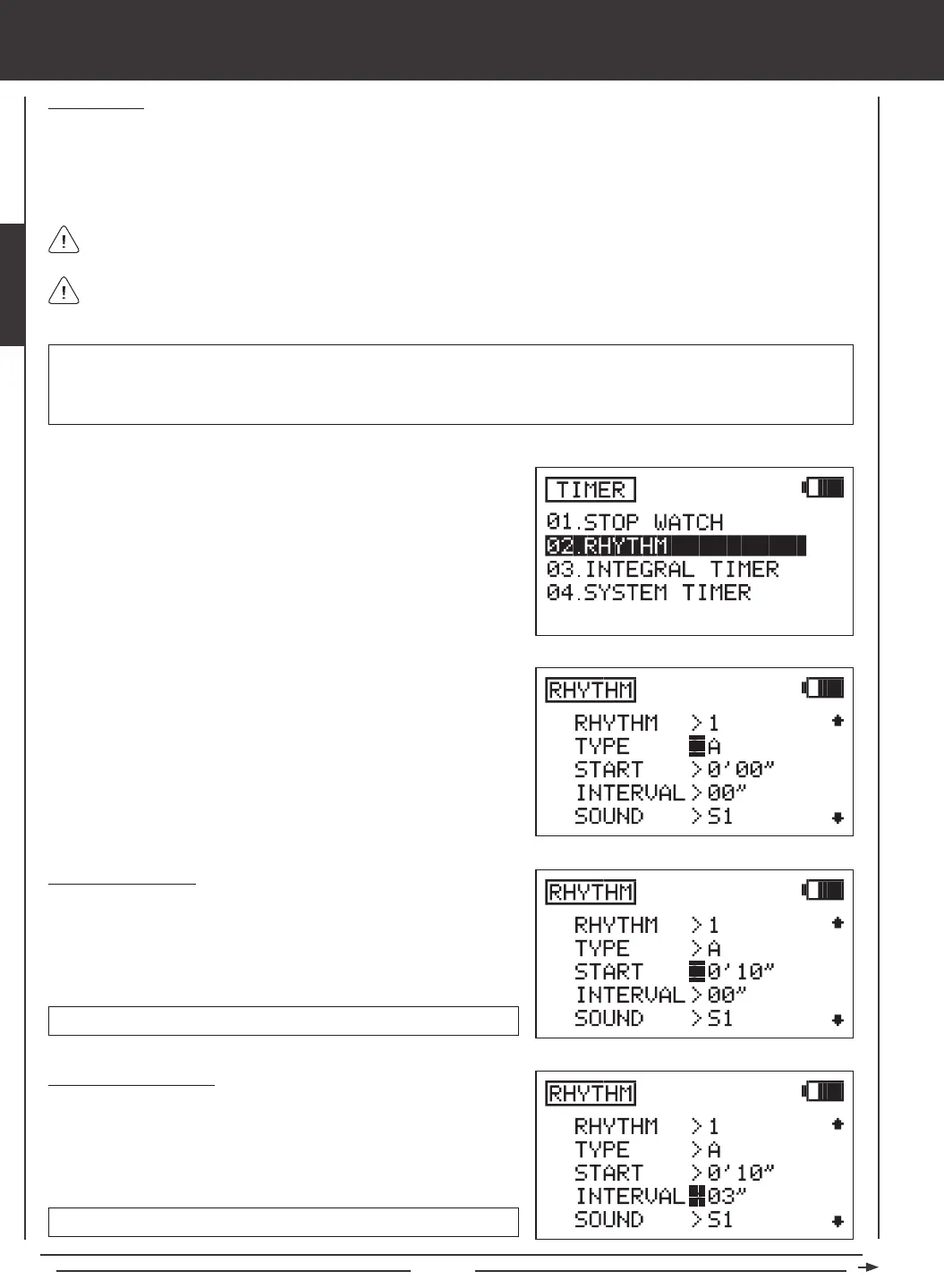
ENTER key to display the TIMER menu. The STOP WATCH sub-menu
will be highlighted by default.
2) Press the Navigation Pad
6
to highlight RHYTHM, then press the
ENTER key to display the RHYTHM menu.
3) The cursor will default to RHYTHM>1. Press the YES/+ or NO/- keys
to choose which Rhythm timer you would like to program. There are
three separate Rhythm timers that can be programmed. If this is the
rst Rhythm timer you're programming, choose RHYTHM>1.
4) Five separate Rhythm Types can be programmed independently for
each of the three Rhythm timers. Types are not pre-programmed.
They consist of the Start time, the Interval time, the Sound, and the
Count you program in the next few procedures. Press the Navigation
Pad
6
to highlight TYPE>A.
Unlike other timers, the Rhythm timers are not displayed on the Top menu. They operate strictly in the background.
After programming a RHYTHM timer (either RHYTHM 1, RHYTHM 2, OR RHYTHM 3), it must be assigned to a Switch
Position Number as described in the SW ASSIGN menu section. For more information, see page 45.
Setting the Start Time
The Start Time is the time (in Minutes and Seconds) that the Rhythm timer
will begin after the Rhythm timer is switched ON. For example, if set to 10
Seconds, the Rhythm timer will Start 10 seconds after being turned ON.
START time setting range is 0' 00" to 9' 59".
Setting the Interval Time
The Interval time is the time (in Seconds) that the audible tone will sound
while the Rhythm timer is switched ON. For example, if set to 3 seconds,
the audible tone will sound once every 3 seconds.
INTERVAL time setting range is 00" to 59".
1) Press the Navigation Pad
6
to highlight START>0' 00", then press the
YES/+ or NO/- keys to set the desired Start time.
1) Press the Navigation Pad
6
to highlight INTERVAL>00", then press
the YES/+ or NO/- keys to set the desired Interval time.
IMPORTANT Once a Rhythm timer is started, it will continue to run until the Count nishes. If you need to stop the Rhythm
timer before the Count nishes, open the Rhythm timer menu, highlight INTERVAL, then press the YES/+ and NO/- keys at
the same time to Reset the INTERVAL to 00". When set to 00", the Rhythm timer will stop. To restart the Rhythm timer, set the
Interval to the desired setting.



 To Next Page