Page 35
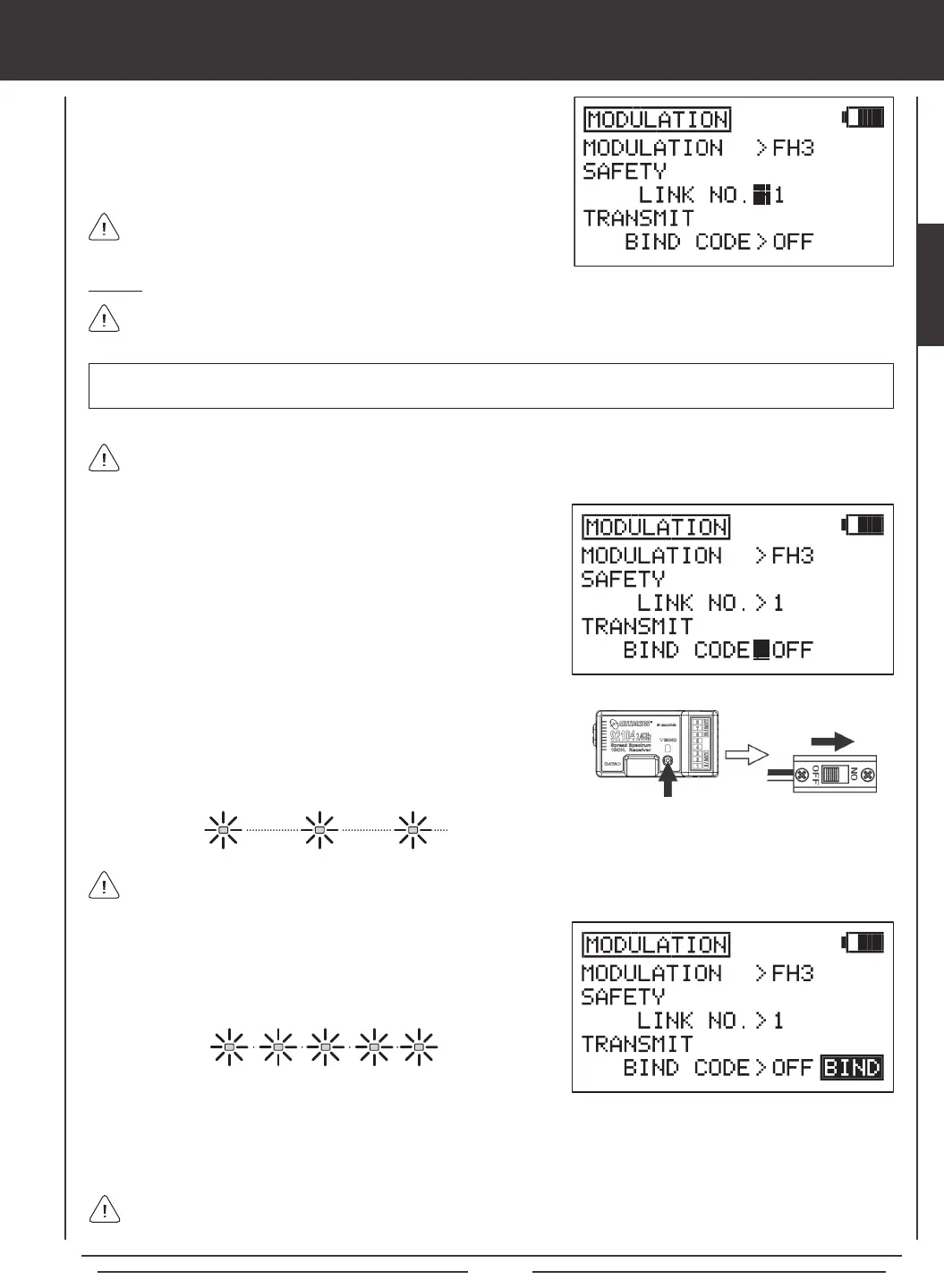
1) While in the MODULATION menu, press the Navigation Pad
56
to
highlight SAFETY LINK NO.
2) Press the YES/+ or NO/- keys to change the Safety Link number.
Remember, for the Safety Link feature to function correctly, the Safety
Link Number MUST match the number of the currently selected model.
Binding
When the binding procedure is successful, the Bind LED on the receiver will stay solid blue when both the transmitter and
receiver are turned ON. If the Bind LED on the receiver is blinking rapidly or not ON at all, the transmitter and receiver
are not paired. In this case, turn both the transmitter and receiver OFF, then repeat the binding procedure.
Use the tip of a pencil or a 1.5mm hex wrench to reach the Bind Button in the receiver.
3) Quickly press the YES/+ key. The green RF Output Indicator will blink,
the TRANSMIT BIND CODE selection will change to ON, and BINDING
will blink. The Bind LED on the receiver will blink rapidly for ~3 seconds,
then go out.
4) After Bind LED on the receiver goes out, press the END key. The Bind LED on the receiver, as well as the green RF Output
Indicator, will turn solid and the LCD Display will revert to the System menu indicating the binding process is complete. Press
the END key two times to return to the Top menu.
1) While in the MODULATION menu, press the Navigation Pad
56
to
highlight TRANSMIT BIND CODE.
Before binding the transmitter and receiver, verify that the Modulation and Safety Link settings are accurate for the receiver
type you're using.
2) While holding down the Bind Button on the receiver, turn the receiver
ON. The Bind LED on the receiver will blink slowly. After ~2 seconds
release the Bind Button. The Bind LED on the receiver will continue to
blink slowly.
IMPORTANT The SD-10G transmitter is compatible with FHSS-3 and FHSS-1 Airtronics 2.4GHz aircraft receivers. To bind
the transmitter to an FHSS-1 receiver, the transmitter modulation must rst be changed to FH1.
SYSTEM MENU
The Binding procedure is the same whether you're binding an FHSS-3 receiver or an FHSS-1 receiver. Just keep in mind
that if you're binding an FHSS-1 receiver, the transmitter modulation must rst be changed to FH1.
SYSTEM


 To Next Page