Page 46
SYSTEM MENU
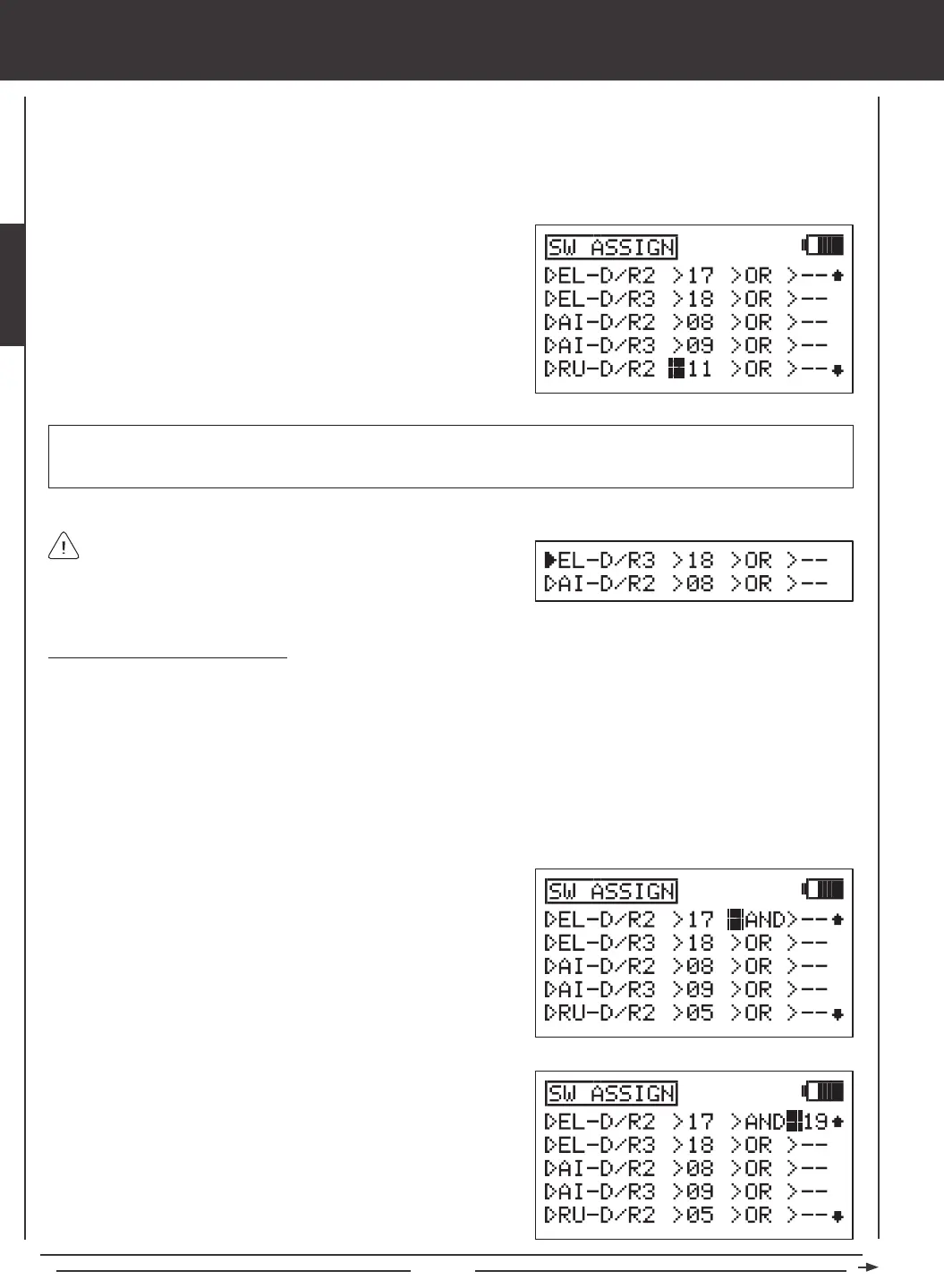
Switches are assigned based on function and number. Notice that all transmitter switches have a number that corresponds to the
switches position. This Switch Position Number is what is changed in the SW ASSIGN menu to assign the switch to a particular
function. For example, in the default AERO conguration, EL-D/R2 (Elevator Dual Rate 2) is assigned to switch position 17 and
EL-D/R3 (Elevator Dual Rate 3) is assigned to switch position 18. With the switch in position 16, the Default Rate (Elevator
Dual Rate 1) is Active. Elevator Dual Rate 2 will Activate when the switch is moved to position 17 and Elevator Dual Rate 3 will
Activate when the switch is moved to position 18.
2) Press the Navigation Pad
56
to highlight the function you want to
assign to a switch. Functions that are assigned to a switch will display a
Switch Position Number and functions that aren't assigned to a Switch
Position Number will display dashes.
3) Determine the Switch Position Number on the transmitter that you want
to assign the highlighted function to, then press the YES/+ or NO/- keys
to change the Switch Position Number to match.
When a function is Activated by a switch, the triangle to the left
of the function will become highlighted. This allows you to visually
see how the different switches are operating as you assign them. For
example, Elevator Dual Rate 3 is currently Active and Aileron Dual Rate
2 is currently OFF.
IMPORTANT Switch Position Numbers can be changed from -- (Unassigned), 01~34 (Three-Position Switches and
Push-Button Switches), S1~S5 (Stick Switches), or ON (Always On). For information on programming Stick Switches, see
page 48.
Using Boolean Conditions OR/AND
Switches can be made to operate interdependently using the Boolean conditions OR/AND.
OR - You can assign a function to two different switches and have them operate independently. For example, you can assign
the Stopwatch function to push-button switch position 34 OR to push-button switch position 32. When either switch is depressed,
the Stopwatch function will Activate.
AND - You can assign a function to two different switches and make them dependent on one another. For example, the Snap
Roll function can be assigned to switch position 21 AND to switch position 24 (Gear). Doing this will allow the Snap Roll
function to work ONLY when the landing gear is retracted. This makes the operation of the Snap Roll function dependent on
the landing gear being retracted. This would prevent a crash if you accidently hit the Snap Roll switch instead of the landing
gear switch after takeoff.
1) Press the Navigation Pad
56
to highlight the function you want to
change the Boolean condition for. If a Switch Position Number isn't
assigned to the function yet, do that now by following the previous
procedures.
2) Press the Navigation Pad
4
to move the cursor to >OR. To change the
Boolean condition to AND, press the YES/+ or NO/- keys.
3) Press the Navigation Pad
4
to move the cursor to >--, then press the
YES/+ or NO/- keys to change the Switch Position Number to the
desired switch position.



 To Next Page