Page 58
CUSTOM MENU
MEMORY PACK
SYSTEM INFORMATION
SX MONITOR
STICK MONITOR
D/R
EXP
LANDING
CAMBER
CAMBER POINT
TH-CURVE
PI-CURVE
TH-HOLD
TH-CUT
HOV-TH
HOV-PI
IDLE DOWN
AI DIFFERENTIAL
OFFSET
CH DELAY
TRIM
TRIM STEP
TRIM AUTH
GYRO
GOVERNOR
CROSS-TRIM
SNAP-ROLL
MIXING
C-MIX
VR ASSIGN
F-MODE COPY
F-MODE DELAY
F-MODE NAME
SYSTEM MENU
STOP WATCH
INTEGRAL TIMER
SYSTEM TIMER
STICK MONITOR TH
STICK MONITOR AI
STICK MONITOR EL
STICK MONITOR RU
STICK MONITOR FL
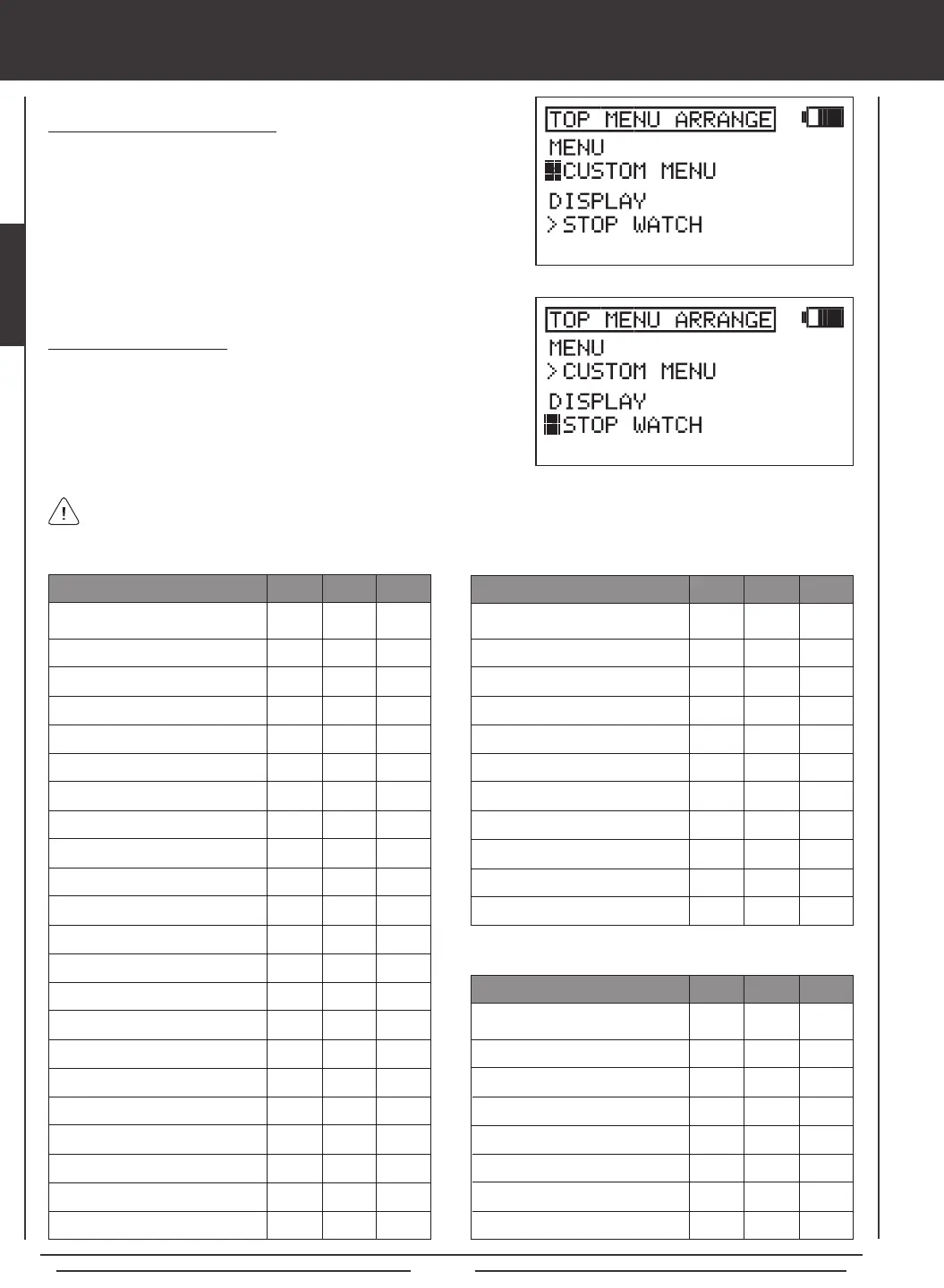
Choosing Shortcut Menu Options
1) Press the Navigation Pad
56
to highlight TOP MENU ARRANGE,
then press the ENTER key to display the TOP MENU ARRANGE menu.
The cursor will default to MENU>CUSTOM MENU.
2) Press the YES/+ or NO/- keys to choose which Menu shortcut option
you would like to be displayed in the Shortcut menu.
Options displayed in the Timer / Stick Monitor Display are not selectable. They are displayed only. The option displayed in
the Shortcut menu is selectable. Press the Navigation Pad
6
to highlight the Shortcut menu option, then press the ENTER
key to open that menu. The Shortcut menu and Display options are shown in the tables below.
Choosing Display Options
1) From within the TOP MENU ARRANGE menu, press the Navigation
Pad
6
to highlight DISPLAY, then press the YES/+ or NO/- keys to
choose which Display option you would like to be displayed in the
Timer / Stick Monitor display.
X
X
X
X
X
X
X
X
X
X
X
X
X
X
X
X
MENU
AERO GLID HELI
X
X
X
X
X
X
X
X
X
X
X
X
X
X
X
X
X
X
X
X
X
X
X
X
X
X
X
X
X
X
X
X
X
X
X
X
X
X
X
MENU
AERO GLID HELI
X
X
X
X
X
X
X
X
X
X
X
X
X
X
X
X
X
X
X
X
X
X
X
X
DISPLAY
AERO GLID HELI
X
X
X
X
X
X
X
X
X
X
X
X
X
X


 To Next Page