69
Useful functions
Cableclonefunction
This feature will copy the programmed data and parameters in the master unit to slave units.
Refer to the picture below also to connect an optional ERW-7 to edit memopries and settings by using the
clone utility software.
Connection
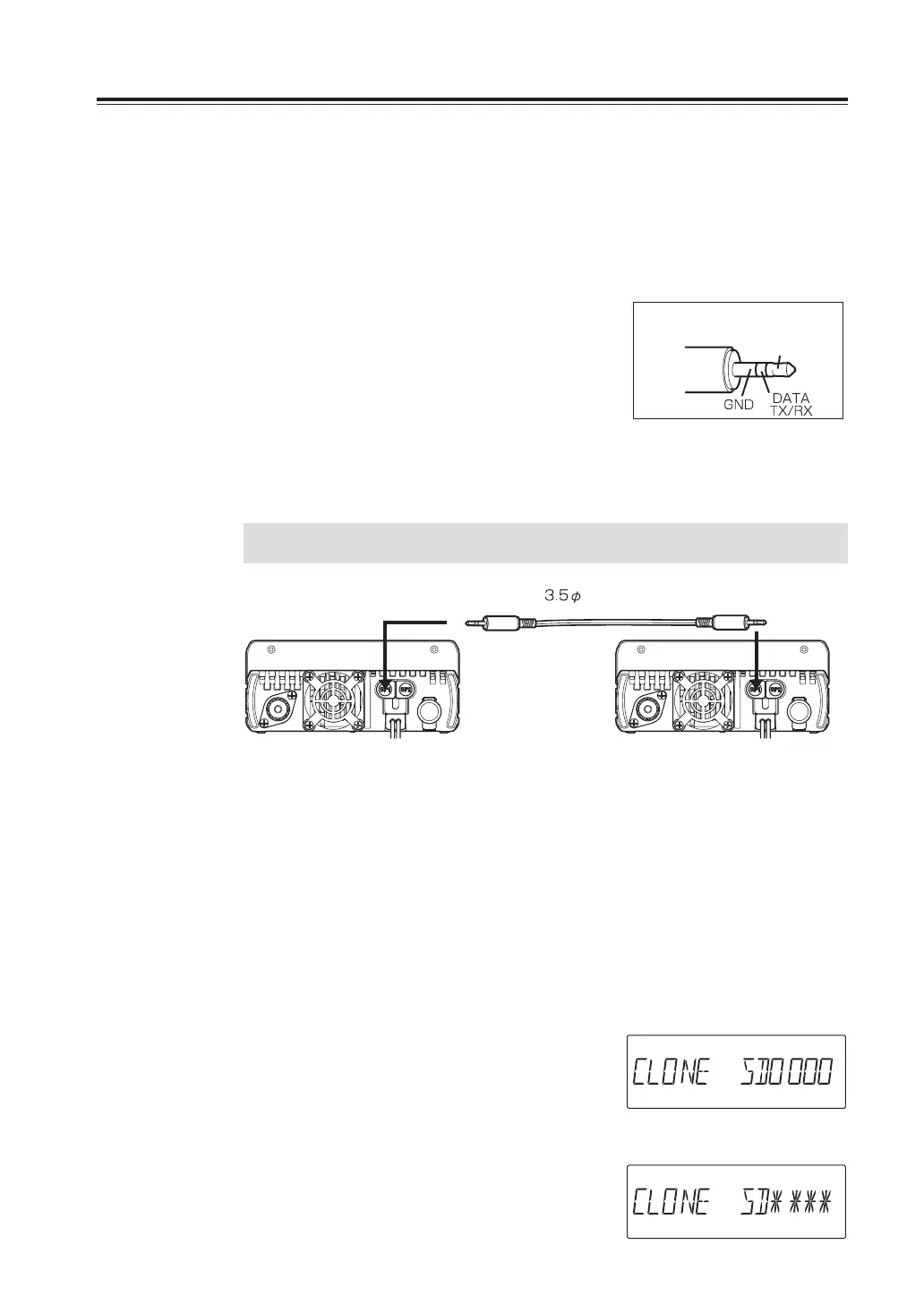
Turn off the units. Make a connection between the
master and slave units as shown below using a
commercially available unloaded 3.5mmφ stereo-plug
audio cable. To make a cable by yourself, refer the Plug
configuration.
Turn on both units after the connection is completed.
Use the same port for the ERW-7 connection to operate
PC cloning. See the instruction of the utility software for
details.
IMPORTANT
Be certain to connect cables while the units are turned OFF.
stereo-mini plug
Slave SideMaster Side
Setting on the Master side
1. Press the FUNC key and then press and
hold MW key while [FUNC] appears on
the display. [CLONE SD0000] will be
displayed and the radio enters the clone
mode.
This operation is also necessary to copy the data
edited in the Clone utility software.
2. Press PTT. [CLONE SD****] will be
displayed and the master unit start
sending data to the slave unit.
The displaying codes will vary during data transferring.
3. [CLONE PASS] will appear on the display
when the data has been successfully
transmitted.
Plug configuration
(both for Master/Slave)
No connection
During transmission



 To Next Page