16
Controls, Connectors, and Display
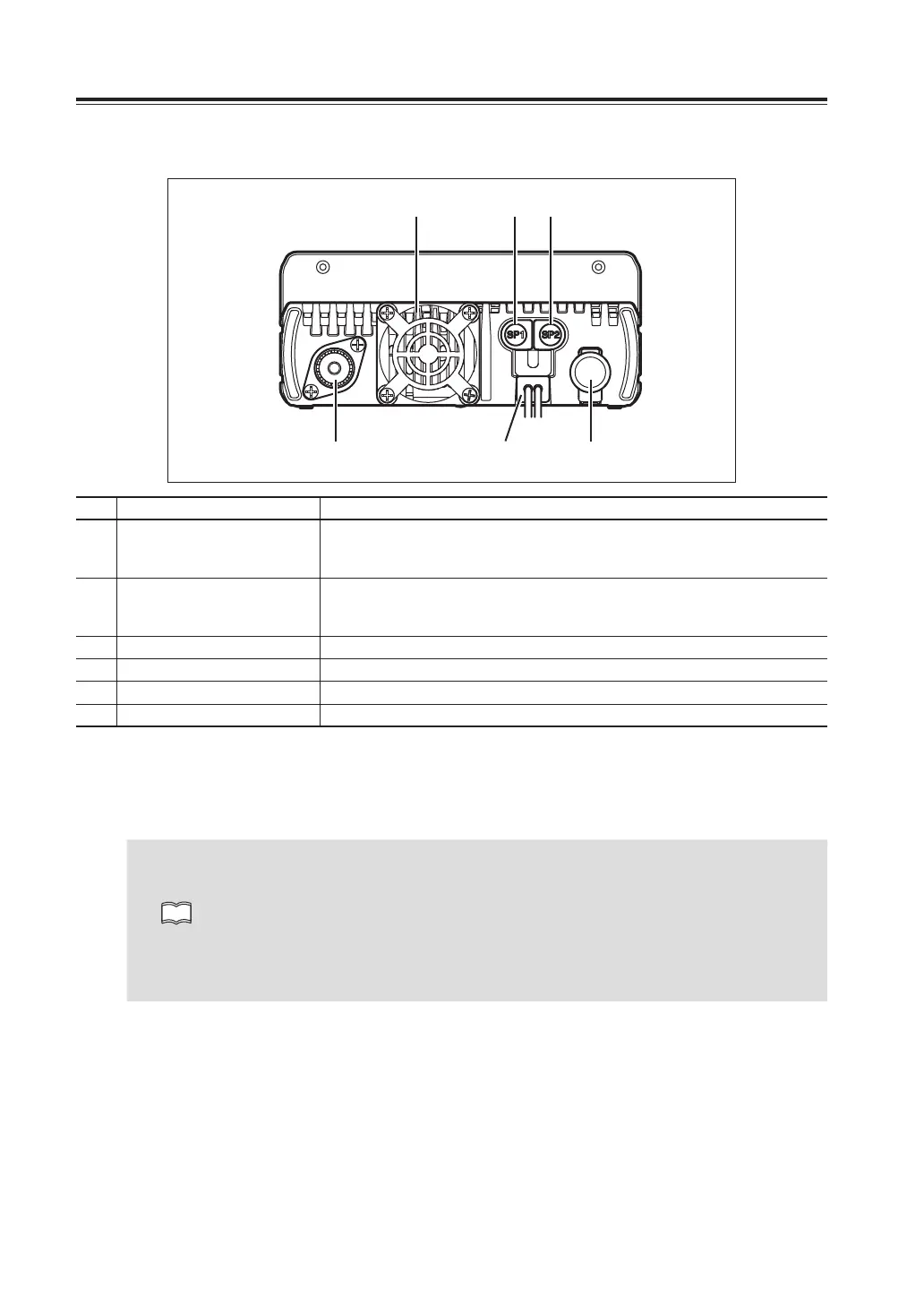
RearPanel
④ ① ②
⑥③⑤
No. Key Function
A
External Speaker Jack 1 [SP1]
Connects an external 8Ω speaker. Outputs audio of the right band. When
another speaker is not connected to [SP2], left band audio is heard through
internal speaker. Also [SP1] used for connecting clone or PC cables.
B
External Speaker Jack 2 [SP2]
Connects an external 8Ω speaker. Outputs audio of the left band. When
another speaker is not connected to [SP1], right band audio is heard through
internal speaker.
C
DC Power cable Connects to the 13.8V DC power supply.
D
Air-cooling fan Cools the unit during transmission or when the radio is hot.
E
Antenna connector Connects to antenna with 50Ω impedance matched with operation frequency.
F
DIN connector (6 PIN) Connects to external TNC unit for Packet communications.
AntennaConnection
Before operating, install an efficient, well-tuned antenna. The success of your installation will depend on the
type of antenna and its correct installation. Use a 50Ω impedance antenna and low-loss coaxial feed-line
that has a characteristic impedance of 50Ω.
NOTE
• Transmitting without first connecting an antenna or other matched load may damage the
radio. Always connect the antenna to the radio before transmitting.
All fixed stations should be equipped with a lightning protection to reduce the risk of fire,
electric shock, and damage to the radio.
• The antenna connector used is combined PL259/M. You may feel it too loose comparing
to the specific ones, but it is not a defect. Please be sure to tighten the outer ring until it
stops.
ExternalSpeakerConnection
• If you plan to use an external speaker, choose a speaker with an impedance of 8Ω. Each external speaker
jacks accept a 3.5mm (1/8") mono (2-conductor) plug.
• External speaker adopt double port BTL, please care about the connection. Do not use the speaker that
requires grounding.
• Carefully insert plug into jack. Do not twist the plug and do not apply stress on speaker jacks.
• When jacks are not in use, keep the [SP] cap (speaker jack cover) closed to keep contacts clean and
avoid entering dust and other objects into the radio.
• Insert plugs into jacks completely until locks to prevent damaging the jack or plug.



 To Next Page