76
Maintenance / Reference
Troubleshooting
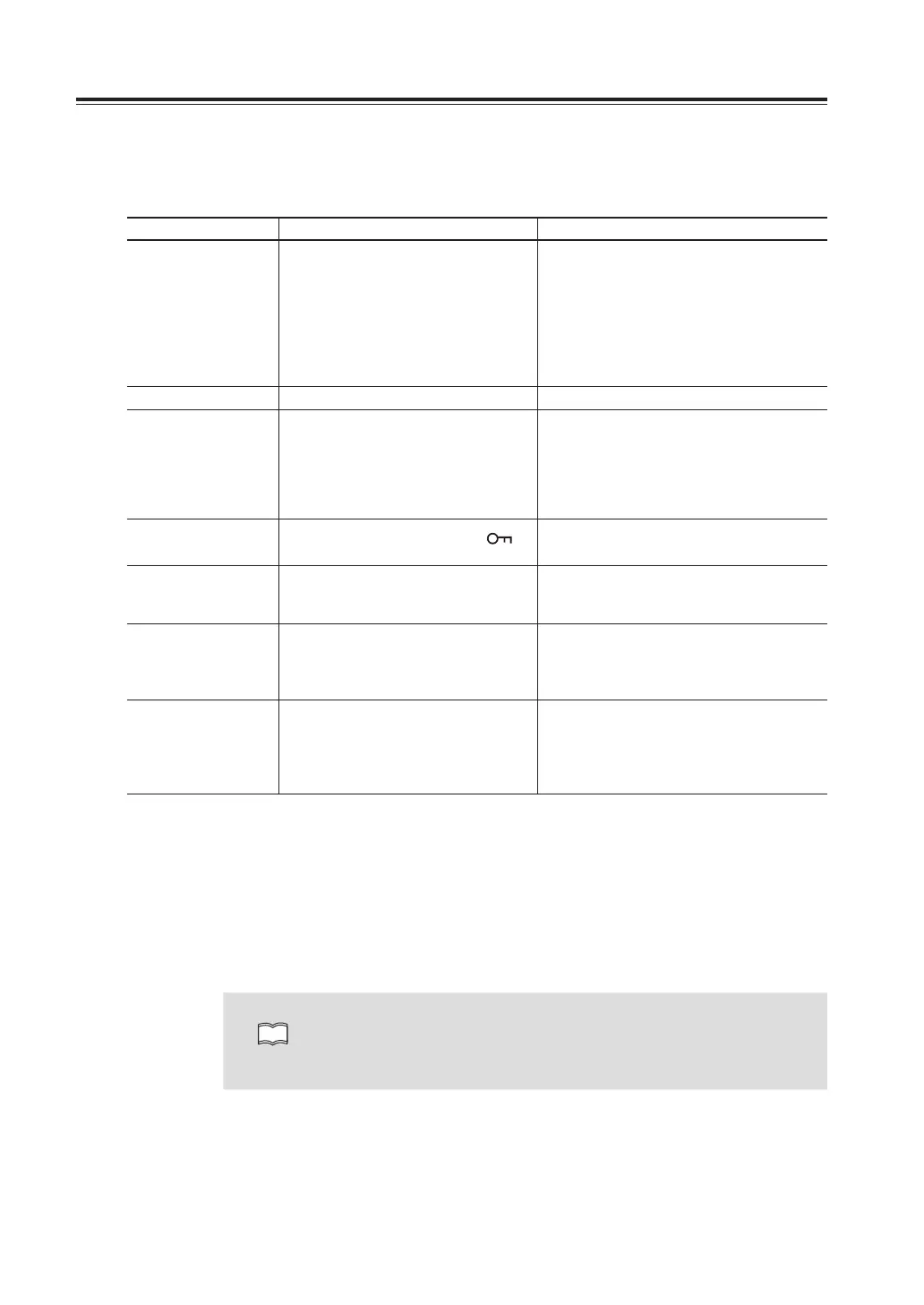
Please check the list below before concluding that the radio is faulty.
If a problem persists, reset the radio. This can sometimes correct erroneous operation.
Problem Possible Causes Potential Solutions
Can’t turn on the
power.
a. + and – polarities of power
connection are reversed.
a. Correctly connect the red lead and the
black lead of the DC power cable
respectively to the terminals.
b. Fuse is blown. b. Check and solve the problem resulting
in blown fuse and replace it with a new
one with the same rated capacity.
c. Power supply or DC/DC convertor
is not turned on.
c. Turn on the power supply or DC/DC
convertor.
Display is too dim. Dimmer setting level is low. Make the dimmer level setting higher.
No sound comes
from the speaker.
The unit does not
receive.
a. Audio level is too low. a. Set the volume knob properly.
b. Squelch is muted. b. Decreases squelch level.
c. Tone or DCS squelch is active c. Turn tone or DCS squelch off.
d. PTT key of the microphone is
pressed for transmission.
d. Immediately release PTT switch.
e. External speaker is defective. e. Remove and inspect the speaker.
Keys and the dial do
not function.
Key-lock function is activated ([
] is
on).
Cancel key-lock function.
Rotating the dial will
not change memory
channel.
a. No memory is programmed.
b. The unit is in CALL mode.
a. Program memory channels.
b. Press V/M key to cancel CALL mode.
Pressing the UP/
DOWN key will not
change frequencies
or memory channels.
a. The unit is in CALL mode.
b. Lock switch on the microphone is
ON.
a. Press V/M key to cancel CALL mode.
b. Turn off the lock switch on the
microphone.
PTT pressed but
doesn’t transmit.
It transmits but can’t
communicate.
a. Microphone terminal is not properly
inserted.
b. Antenna is not connected.
c. [OFF] appears on the display.
a. Properly insert the microphone
connection.
b. Properly connect the antenna.
c. Cancel SHIFT or set within the band.
d. Transmit inside transmission range.
Noise
• When reception frequencies fall in any one of the formula below, the unit may receive a
non-modulated signal.
This is due to the structure of frequencies of this unit and not a malfunction.
(Reception frequency on the left side VHF band – 21.7MHz) X 3 = UHF reception frequency
on the right side)
(Reception frequency on the left side UHF band – 21.7MHz) X 3 – (VHF reception frequency
on the right side + 30.85MHz) X 7 = 30.85 MHz
• When reception frequency is 3 times bigger than transmission frequency, transmitted voice
will be heard and [FREQ X3] appears on the display.
NOTE
Alinco guarantees the supply of minimum-necessary spare parts such as
microphones, components and mechanical parts for at least 5 years after
the production of this product is terminated except in case of accidents
beyond control.
Demonstration mode
This is for showcase purposes and display shows characters and different colors
automatically.
Turn the dial while in the demo mode to operate, and leave it for 10 minutes without operating
to return to the demo mode. Key lock then turn off the power. Turn on with MW and H/L key
pressed together to enter.
Turn off the power in demo mode, turn on with MW and H/L key pressed together to exit.



 To Next Page