18
Chapter 1 Getting Started
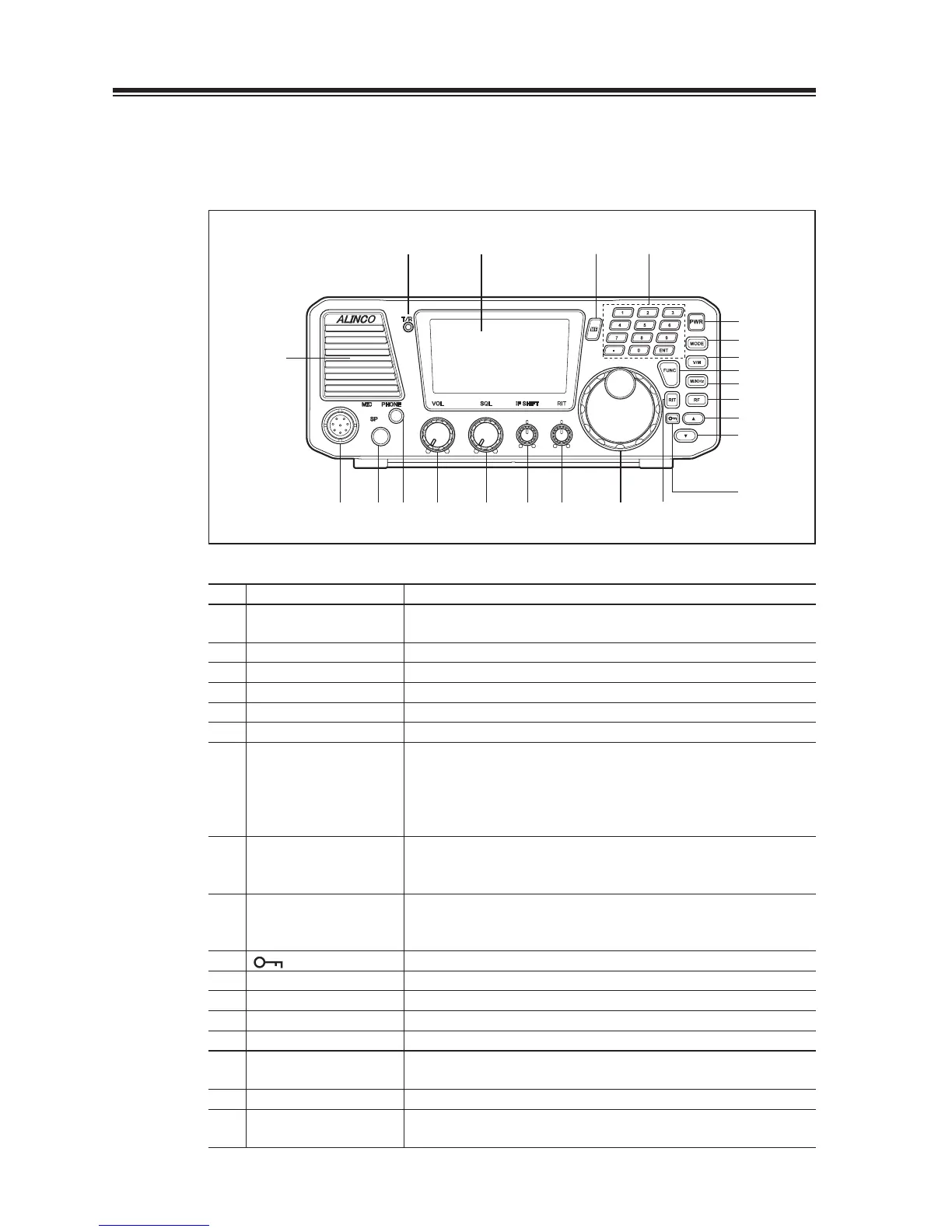
1.5 Controls, Connectors, and Display
Front Panel
(22) (23) (12)
(13) (6)
(11)
(14)(15)(16)(17)(18)(19)(20)
(1)
(21)
(5)
(7)
(8)
(9)
(10)
(2)
(3)
(4)
No. Key Principal Function
(1) POWER SWITCH
[PWR]
Turns the power on/off.
(2) [MODE] key Press to select the USB, LSB, CWU, CWL, AM, or FM modes.
(3) [V/M] key Switches between VFO mode and memory mode.
(4) [FUNC] key Press and hold this key for 1 second to access the Set mode.
(5) [M/KHz] key Switches the cursor position between MHz and kHz.
(6) [RIT] key Press to turn the RIT or TXIT function on/off.
(7) [RF] key
(preamplifi er/attenuator)
Press to adjust receiver’s front-end gain by switching between the
preamplifi er and attenuator. Pressing this key will change gains
as follows: +10 dB, 0 dB, -10 dB, and -20 dB. After pressing the
[FUNC] key, press this key to select a narrow fi lter in the SSB,
CW and AM mode.
(8) [Ÿ] key Press to select memory channels and amateur radio bands, and to
change frequency in 1 MHz and 100 kHz increments. Also used to
select the transceiver’s settings in the Set mode.
(9) [ź] key Press to select memory channels and amateur radio bands, and to
change frequency in 1 MHz and 100 kHz decrements. Also used to
select the transceiver’s settings in the Set mode.
(10) [
] key Enables the dial and key locks.
(11) KEYPAD The keypad can be used for several functions as described later.
(12) MULTI FUNC [MF] key Press to access the multifunction.
(13) MAIN tuning dial Rotate to select transmit/receive frequencies.
(14) RIT control knob [RIT] Fine-tunes the reception frequency within a range of ±l.2 kHz.
(15) IF SHIFT control knob
[IF SHIFT]
Rotate to eliminate the interference by shifting the receiver IF pass
band (±1.5 kHz).
(16) SQL control knob [SQL] Rotate to eliminate noise when no signal is received.
(17) AF gain control knob
[VOL]
Rotate to adjust audio level.



 To Next Page