29
Chapter 2 Communications
Exercise
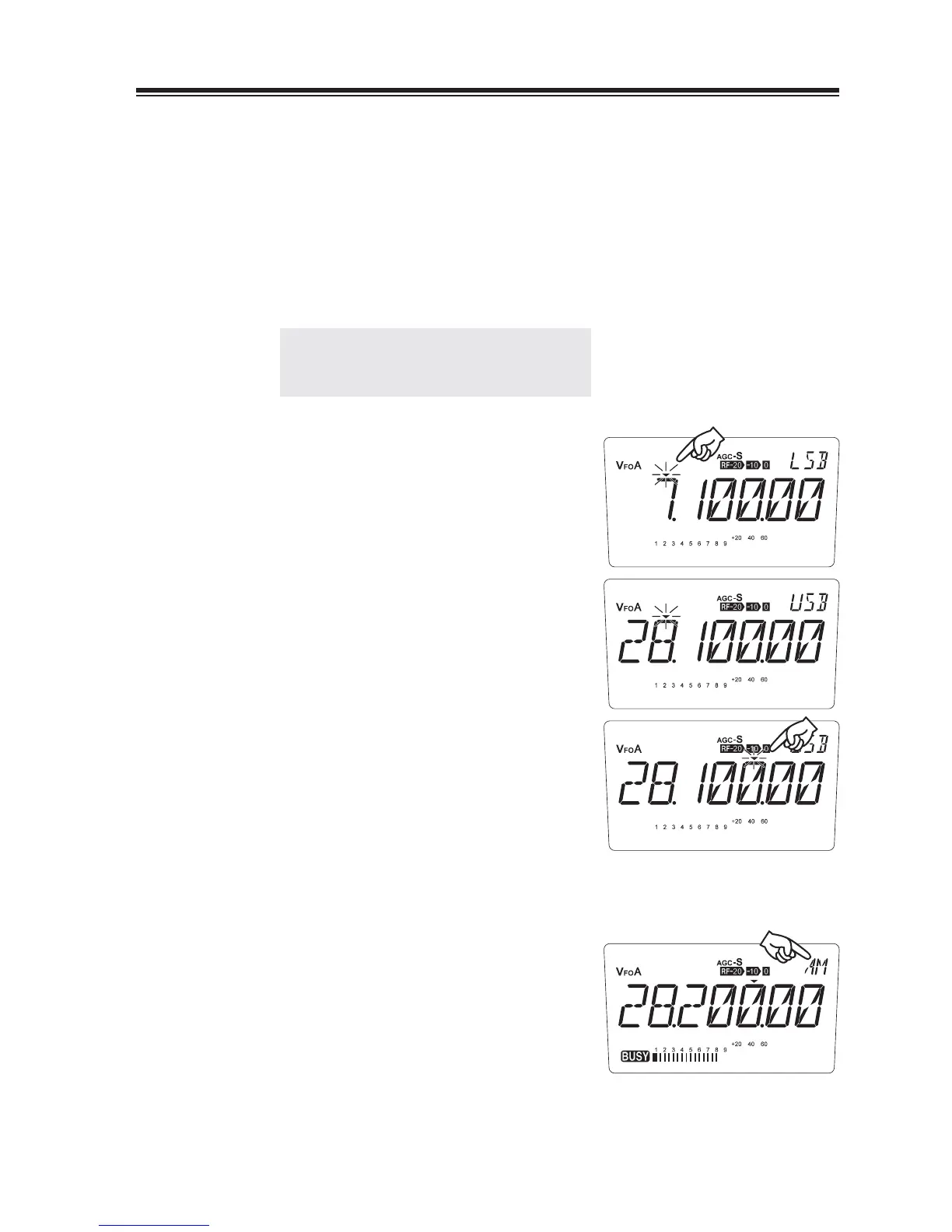
• Try receiving a 28.200 MHz signal in the AM mode.
Make sure that antenna connection is correct.
1.
Turn the power on.
2.
Rotate the VOL knob to adjust the audio
3.
level.
NOTE: Be sure that the SQL knob is fully
turned to the left to unmute the
squelch.
4.
Press the [M/KHz] key repeatedly until ź
fl ashing appears above the MHz frequency
indication (amateur radio band selection
position).
5.
Press the [UP/DOWN (or [Ÿ/ź] key)] keys
to select the 28 MHz band.
6.
Press the [M/KHz] key repeatedly until ź
fl ashing appears above the 1 kHz frequency
indication.
Press the [UP/DOWN] key to set the
7.
frequency to 28.2 MHz. Press the [M/KHz]
key once again to stop fl ashing the ź cursor.
8.
Press the [MODE] key to select the AM
mode.
Turn the SQL control knob clockwise until
9.
the background noise just disappears.
• To receive the neighbouring frequencies,
use the main tuning dial.
• Likewise, try receiving different frequencies in each band.



 To Next Page