APPENDIX C: CALIBRATION
HF-2500A HIGH FREQUENCY WELD CONTROL
C-2 990-371
Calibration Procedure
Initial Calibration Setup
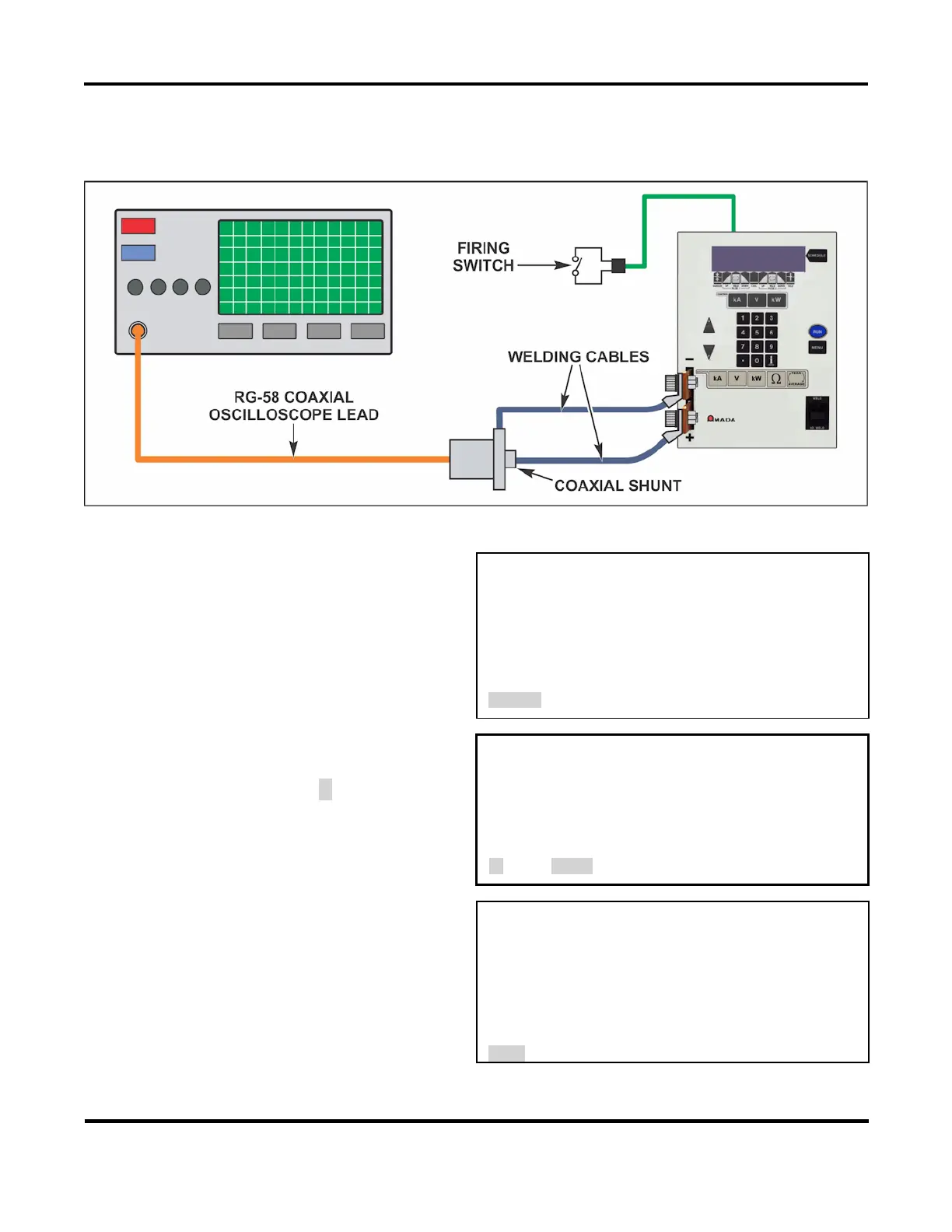
1. Connect the calibration setup to the
Power Supply as shown.
2. Turn the Power Supply ON.
3. In the MAIN MENU press 4 to enter the
calibration screen.
<MAIN MENU>
1. SETUP 6. COMMUNICATIONS
2. WELD COUNTERS 7. RELAY
3. COPY A SCHEDULE 8. RESET DEFAULTS
4. CALIBRATION 9. CHAIN SCHEDULES
5. SYSTEM SECURITY
Number Select an item
1
HF-2500A CALIBRATION
which will bring up the CAUTION screen
on the right. Press the ▼ arrow.
CAUTION
CALIBRATION SHOULD BE PERFORMED BY A
QUALIFIED TECHNICIAN ONLY.
REFER TO MANUAL FOR CALIBRATION SETUP.
▼ next, MENU
2
to calibrate the HF-2500A.
<PRE-CALIBRATION>
1. TEST HF25 (T-232 REQUIRED)
2. CALIBRATE HF25
3. RESET CALIBRATION
4. SET CURRENT SHUNT VALUE
5. TEST SERIAL PORT



 To Next Page