Assembly and function
56
UF 01 DB 238. 07.04
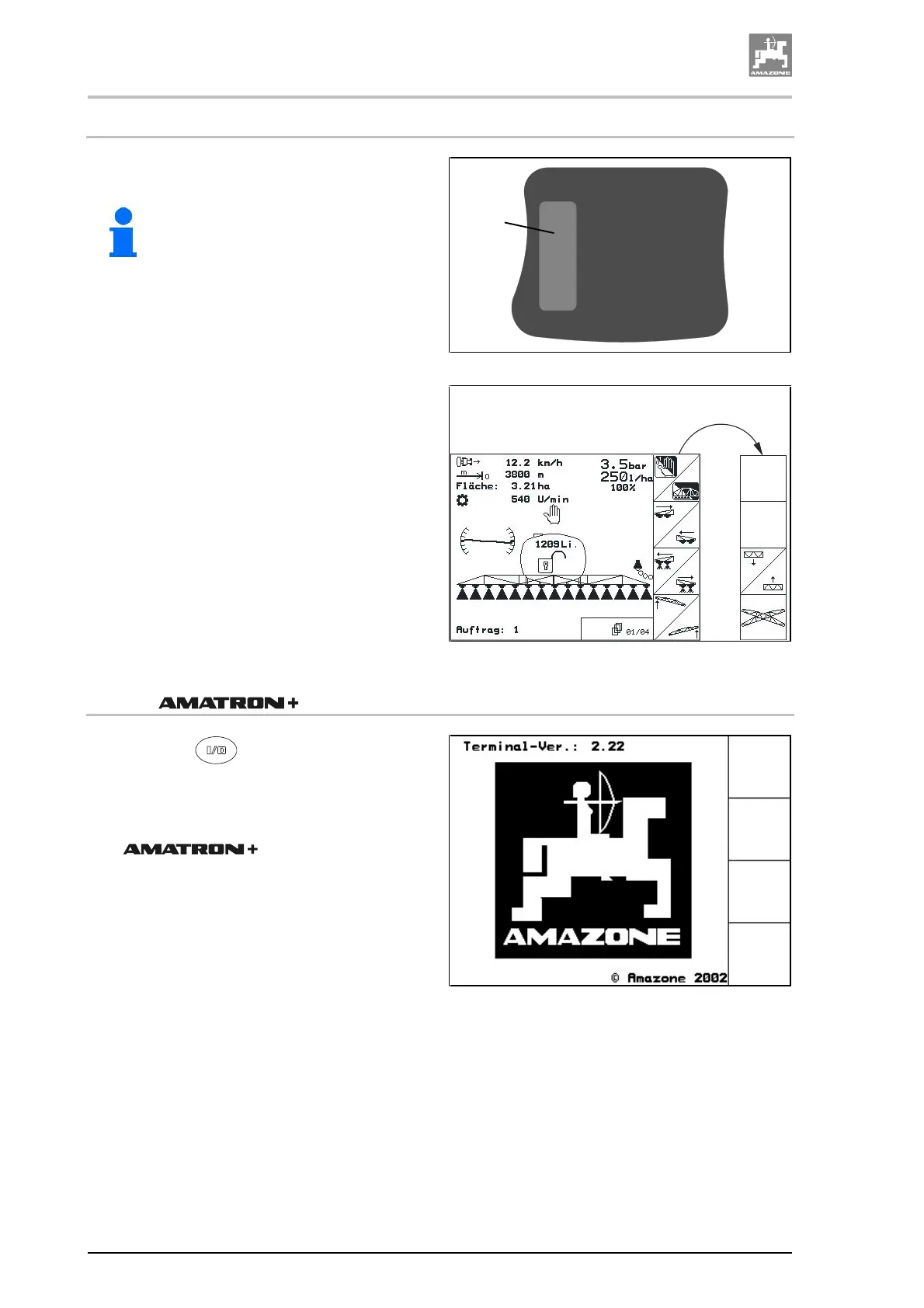
4.9.2.3 Keys on implement rear side
The shift key is located on the implement rear
side (Fig. 32/1).
Hint!
The shift key is active (1) only in the
menu operation and in the menu
order!
Fig. 32
When you press the shift key in the menu opera-
tion (Fig. 33/1), additional functional fields will
appear on the display. At the same time the cov-
erage of the functional keys will change also.
With the shift key pressed the indicated functions
can be actuated via the relevant functional key.
Fig. 33
4.9.3 switch on
1. Press key .
→
When the implement computer is connected
the start menu appears (Fig. 34) with the
terminal version (in this case terminal ver-
sion: 2.22). After approx. 2 seconds the
automatically jumps
into the main menu.
Fig. 34
1
Shift






 To Next Page