Assembly and function
UF 01 DB 238. 07.04
59
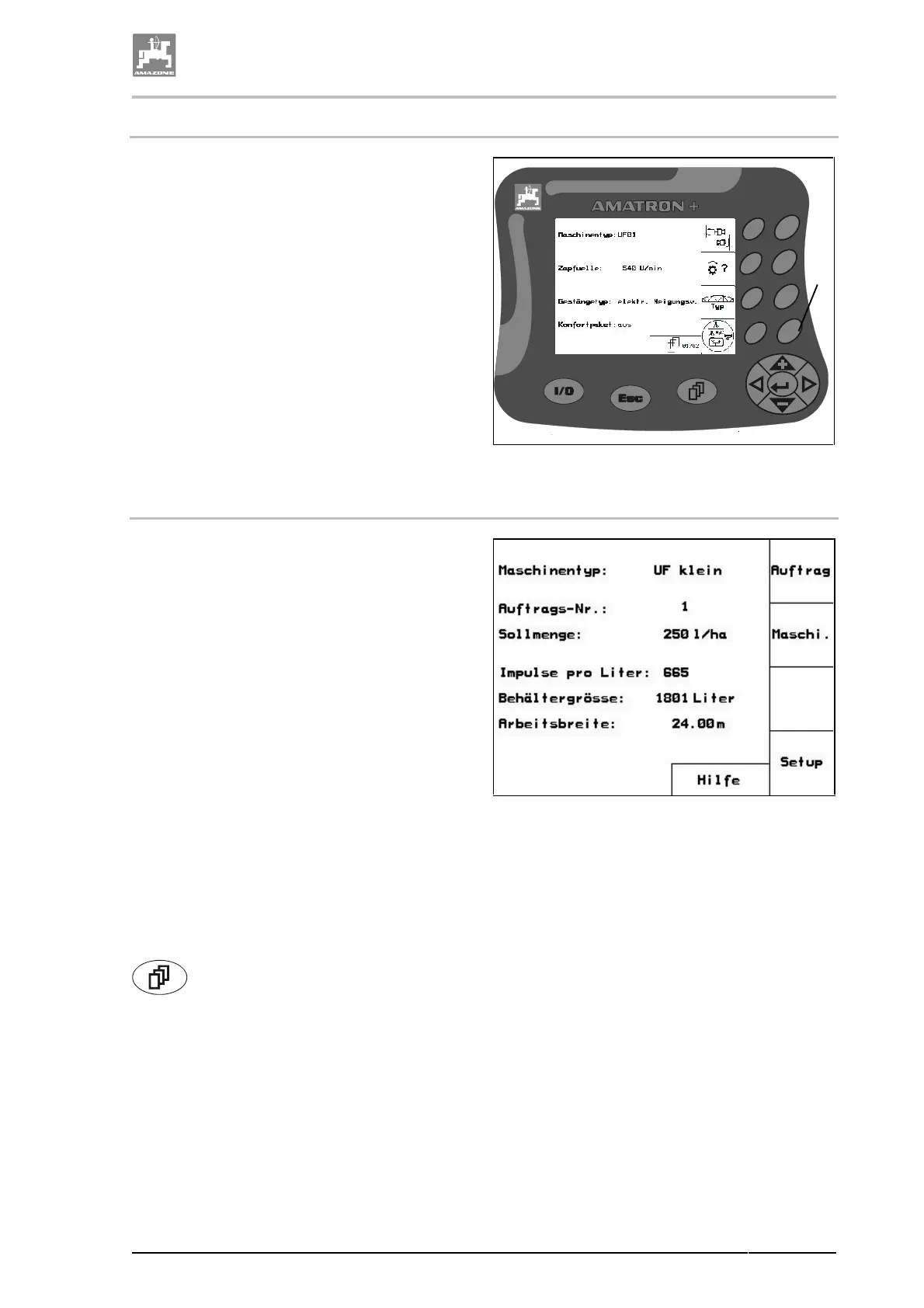
4.9.4.3 Switching on/off of functions (Toggle function)
Switching on/off of functions, e.g. comfort pack-
age: on/off:
1. Press functional key (Fig. 39/1) once.
→ In the display appears "on" and the function
"comfort package" is switched on.
2. Press functional key once again (Fig. 39/1).
→ In the display appears "off" and the function
"comfort package" is switched off.
Fig. 39
4.9.5 Main menu
The main menu shows
• the selected machine type
• the job number of the started order
• the entered required rate for the spray rate
in [l/ha].
• the impulses per litre of the flow meter.
• the size for the spray cocktail tank in litres.
• the entered working width for the sprayer
boom in [m].
Via the functional field "Order" recall the menu
order (please refer to chapter "Menu order", page
61).
Via the functional field "mesh" recall the menu
implement data (please refer to chapter "Menu
implement data", page 62).
Via the "Setup" recall the menu setup (please
refer to chapter "Menu setup", page 78).
Recall the functional field "Aid" via the symbol
. In the aid window you may choose
between
• aid for operation and
• aid for fault messages.
Fig. 40
1



 To Next Page