Ch. 11. Tutorial: AC Mode in Air, ES Sec. 11.2. Loading the Cantilever and Sample
20.
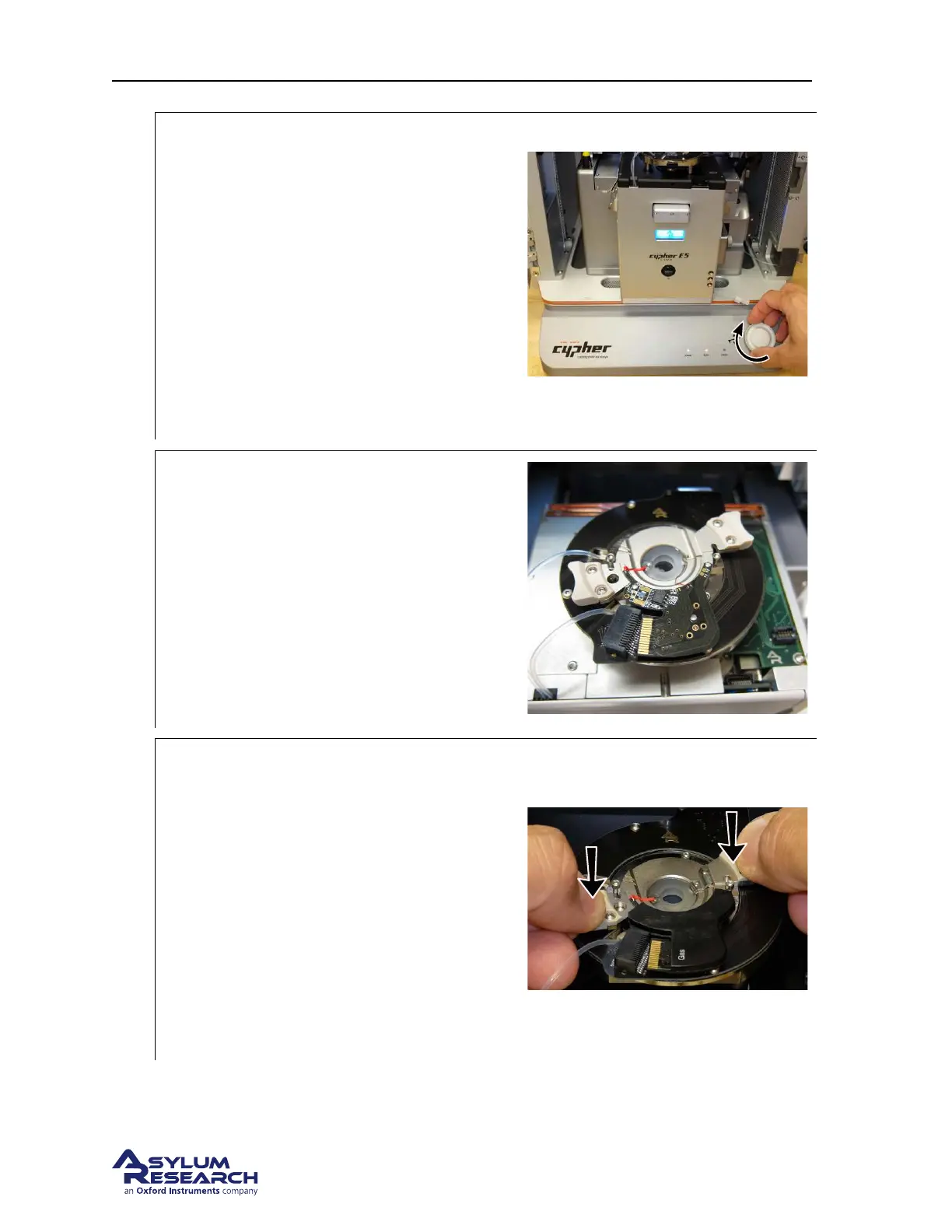
Prepare scanner to load cantilever holder:
• RAISE THE COARSE ENGAGE
STAGE by turning the Engage Control
Knob clockwise.Raise the stage until it
reaches its upper limit of travel.
Warning: Before loading the cantilever
holder, raise the coarse engage stage. If you
do not raise the coarse engage stage, you will
crash the cantilever into the sample and ruin
your cantilever, sample, and possibly even the
cantilever holder!
21.
Place cantilever holder:
• Check to make sure that the coarse
engage stage is raised to its highest
position.
• Position the cantilever holder in the cell
body as shown in the image to the right.
The cantilever holder should sit level
and be rotationally aligned so that the
cantilever holder board is almost
touching its mating connector.
22.
Press the cantilever holder down:
• Before starting this process it is
important that the cantilever holder is
sitting level with respect to the top of
the cell body.
• With fingers on both handles of the
cantilever holder, use firm pressure to
wiggle the cantilever down into the cell
body. The O-ring will offer some
resistance. When the cantilever holder is
firmly seated, you will feel a hard stop
as metal parts make contact.
DRAFT
Page 138



 To Next Page