Ch. 4. Tutorial: AC Mode in Air, Std. Scanner Sec. 4.2. Loading Lever and Sample
8.
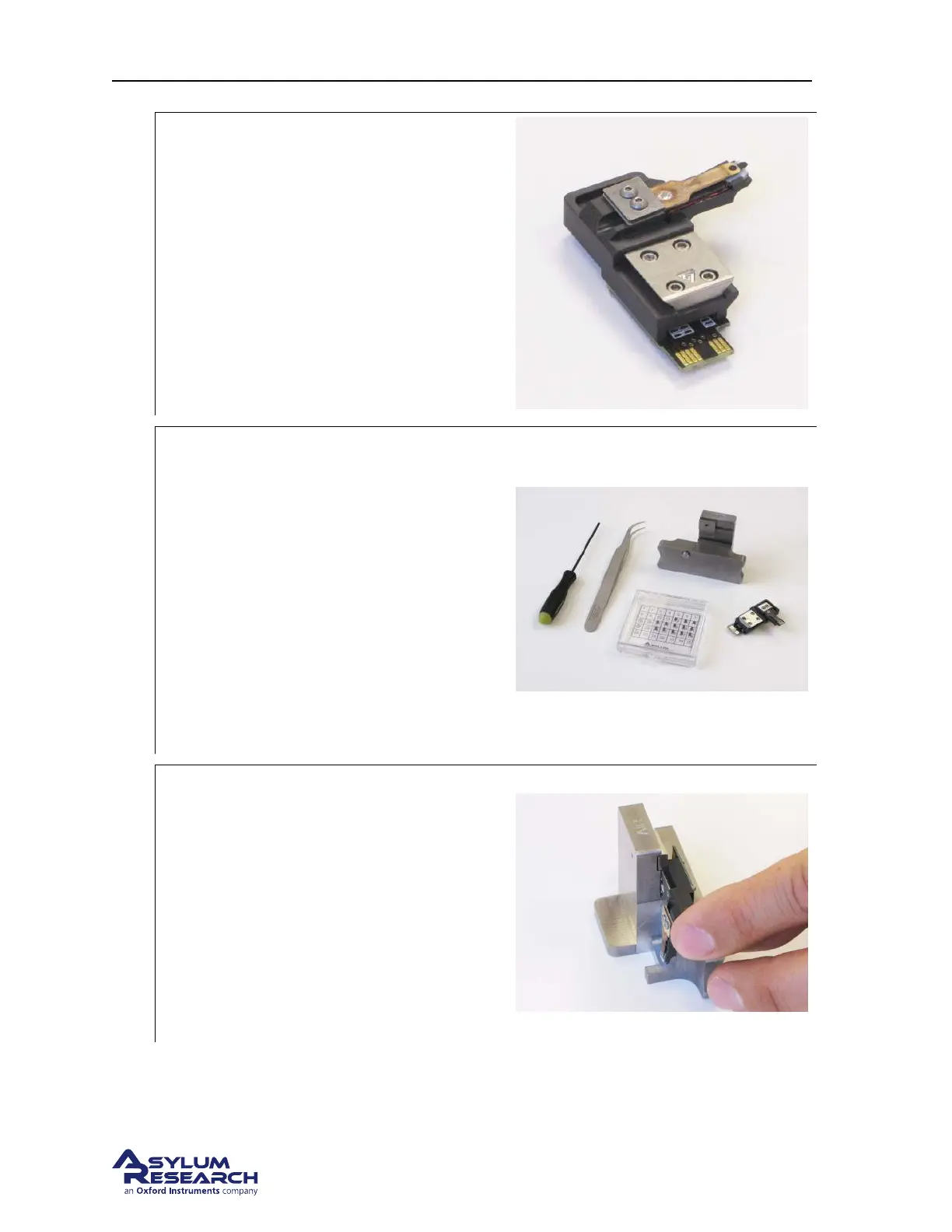
Select AC mode cantilever holder:
• Identify the cantilever holder. This
demo requires the standard “AC Air”
holder, Asylum Part# 901.705.
Note To learn more about cantilever holders
for the standard scanner, please refer to
Chapter 5 on page 49.
9.
Prepare cantilever mounting workspace:
• Set out your changing station, tweezers,
and cantilevers on a clean, well lighted
surface. Make sure that the changing
station is labeled “Air” (there is also a
“Droplet” changing station for the
droplet holder.)
• A low power binocular dissection
stereoscope with light source can be
useful for some of the following steps.
• Cleaning the tweezer tips with alcohol
improves the handling of the cantilevers.
10.
Mount the cantilever holder in the changing
station:
• Carefully insert the cantilever holder as
shown. The V-shaped piece of metal on
the back of the holder slides into the
dovetail joint on the changing station.
The cantilever should be pointing down.
• If the cantilever holder does not slide in
easily, loosen the screw on the clamping
mechanism.
support.asylumresearch.com Page 21



 To Next Page