Navigation (NAV)114
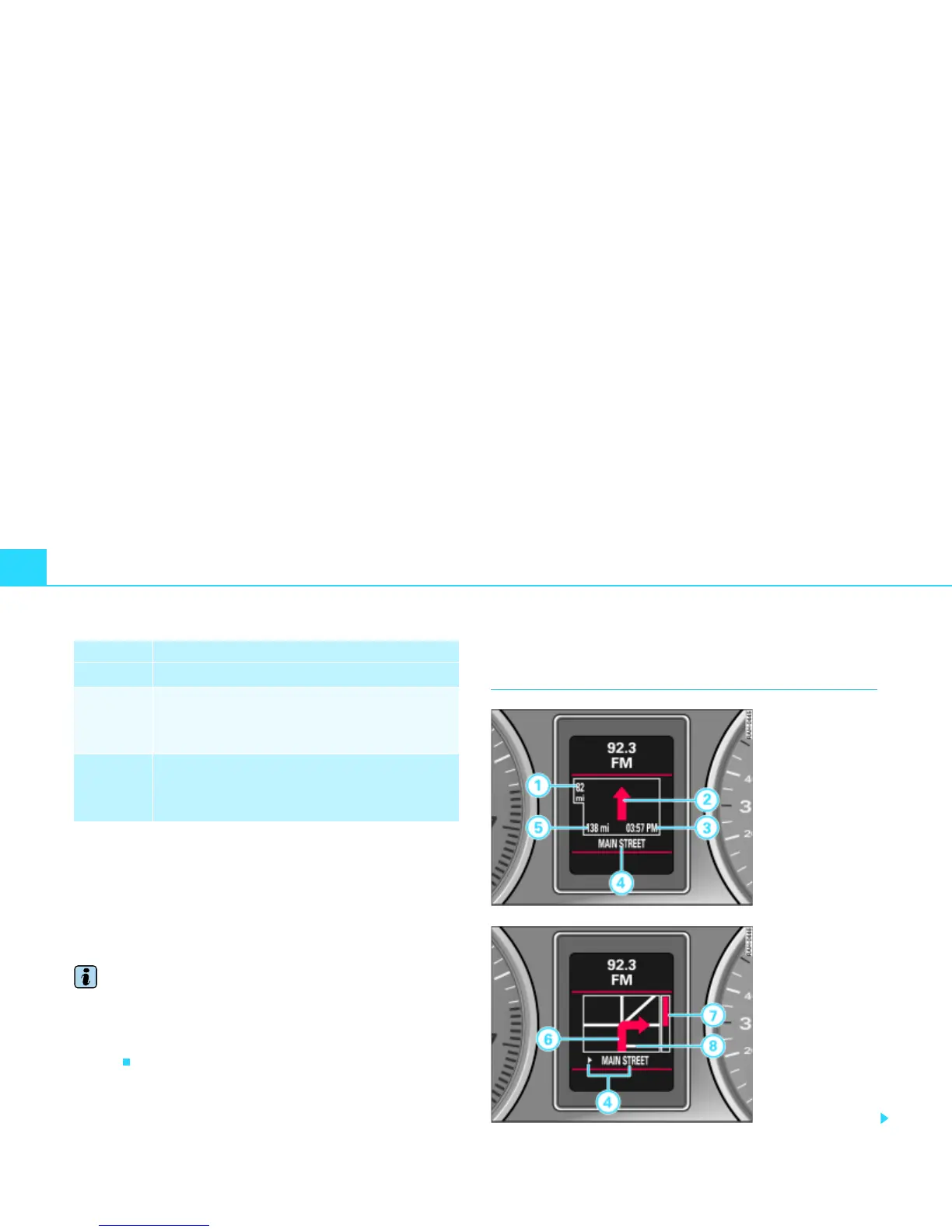
When the turn-off is immediately ahead, the arrow points in the
direction in which you should turn. In addition, the name of the
street is shown under the arrow. A bar graph
Þ page 113, fig. 117 on
the right in the display takes you precisely to the turn-off point.
If it is necessary to make a lane change before the turn off, you are
warned in plenty of time about this lane change before the turn-off
arrow by a second arrow
Þ page 111, fig. 114.
Tips
With active guidance, you can switch to the trip computer display*
by pressing the trip computer reset button*. Pushing the trip
computer reset button* again returns you to guidance. You can find
detailed information about the trip computer* in the Owner's
Manual.
Applies to vehicles: with color instrument cluster display:
Visual presentation in the instrument
cluster display
Change of direction arrow
Bar graph (countdown): bars decreasing in size indi-
cate how the distance to the immediate turn-off
point is decreasing; the bar graph is not shown until
a change of direction arrow is displayed.
If there is another side street before the turn-off
point which is not part of current guidance, this side
street is represented by a side-street symbol in the
instrument cluster display.
Display Short description
A
6
A
7
A
8
Fig. 118 Instrument
cluster display:
Example of route guid-
ance presentation
Fig. 119 Instrument
cluster display:
Example of route guid-
ance presentation
(turn off)



 To Next Page