CCR 1.0 User Guide Page 33
15-601130 Issue 1k (22 May 2009)IP Office
Supervisor: Account Details
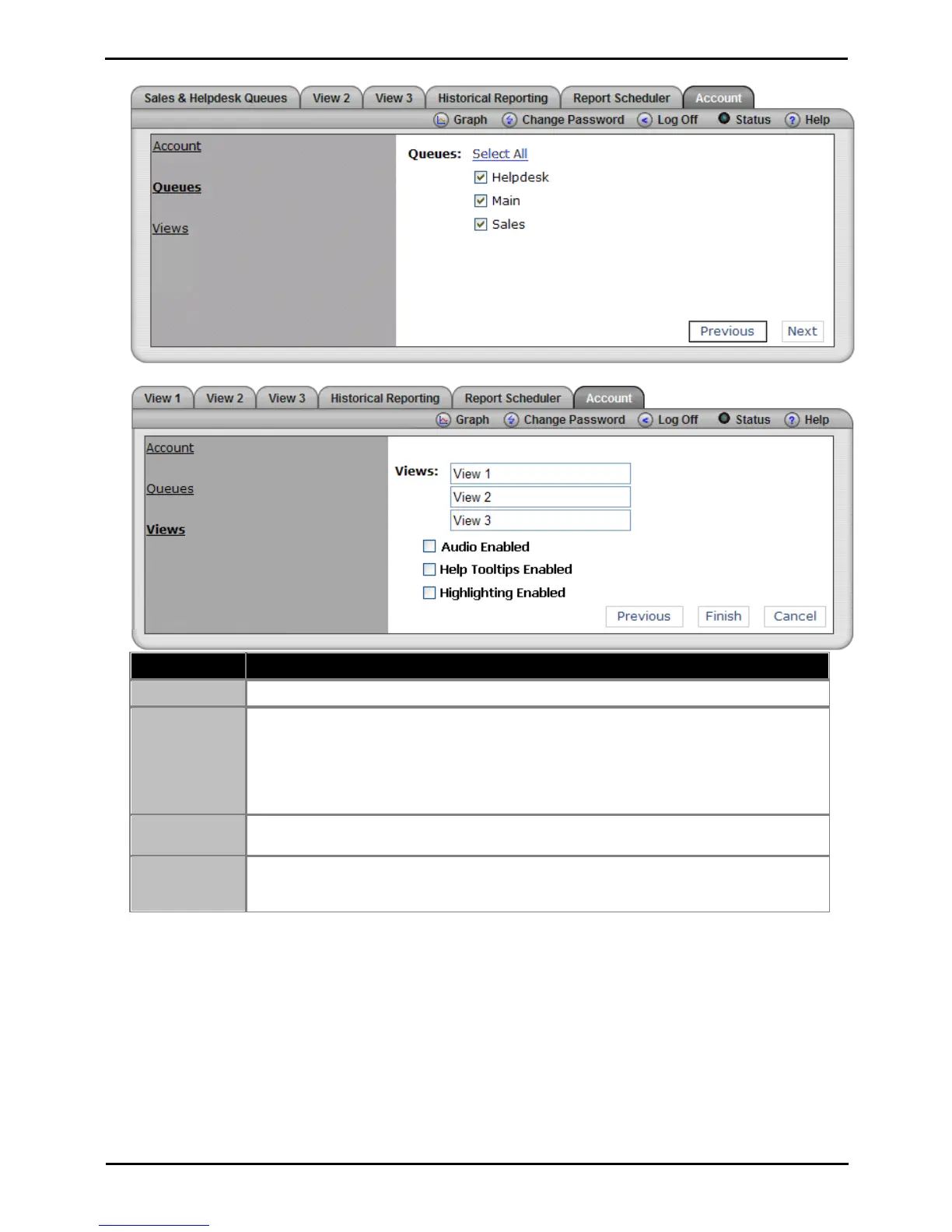
3. Click Next. The Queues window opens. If required amend the queues you want to monitor.
4. Click Next. If required amend the view names.
These fields allow you to rename the 3 views.
This option is used in conjunction with any view that includes an All Views Alarm List. When
enabled, if an alarm occurs, the browser's media player is used to play a sound file from the IP
Office Customer Call Reporter server PC. The sound is played to all users looking at that
supervisor's views.
· This option is off by default. If enabled, an audio plug-in is required for all user browsers. Use
either Quick Time (Non IE browsers) or Windows Media Player/Center (IE).
If enabled, when the cursor is placed over the statistic name in a view, pop-up help for the
statistic is displayed. Tooltips are on by default.
If enabled, when a statistic in a view changes value, its background briefly changes to purple,
then light purple and then back to the normal background color. This option is not applied to
agent state and time values. Highlighting is on by default.
5. Click Finish to save your changes.











 To Next Page