CCR 1.0 User Guide Page 24
15-601130 Issue 1k (22 May 2009)IP Office
2.2 Editing a View
Each supervisor can have up to 3 views showing statistics and alarms for selected queues. Views are setup and amended
by the administrator but they can then be adjusted by the supervisor.
Agents are able to see the same views as their supervisor but cannot change the queues or statistics. The agent's version
of the view will only show queues to which the agent belongs and their own agent details.
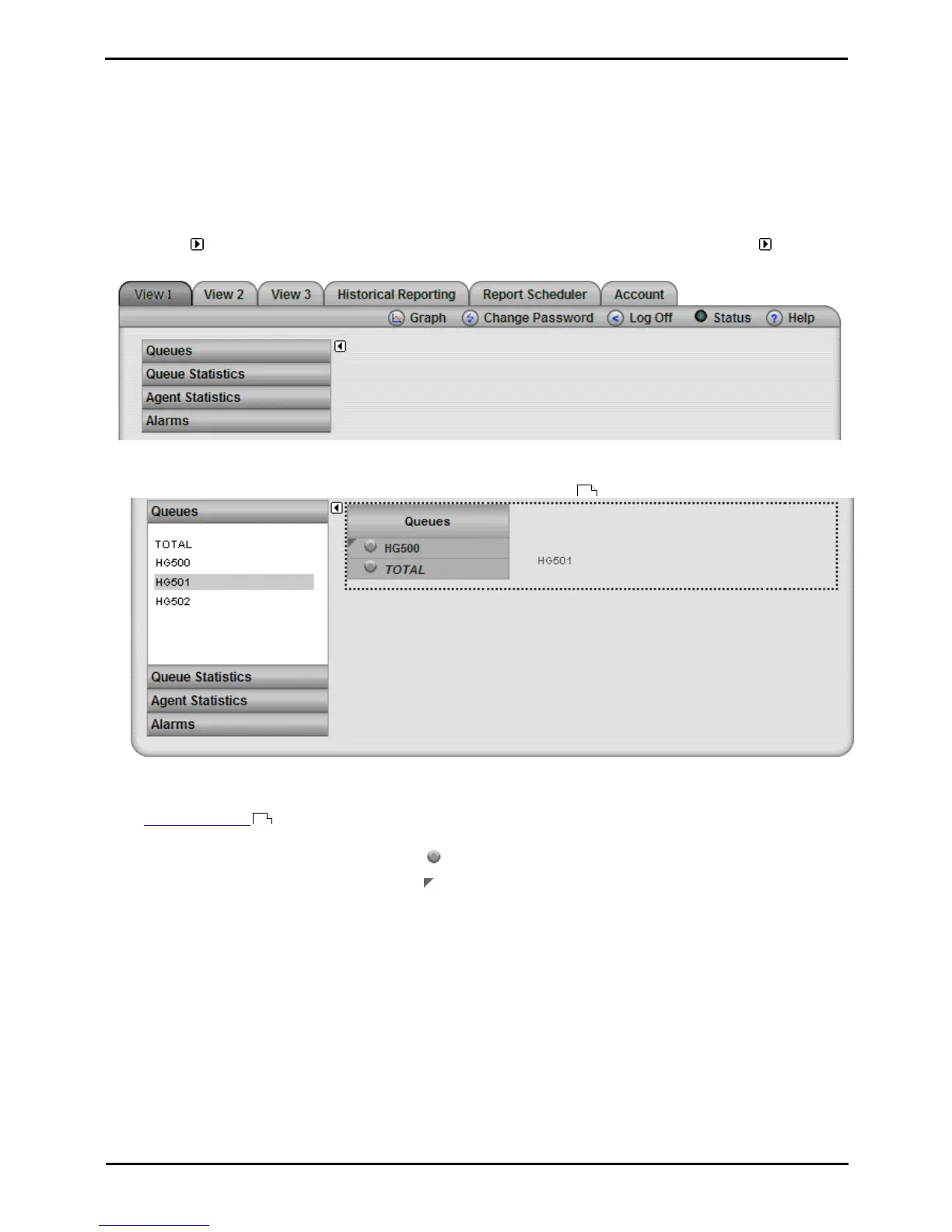
To edit a view
A.Select the view that you want to change.
B.Click on the icon to display the list of elements that can be added to a view (this is already done and the icon
missing if the view currently contains no elements). Note that while the list of displayable elements is in view, the IP
Office Customer Call Reporter does not show or update the statistics and alarms within the view.
1. Adding Queues
By default all the queues configured for the supervisor are already shown. These are the Queues that the supervisor
has permission to view as specified when creating their supervisor account .
· To add a queue to the view, click Queues. Drag and drop the required queue into the view and when the hatched
lines appear drop it into that area.
· TOTAL can be used to add a summary row to the view. For statistics that are averages, the total will be a
weighted average . For other statistics, it provides a simple total of the column. For the Longest Waiting
Time it is blank.
· To remove a queue from the view, click on the circle next to its name and select Hide.
· To adjust the order of the queues, click on the corner icon and drag the queue to the required position.
129
205











 To Next Page