11 | GenICam Camera Features Baumer
98 Operating Manual VCXG.2 / VCXG.2.XC / VCXG.2.I / VCXU.2 | V1.2
11.4 Category: AutoFeatureControl
Category containing the functions for automatic adjustment.
General Information
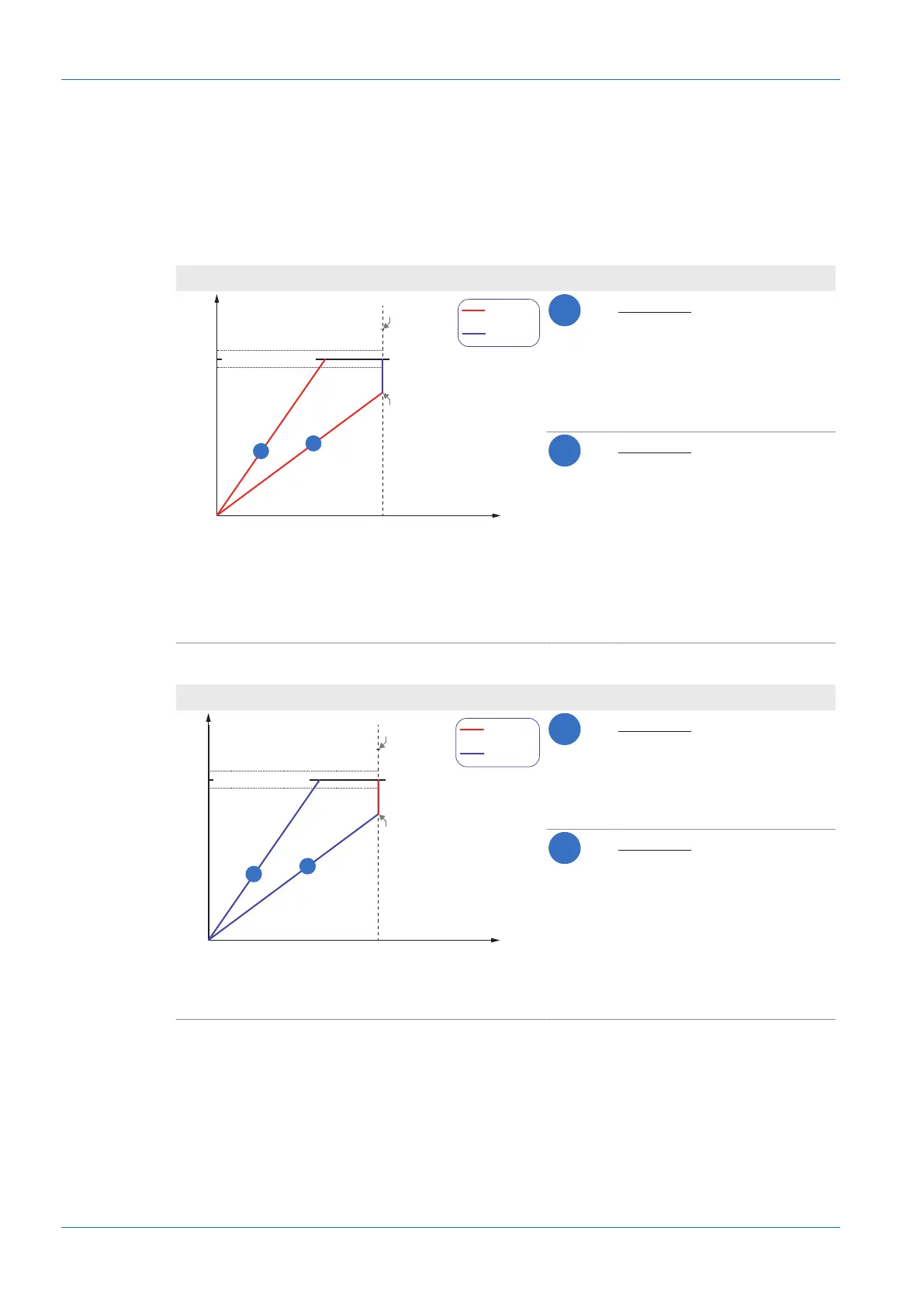
Various auto functions are available to affect the automatic adjustment of image brightness.
Two methods are described below.
BrightAutoPriority = ExposureAuto
ExposureAutoMinValue ExposureAutoMaxValue
Gain
Brightness
BrightnessAutoPriority = Exposure
GainAutoMaxValue
GainAutoMinValue
BrightnessAutoNominalValue
1
2
Example 1
For image 1, it will suffice in-
creasing brightness using Ex-
posureTime to achieve the
value of BrightnessAutoNomi-
nalValue.
Example 2
For image 2, increasing bright-
ness using ExposureTime will
not suffice to achieve the value
of BrightnessAutoNominal-
Value.
Therefore,Gain is increased af-
ter reaching ExposureAu-
toMaxValue.
BrightAutoPriority = GainAuto
ExposureAutoMinValue
ExposureAuto-
MaxValue
Gain
Brightness
BrightnessAutoPriority = Exposure
GainAutoMaxValue
GainAutoMinValue
BrightnessAutoNominalValue
1
2
Example 1
For image 1, it will suffice in-
creasing brightness using Gain
to achieve the value in Bright-
nessAutoNominalValue.
Example 2
For image 2, increasing bright-
ness using Gain will not suffice
to achieve the value in Bright-
nessAutoNominalValue.
Therefore,ExposureTime is in-
creased after reaching Expo-
sureAutoMaxValue.


 To Next Page