MX08 Multichannel Weighing System, Technical Manual, Rev. 2.5 Page 118 of 144
12.6. Error Table
The MX08 EI gateway instruments have been designed as very reliable and virtually error
free instruments. However if an error occurs do not attempt to repair the equipment before
you understand what caused the error. Note the problems you have with your instrument
and the error messages shown by the LEDs located on the front panel. Then try to solve
the problem according to the error table given below.
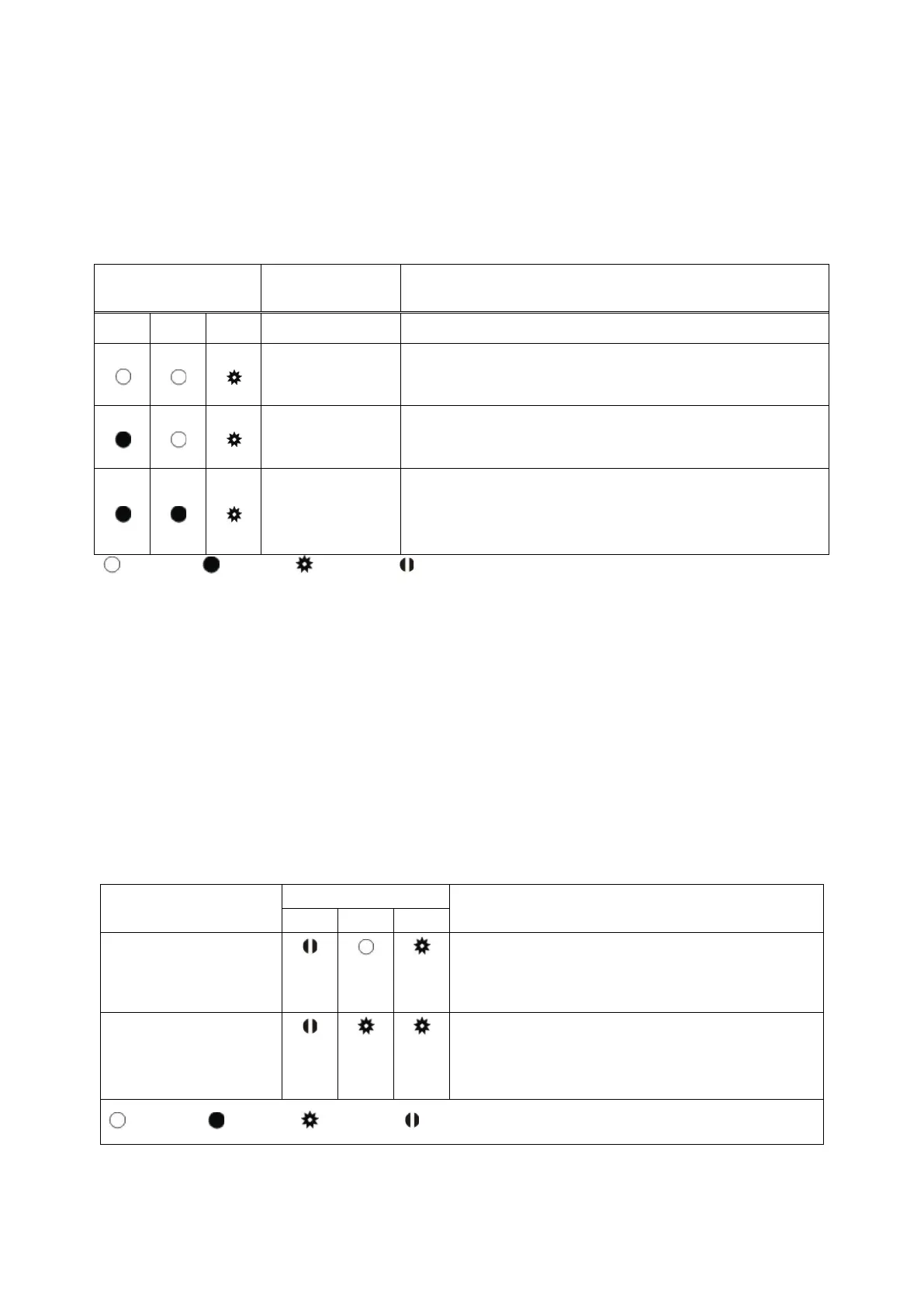
Error Code Description Actions to take / Possible cause
Pwr Link Err
System Error
− Re-
energize the instrument. If seen again,
change the board.
Configuration
Error
− Re-address the instruments on N-Bus (Refer to
section 3.3 or Section 3.9 N-Bus addressing).
Found
− Install MX08 AD or MX08 IO instruments to the
system.
− Check the N-BU
S connector whether they are
installed on the rail.
Blank Light Flash Blank for 0.3 second
Table 11.2 - Error table
12.7. Diagnostic Tests
RC-232C serial interface test can be performed sequentially in this test menu.
For entering diagnostic test mode, press the programming switch before power on and
release the switch after power on the instrument. The instrument will go into RS-232C
RXD test mode which is indicated by lighted Pwr LED and flashed Err LED as seen below.
The status of LEDs on the front panel indicates test steps and the test result as described
below. You can go to the next test by pressing the programming switch.
Test
Description
Pwr LED blanks 0.3 sec after receiving any
data. Press programming switch to go next
test.
‘A’ to ‘Z’ characters are send sequentially
in 0.8 s period. If the same data is
received, Pwr LED blanks 0.3 sec. Press
programming switch to go following test.
Blank Light Flash Blank for 0.3 second
Table 11.3 - Diagnostic test sequence


 To Next Page