MX08 Multichannel Weighing System, Technical Manual, Rev. 2.5 Page 22 of 144
4.3. N-Bus Addressing via xFace
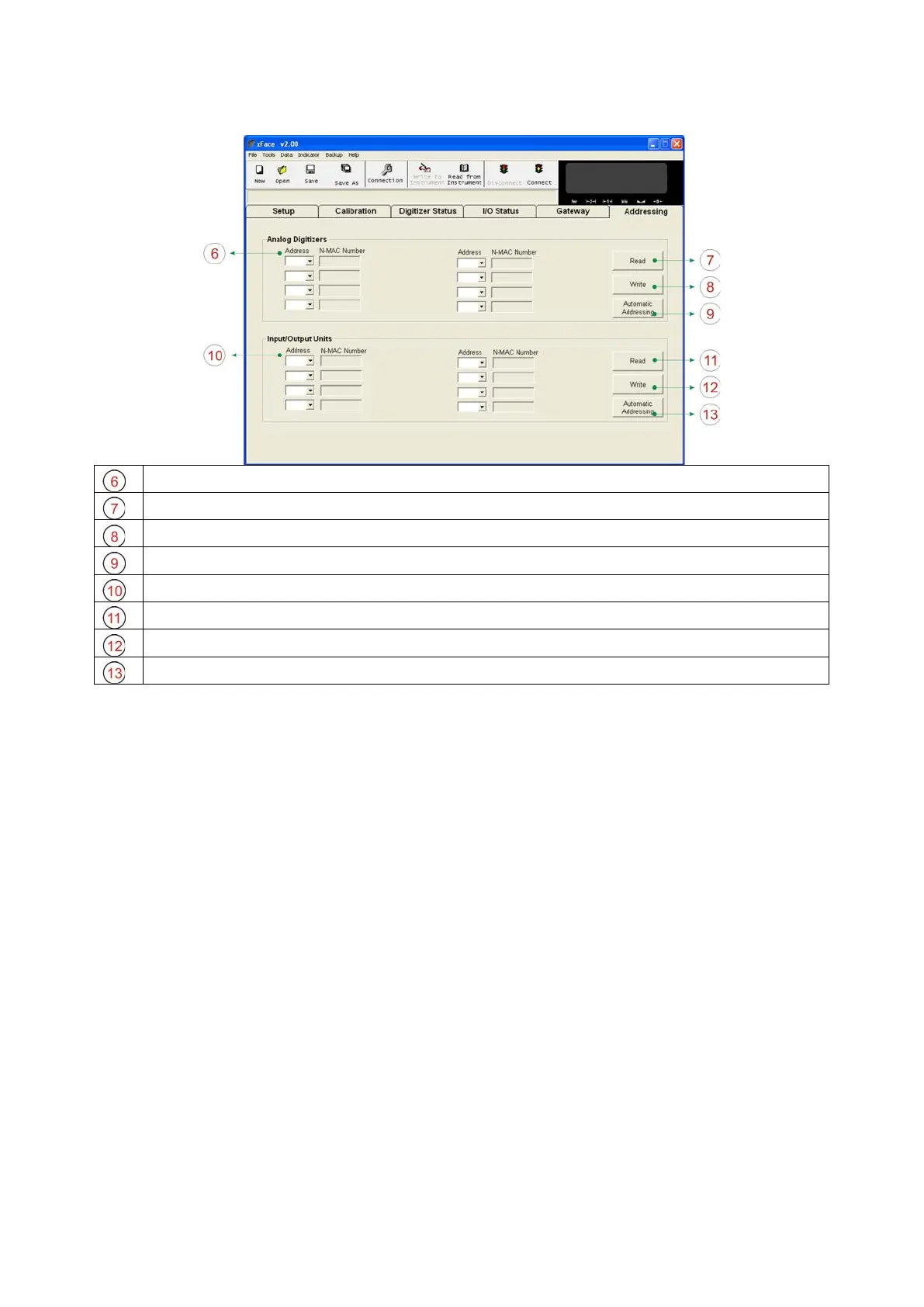
N-Bus Addresses of Analog Digitizer Instrument.
Read Button: Reads the Address and N-MAC Numbers of Analog Digitizers.
Writes the N-Bus address to Analog Digitizers related to N-MAC number.
Auto Address: Fills the address fields from 0 to 7.
N-Bus Addresses of I/O Instrument.
Reads the Address and N-MAC numbers of I/O units.
Write Button: Writes the N-Bus address to I/O units related to N-MAC number.
Fills the address fields from 0 to 7.
Figure 3.7 - N-Bus Addressing tab
For the first time connection to MX08 system, only Gateway and Addressing tabs becomes
active. First, address the instruments to N-Bus to activate the instruments in MX08 system.
Addressing Analog Digitizers to N-Bus: First, click ‘Read’ button to read the N-MAC
numbers and the addresses. Give an address number to each Analog Digitizers. Then
click ‘Write’ button to save the addressing settings. If the addressing Analog Digitizers to
N-Bus is completed successfully; Setup, Calibration and Digitizer Status tabs, Scale
Address and Visual Weight Display will be activated.
Addressing Input/Output Instruments to N-Bus: First, click ‘Read’ button to read N-
MAC numbers and addresses. Give an address to each MX08 IO. Then click ‘Write’ button
to save the addressing settings. If the addressing MX08 IOs to N-Bus is completed
successfully, I/O Status tab will be activated.
Note: Sequentional address numbers of N-Bus slave instruments are recommended.


 To Next Page