MX08 Multichannel Weighing System, Technical Manual, Rev. 2.5 Page 21 of 144
• After closing the Setup Wizard you can start using the xFace software.
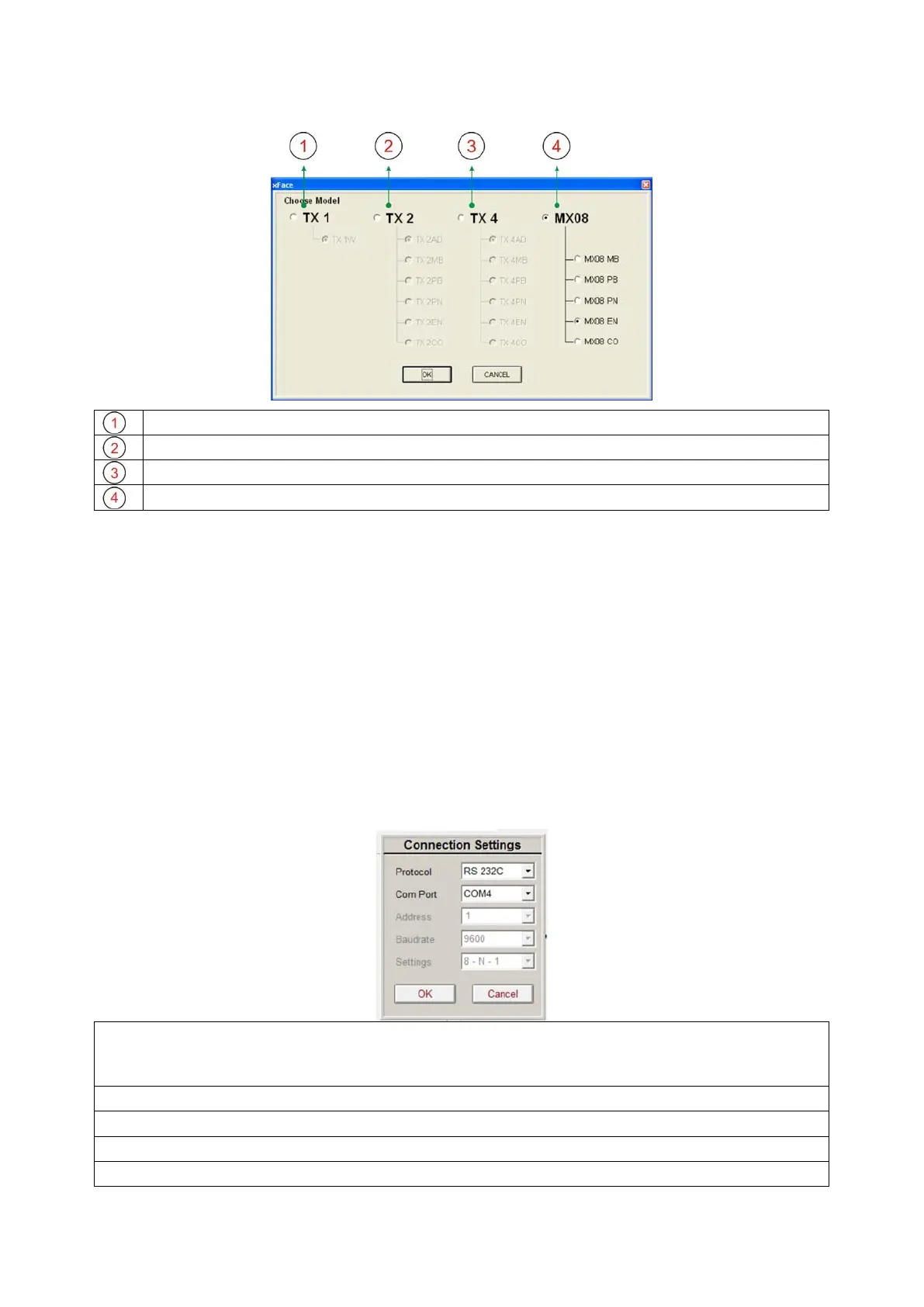
MX08 Models: Select one of the MX08 models and press OK button
Figure 3.5 - xFace model selector window
4.2. Connection to xFace
MX08 gateway and xFace connection is done via RS-232C service port for all gateway
instruments. Additionally, RS-485 can be used for xFace connection. You can supply any
PC connection cable as an accessory from BAYKON (Refer to Section 1.4.2 Accessories
sold separately).
After running xFace, select the instrument model you use. Select PC com port at
connection settings menu in the tools tab and click the connect icon. The traffic lights of
connect icon turns from red to green light when the communication is built between MX08
gateway instrument and your PC.
Protocol: Select programming port of the instrument. MX08
programmed over both RS-232C and RS-
485. But the other type of instruments can be
programmed over only RS-232C
Com Port: Select the com port of the PC.
Address: Select the address of the RS-485, if the protocol is selected RS-485.
Baudrate: Select the baudrate of the RS-485, if the protocol is selected RS-485.
Setting: Select com port setting of the RS-485, if the protocol is selected RS-485.
Figure 3.6 - xFace connection settings


 To Next Page