MX08 Multichannel Weighing System, Technical Manual, Rev. 2.5 Page 122 of 144
Application watchdog timeout
Application controller failure
13.2. Electrical Connections
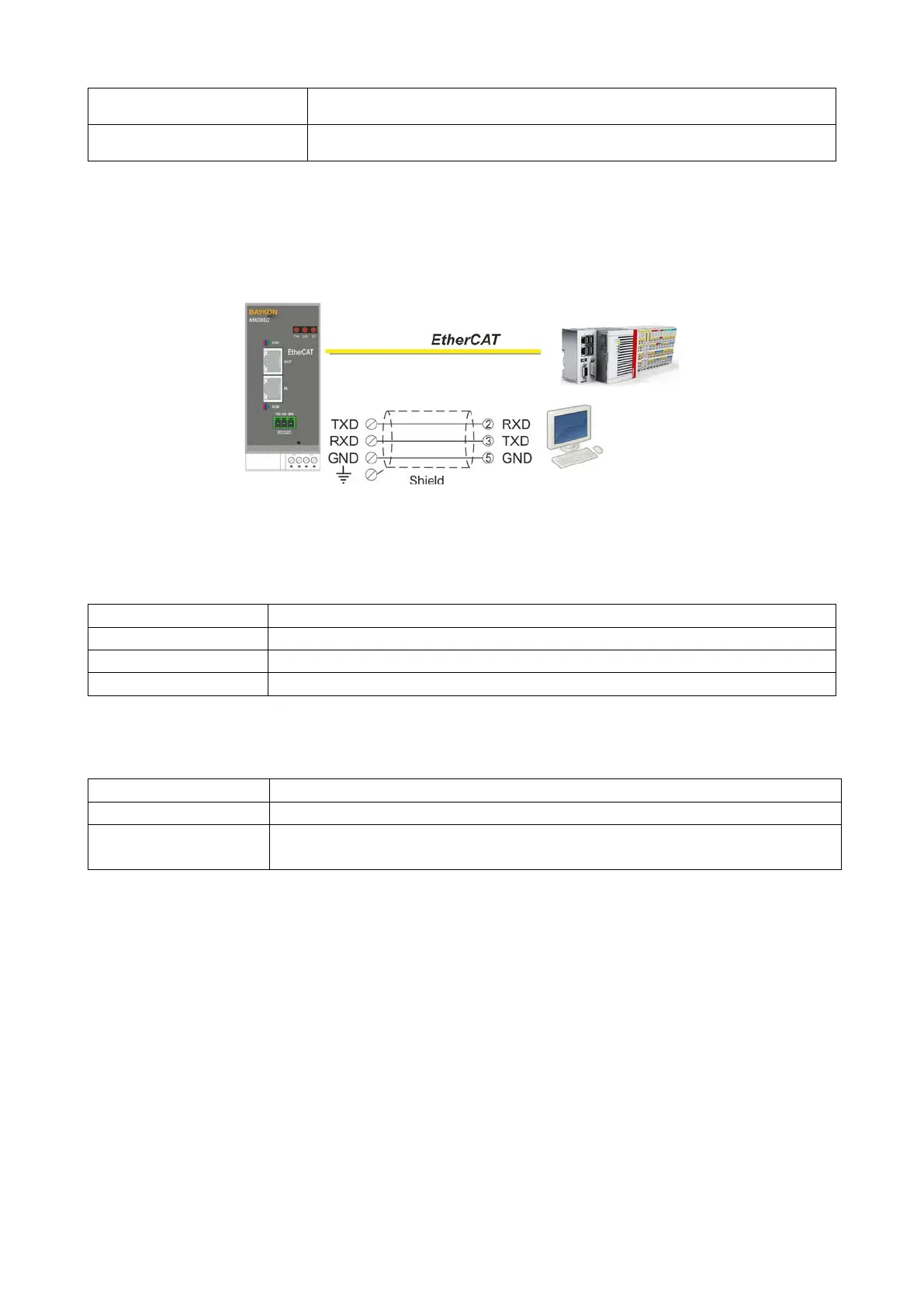
EtherCAT, RS-232C and power supply terminals are shown in Figure 12.1.
Figure 12.2 - MX08 EC serial interface connections
RS-232C Serial interface
Used for service port (xFace)
1 start bit and 1stop bit
EtherCAT interface
EtherCAT interface with PC or PLC
Ethernet
The Ethernet interface operates at 100Mbit, full duplex, as required
by EtherCAT.
Warning: Connect the shield to the reference ground or shield pin of the power connector.
Warning: Disconnect xFace PC software for EtherCAT interfacing.
Power Supply Connection
The pin configuration of the 24 VDC power supply connector located on front bottom of the
instrument is shown in figure below. Proper grounding is very important for the accuracy
and the safety of your measuring system. Before interfering the instrument, please turn off
the power and wait at least for 30 seconds.
Warning: Connect the grounding terminal to the reference ground.


 To Next Page