BD BACTEC™ FX Instrument User’s Manual
34
Enabled radio button
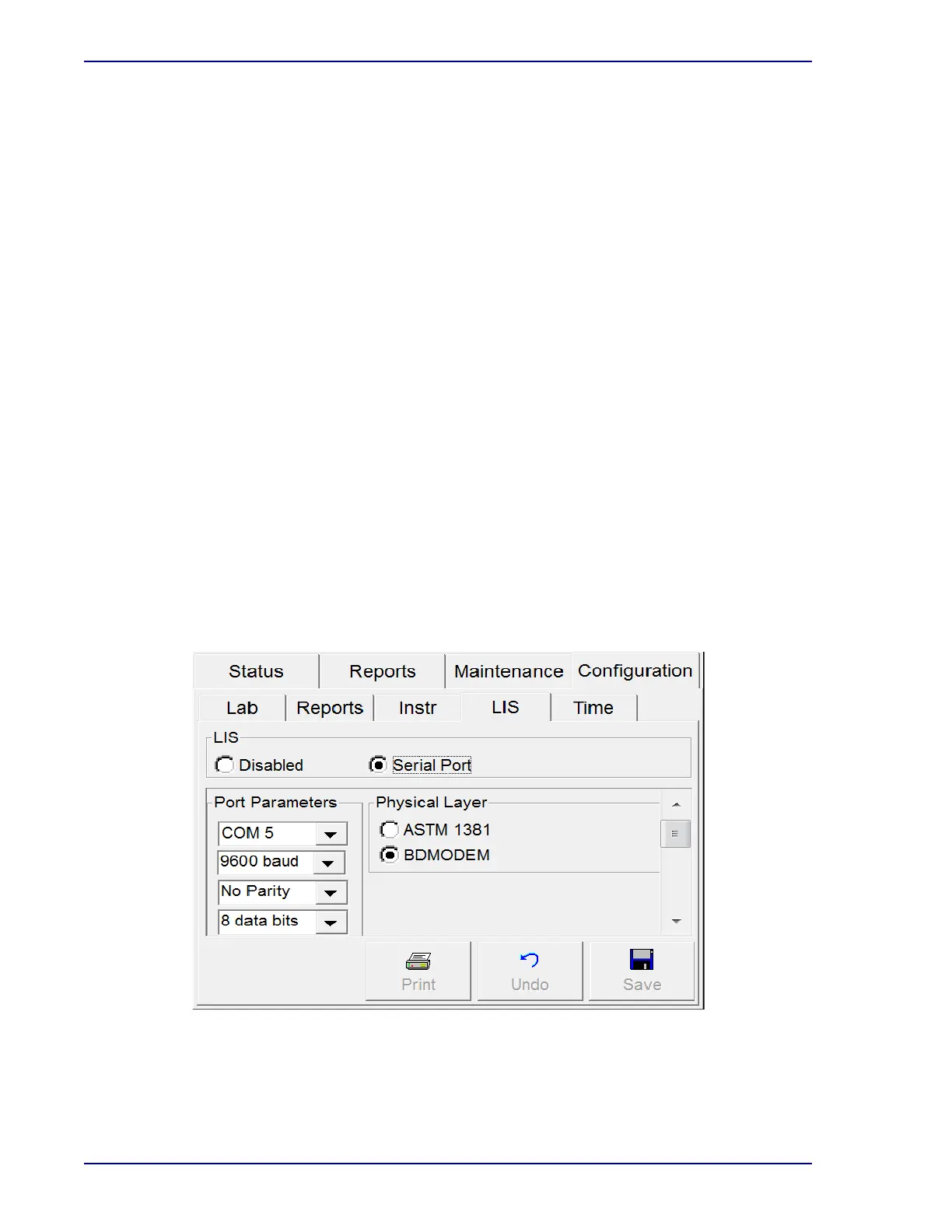
To enable communications with a compatible LIS system, select the Enabled radio button.
Check the settings in the Port Parameters, Physical Layer, LIS Options, and BD Modem™
windows to complete the setup.
Port Parameters Window fields:
Com Port
Select the Drop-down Arrow to select the desired com port. Only configured com ports
appear in the drop-down box.
Baud
Select the Drop-down Arrow to select the desired baud rate. Select 1200, 2400, 4800, 9600
(default), or 19.2k.
Parity
Select the Drop-down Arrow to select the method of parity check used in serial
communications with the LIS. Select No Parity (default), Odd Parity, or Even Parity.
Data Bits
Select the Drop-down Arrow to select the number of data bits used in serial communications
with the LIS. Select 7 or 8 (default).
Stop Bits
Select the Drop-down Arrow to select the number of stop bits used in serial communications
with the LIS. Select 1 (default) or 2.
Figure 2-7 – LIS Configuration Display











 To Next Page