REMARK : If you restart or stop the Beemo appliance you will interrupt all processes
running. Before performing this operation, check that no operation is in progress.
2. Remote access : enables remote maintenance (SSH protocol) or remote access to this administration console.
NOTE : If remote maintenance is not enabled, Beemo Technologie or the technical staff
appointed by its resellers will not be able to run diagnostics in case of failure. Similarly, if
remote administration is not enabled, no one outside the LAN on which the
Beemo ap-
pliance
is installed will be able to configure it.
3. Graphics : Monitoring the hardware status of the Beemo appliance over time using different
indicators (CPU, inputs and outputs, uptime, etc.) can detect any abnormal hardware activity
and prevent failures.
5.4 Network drives
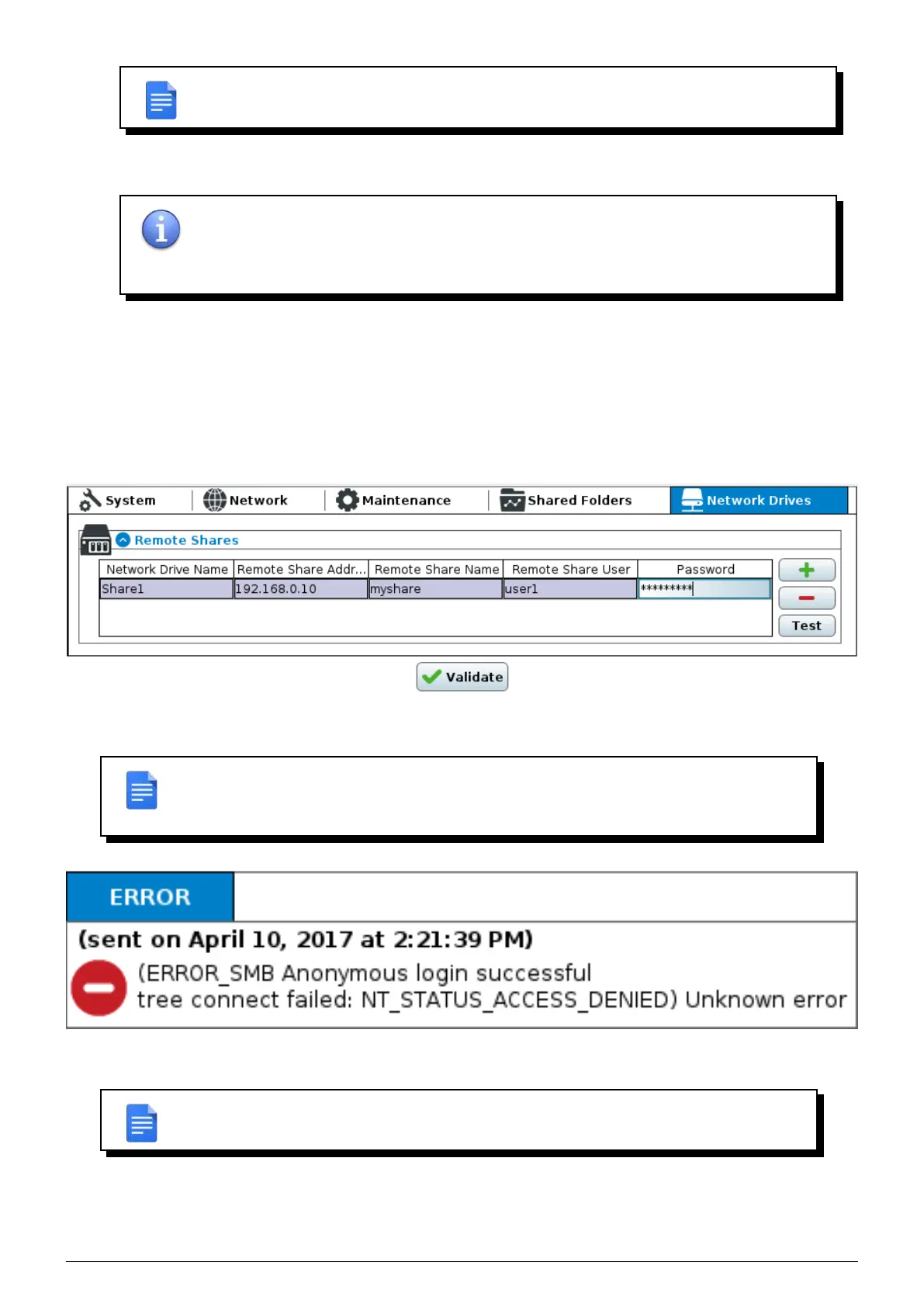
To backup network shares, they must be configured in this window.
FIGURE 5.4 – Network drive management window
REMARK : You can test the connection to the NAS from this interface with the Test button.
the
Beemo appliance will display an appropriate message displayed at the bottom of the
current window.
FIGURE 5.5 – Standard error message
REMARK : In case of a connection error, check that all the fields related to the NAS are
properly filled out and also check your network settings.
Data Safe Restore User manual Version 3.08 Page 23



 To Next Page