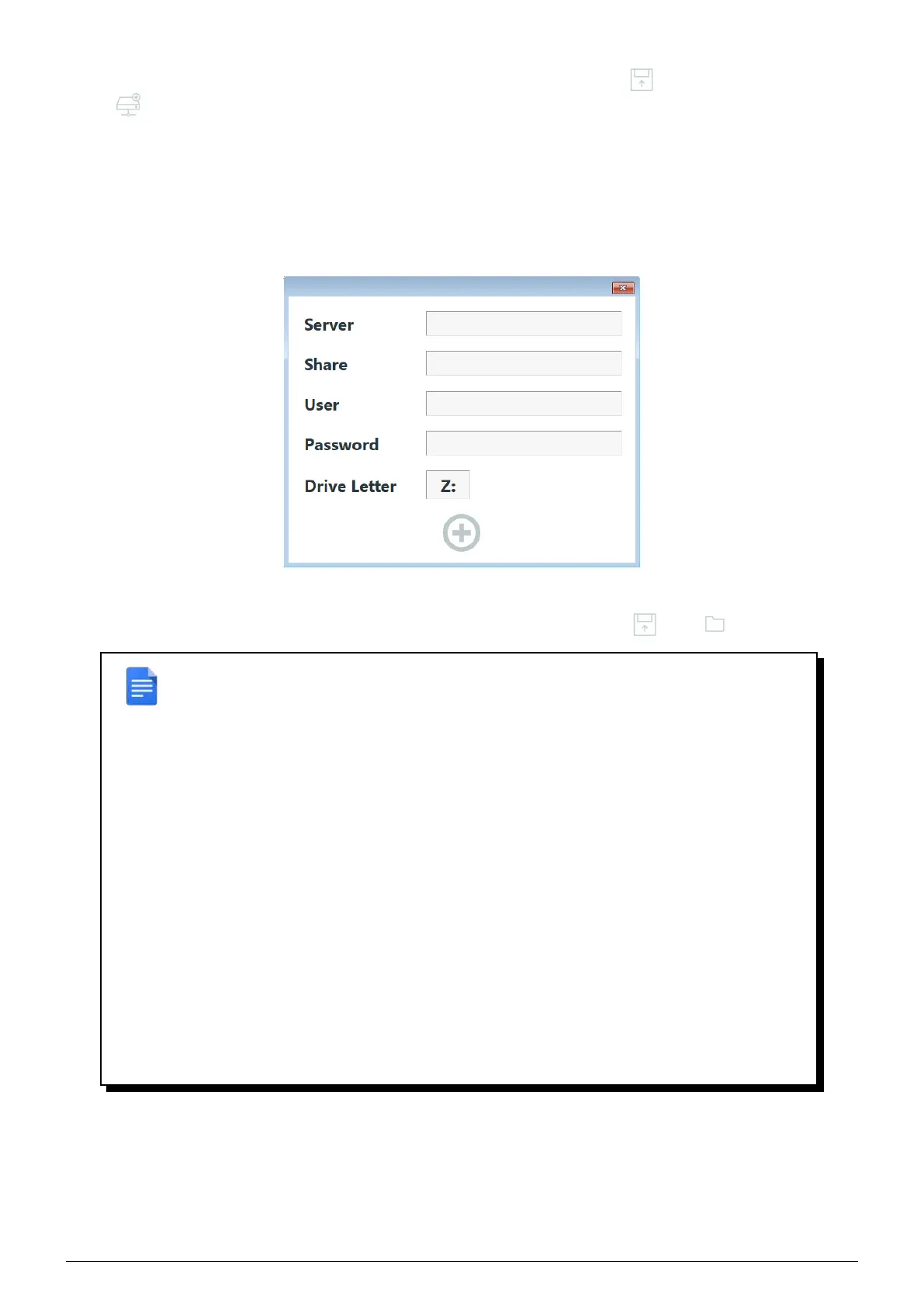
If you want to add a driver from a network share, click on the add driver button , then click on the add share
button
, and setup following informations :
• Server : IP Adress of the machine providing the network share.
• Share : name of the network share as defined on the machine.
• User : user name with read rights on the share.
• Password : password of the user provided.
• Drive Letter : drive letter to map the shared folder with.
FIGURE 11.10 – Add a network share window
Once the share mapped, it will be accessible on defined drive via the file explorer (
then ).
REMARK : bootable flash drive is setup in DHCP, if your network doesn’ t have a DHCP
server, specify IP address following the procedure below.
Open a command prompt and type in :
netsh interface ip set address Ethernet static #IP #MASK #GW #METRIC
Replace the above values with the correct parameters :
• #IP : IP adress to give at the machine booted on Flash Rescue.
• #MASK : subnet mask.
• #GW : default gateway IP address.
• #METRIC : metric, can be replaced by "1".
Check configuration with following command :
ipconfig
NOTE : The interface will not display new parameters unless you restart it with the
Ctrl+Alt+Maj+Q shortcut.
Data Safe Restore User manual Version 3.08 Page 52



 To Next Page