BENNING IT 130 Measurements
- 44 -
How to perform an automatic test
Steps of the automatic test Note
Select the FI/RCD function by means of the function selector
switch.
Set the sub-function to AUTO.
Set the testing parameters.
Connect the test cables to the test object (see figure 5.17).
Press the "TEST" key to start the measurement.
Start of test
Testing with I
∆
N, 0° (step 1)
RCD should trip
Activating the RCD
Testing with I
∆
N, 180° (step 2)
RCD should trip
Activating the RCD
Testing with 5×I
∆
N, 0° (step 3)
RCD should trip
Activating the RCD
Testing with 5×I
∆
N, 180° (step 4)
RCD should trip
Activating the RCD
Testing with ½×I
∆
N, 0° (step 5)
RCD must not trip
Testing with ½×I
∆
N, 180° (step 6)
RCD must not trip
Tripping current test, 0° (step 7)
RCD should trip
Activating the RCD
Tripping current test, 180° (step 8)
RCD should trip
Activating the RCD
Save the measuring result by pressing the "MEM" key
(optional).
End of test
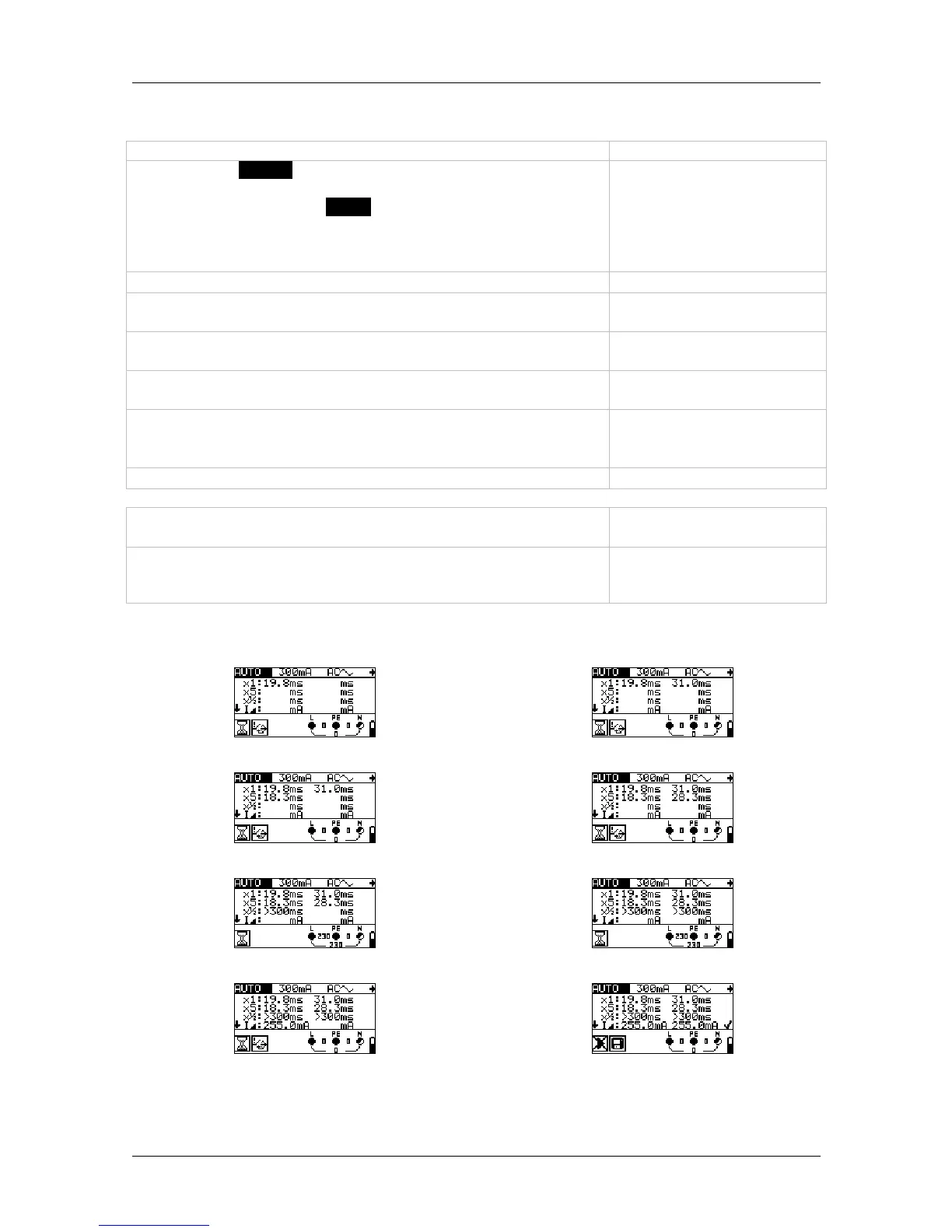
Example of the test steps:
Step 1
Step 2
Step 3
Step 4
Step 5
Step 6
Step 7
Step 8
Figure 5.21: Test steps of the automatic test



 To Next Page