Installing the GSM Module
!
Before installing the GSM Module, make sure
that the control panel is not connected to the
power supply.
!
Before inserting or removing the SIM card,
make sure that the GSM Module is not con
-
nected to the power supply.
+
Disable the PIN and call forwarding on the SIM
card before inserting it in the GSM Module.
The ABS-GSM Module can be installed in the ABS-M
metal box and the ABS-P plastic box as shown in Figure
2 on page 16 and in Figure 3 on page 17 (part n. 25b)
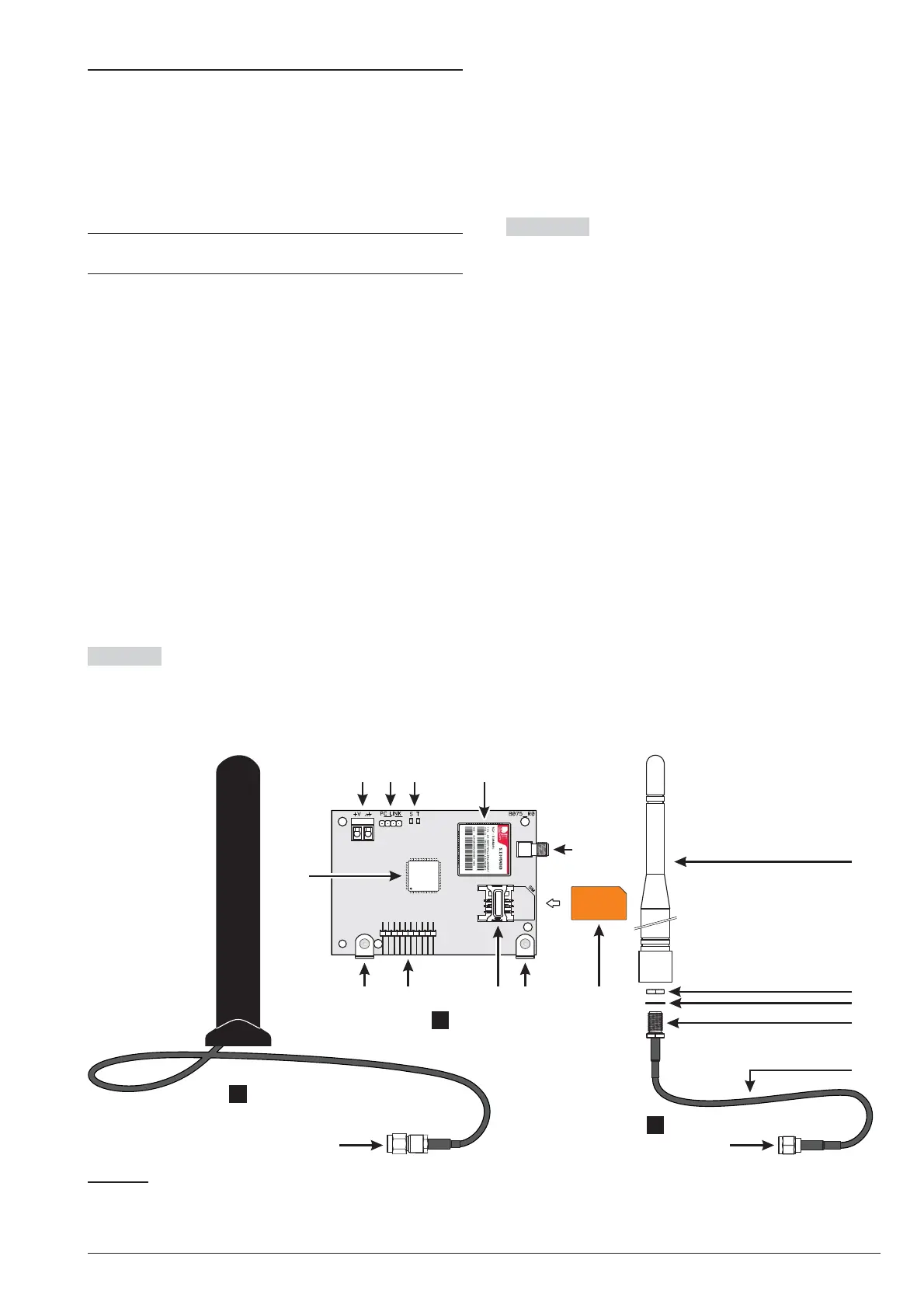
respectively and described below (see Figure 6).
1. Insert the SIM card in SIM holder 102 of the Mod
-
ule.
2. Insert the GSM Module on connector 8
(GSM/GPRS), while being careful to make the
holes on corner guards 101 coincide with the holes
7 on the Motherboard.
!
Inserting the GSM Module incorrectly may lead
to serious damage.
3. Attach the GSM Module to the holes 7 using the
screws provided.
Metal Box Installation in the ABS-M metal box re-
quires antenna BGSM-100CA (b).
4. Place antenna BGSM-100CA on the top of the
metal box as far away from the wall as possible.
5. Thread the antenna’s wire through hole 43 on the
bottom of the control panel and then connect it to
connector 93 of the GSM Module.
6. Fix the antenna wire to anchor 45.
Plastic Box Installation inside plastic box ABS-P re
-
quires the ABS-AK antenna (c).
7. Remove bolt 95 and washer 96 from connector 97
of wire 98 provided with the ABS-AK antenna.
8. Insert connector 97 in hole 39 of the ABS-P box.
9. Insert washer 96 and screw in bolt 95 until connec
-
tor 97 is blocked.
10. Screw antenna 94 onto connector 97.
11. Screw connector 99 onto the Module’s connec
-
tor 93.
Check that the GSM signal is strong enough at the loca
-
tion chosen for the control panel’s installation (see Sta
-
tus page); if it is NOT strong enough, try to move the
antenna on the metal box or the control panel or try with
the ANT-EU external antenna.
Program the options for the GSM Module: GSM and
SMS Message option groups.
22 Expandable Hybrid Control Panel
89
101
94
90 91 92
102
93
103 102101
95
96
97
98
9999
100
a
b
c
Figure 6 Parts of the ABS-GSM Module (a), of the BGSM-100CA antenna for metal box (b), and of the ABS-AK an
-
tenna for plastic box (c).










 To Next Page