Voice Messages
This Option Group will allow you to manage voice mes
-
sages. This Control Panel can store up to 206 mes
-
sages: 1 Long 12-sec Message; 205 short 6-sec
messages.
You can record the Voice Messages via a microphone
connected to the PC or you can load a prerecorded
messages from the PC resources (hard disk, LAN, etc.)
+
This Control Panel supports WAVE audio files
(.WAV), with different specifications. Possible con
-
version errors are handled: logged and displayed
to the user.
RECORD button: press to start recording of the
voice message.
LOAD button: click to load a recorded voice mes
-
sage from the PC resources (hard disk, LAN, etc.).
SAVE button: click to save the voice message on
the PC resources (hard disk, LAN, etc.).
ERASE button: click to delete the voice message.
PLAY button: click to listen to the voice message.
PAUSE button: click to pause playing or recording
of the voice message.
STOP button: click to stop playing or recording of
the voice message.
When recording a message, a counter indicates (in real
time) the time elapsed.
A
In order to comply with the EN50131-1 and
EN50131-3 standards, reserved messages for
alarm, tamper, fault and automatic arming refused
(from No. 2 to No. 9 and No. 13) should NOT be
modified. If there is a Hold-Up Zone, its message
should NOT be changed (No. 14).
System Options
The System Option Group is to setup the options that
determine the operating mode of the system. You can
find the following Sub-Groups System Group.
n
General
Lock Installer Code If this option is enabled, restoral
of the default settings WILL NOT default the PIN of In
-
staller Code.
+
If the option Lock Installer Code is enabled, you
CAN’T perform the Hardware Default. In this way
ONLY the Installer (the person that know the In
-
staller PIN) can perform the default restore via an
LCD Keypad (refer to “Factory Default” in
“KEYPAD OPERATION” section).
BOSS Access Code Enter the Installer PIN.
Default: 0104 (00104 for Grade 3 Control Panels).
+
If the PIN entered in this option does not match with
the one programmed into the Control Panel, you
CAN’T download/upload the options.
User Code Length Enter the number of digits required
for the PIN automatically generated by the control panel
when the Auto PIN Generation option is enabled (refer
to the relative option).
Valid entries: 4 (Grade 2 Control Panels ONLY), 5 or 6.
Default: 5.
+
If the option Auto PIN Generation is disabled, the
user can program an 4 to 6 digits PIN.
Auto PIN Generation If this option is enabled, the
Control Panel generates a random PIN when the user
asks for a new PIN. If this option is disable, the user
can enter the required PIN when he asks for a new PIN.
Default: enabled.
+
In order to comply with the EN50131-1 and
EN50131-3 standards, this option should be
ENABLED.
Clear System Calls by Master Code If disabled (de
-
fault), the Main User PIN’s can delete ONLY calls gen
-
erated by Partition events from the telephone queue.
If ENABLED, the Main User PIN’s may ALSO delete
calls generated by System Events from the telephone
queue.
Clear Calls on Disarming by Master Code If
ENABLED, disarming with a Main User PIN automati
-
cally cancels calls from the telephone queue.
+
Depending on the status of the Clear System
Calls by Master Code option, ONLY calls gener
-
ated by Partiton Events and ALSO those gener
-
ated by System Events will be deleted.
Default: disabled.
ABSOLUTA PROGRAMMING FROM THE PC 53
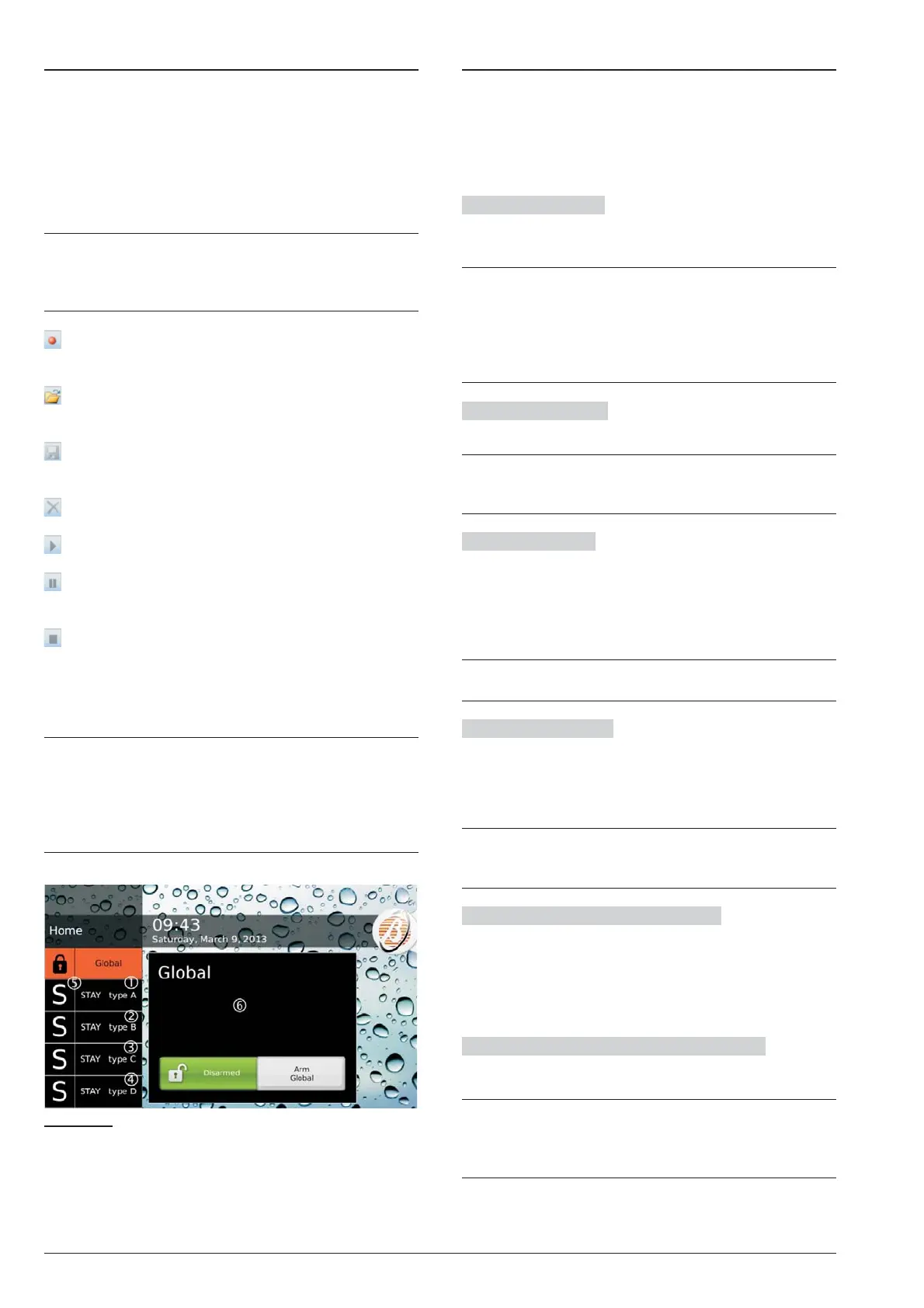
Figure 26 Arming by the Touch Keypad: labels 1, 2, 3
and 4 can be customised, as explained in the text; the
corresponding Special arming initial letter will be put in
position 5; the description assigned to the arming se
-
lected will appear in window 6, as explained in the text.










 To Next Page