Monostable-Enabled If this option is disabled (at de
-
fault) the Output is Bistable: it will activate when AT
LEAST ONE of its associated Events occurs, and will
stop when ALL of its associated Events end.
If this option is enabled, the Output is Monostable: it will
activate when AT LEAST ONE of its associated Events
occurs, and will stop when the programmed ON Time
expires (see “ON Time” below).
Monostable-Time ON This is the maximum activation
time of the Output.
Valid entries: 1 through 25 seconds, in 1-second
steps; 1 through 127 minutes, in 1-minute steps.
Default: 3 minutes.
Monostable-Time OFF This is the minimum OFF
Time after restoral of the Output. The Output will be un
-
able to re-activate until the programmed OFF Time ex
-
pires.
Valid entries: 1 through 255 seconds, in 1-second
steps;
Default: 6 seconds.
+
The Monostable-Time On and Monostable-Time
Off can be set for Monostable Outputs ONLY.
Timer This option will allow you to associate a Timer
with the Output. The Output can be activated ONLY
when the selected Timer is in the active state (refer to
“Timer”).
+
When the Timer window expires, the Output will re-
store to standby, even if the conditions that gener-
ated the event are still present.
Cycles Setup the number of cycles the Output must run.
Valid entries: 1 to 31 or unlimited cycles.
Default: 1 cycle.
+
Outputs that have Unlimited set for the Output op
-
tion come back to standby ONLY when you enter/exit
to/from Installer Menu or download the options to
BOSS, therefore this value should be set carefully.
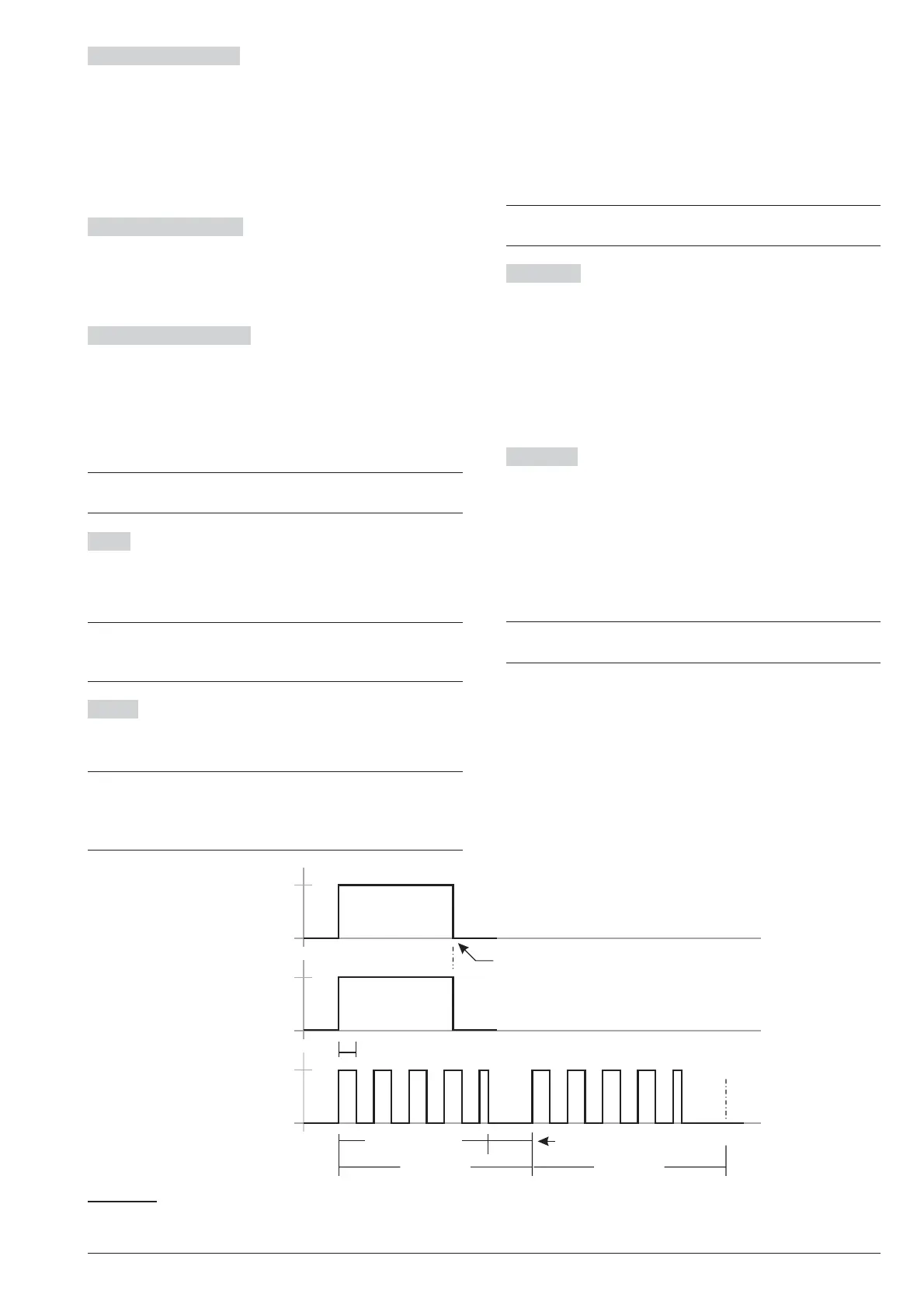
The Output will continue to run the programmed num
-
ber of Cycles even after the triggering event has been
cleared. During each cycle, the Output will be active for
the programmed ON Time and will restore to standby
for the programmed OFF Time.IfanHalf Cycle has
been programmed, the Output will oscillate in accor
-
dance with the Half Cycle parameters (during the ON
Time), as shown in Figure 25.
+
The Cycles option can be set for Monostable Out
-
puts only.
Half Cycle If this option is other then zero, the Output
will remain active for the programmed time, return to
standby for the same amount of time, and then reacti
-
vate, as shown in Figure 25. This option can be used to
generate visual and audible signals (cause LEDs to
blink or buzzers to sound).
Valid entries: 200 through 1400 milliseconds in 200
milliseconds steps.
If you set 0, the Output will not oscillate.
Partitions If disabled (default) the output is NOT as
-
signed to the area.
If ENABLED, the output is assigned to the Partition:
Ø
the output can be activated/deactivated from the
keypad ONLY if the PIN and the keypad used share
at least one Partition with those of the output;
Ø the output can be activated/deactivated by telephone
ONLY if the PIN used shares at least one area with
those of the output.
+
These options are available ONLY for the Re-
served outputs.
52 Expandable Hybrid Control Panel
... occurs
... ends
EVENT
... active
... standby
Bistable
OUTPUT
... active
... standby
Monostable
OUTPUT
Half cycle
ON time
OFF time
1 Cycle
st
2 Cycle
nd
the event ends here
Figure 25 The Effect of the Half cycle and Cycle options on Bistable and Monostable Outputs










 To Next Page