OPERON D 850 SURGICAL TABLE
USING THE SERVICE PROGRAM
700000120 Rev. 1
6-9
2. Low power
3. Sensors
4. Comfort Movements
5. Time/Battery
To display the parameters for the function you
wish to change, click on the tab to bring it
forward and make it active.
NOTE
NOTE: — The values shown in the
illustration may not match those for
your table.
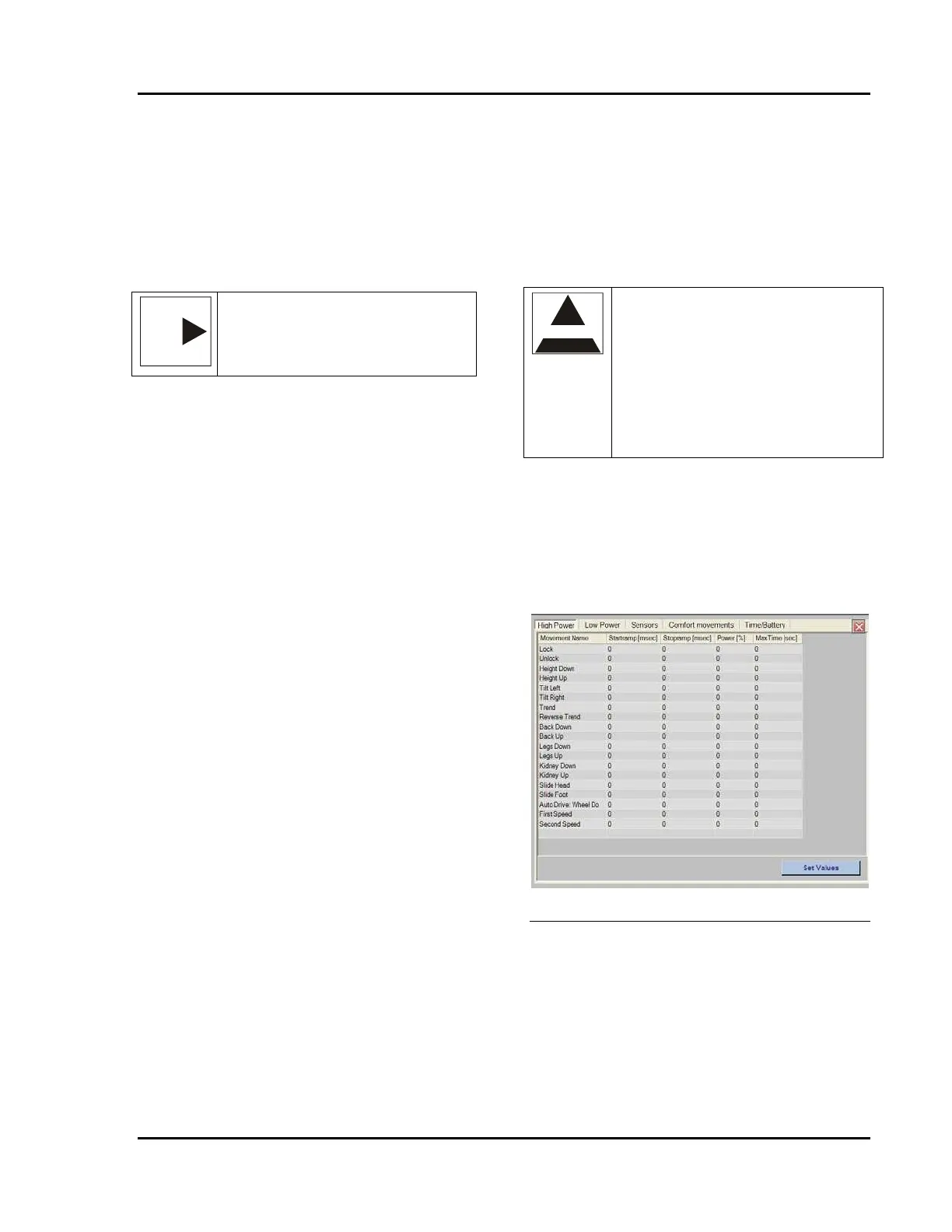
High Power Tab
The High Power tab allows you to set speed at
which the table will perform the various
movements in High Power mode of the
MicroMove™ feature. It is important to note
that you can set opposing actions to operate at
different speeds. Thus, for example, height up
can be set to move rapidly, while height down
can be set to move slowly.
The following parameters can be set for each
movement:
Startramp (msec)
• This value is the amount of time (in
milliseconds) it takes from the time the
operator pushes a hand pendant button until
the motor reaches full power setting. In
effect, it is a ramp up time to achieve a
smooth start to the motion. The startramp
time should not be set above 1000 msec.
Stopramp (msec)
• This value is the amount of time (in
milliseconds) it takes from the time the
operator releases a hand pendant button until
the motor reaches 0V power. In effect, it is
a ramp down time to achieve a smooth
stopping motion. The stop ramp time should
not be set above 1000 msec.
Power (%)
• This is the percentage of motor’s power
used during the movement. The amount of
power applied equates directly to the speed
with which the motion is performed. Power
may be set between 20 and 100% of the
motor’s full power.
Max. Time (sec)
• This is the maximum amount of time (in
seconds) the table is allowed to try to
perform the movement. If the movement is
not complete at the end of the time period,
the motor shuts off.
CAUTION
CAUTION —The Service Program will
allow you to set motor parameters to the
min. and max. values of 100 to 1000.
Setting the parameters to the extreme
min. or max. value could lead to damage
to the table or its components, including
a failure to operate. Always test your
settings to ensure that the table
responds as anticipated.
To set the value of the parameter, use your
cursor to highlight the number you wish to
change. Type in the new value to replace the old
value.
After setting all of the parameters to the desired
levels, click on the “Save Values” button to
record them in the table’s CPU.
Figure 6-22 High Power Settings Screen
Low Power Tab
The Low Power tab allows you to set speed at
which the table will perform the various
movements in Low Power mode of the
MicroMove™ feature. The speeds set in this
form are by default significantly slower than the
High power settings, and are intended to give the
user fine adjustment control of the patient’s
position.








 To Next Page