LB 983 NightSHADE Operating Manual Quick Start
43
4.2.4 Defining a Controller Template
When creating a controller template the workflow is about the same than with a measurement
sequence. The difference is that no measurements are performed. The controller templates are
mainly used to control the LED panels in order to simulate environmental parameters (day night
cycle). That’s why only control commands can be set in the template.
To set up a new controller template refer to <Applications & Templates> <Measuring Tem-
plates>.
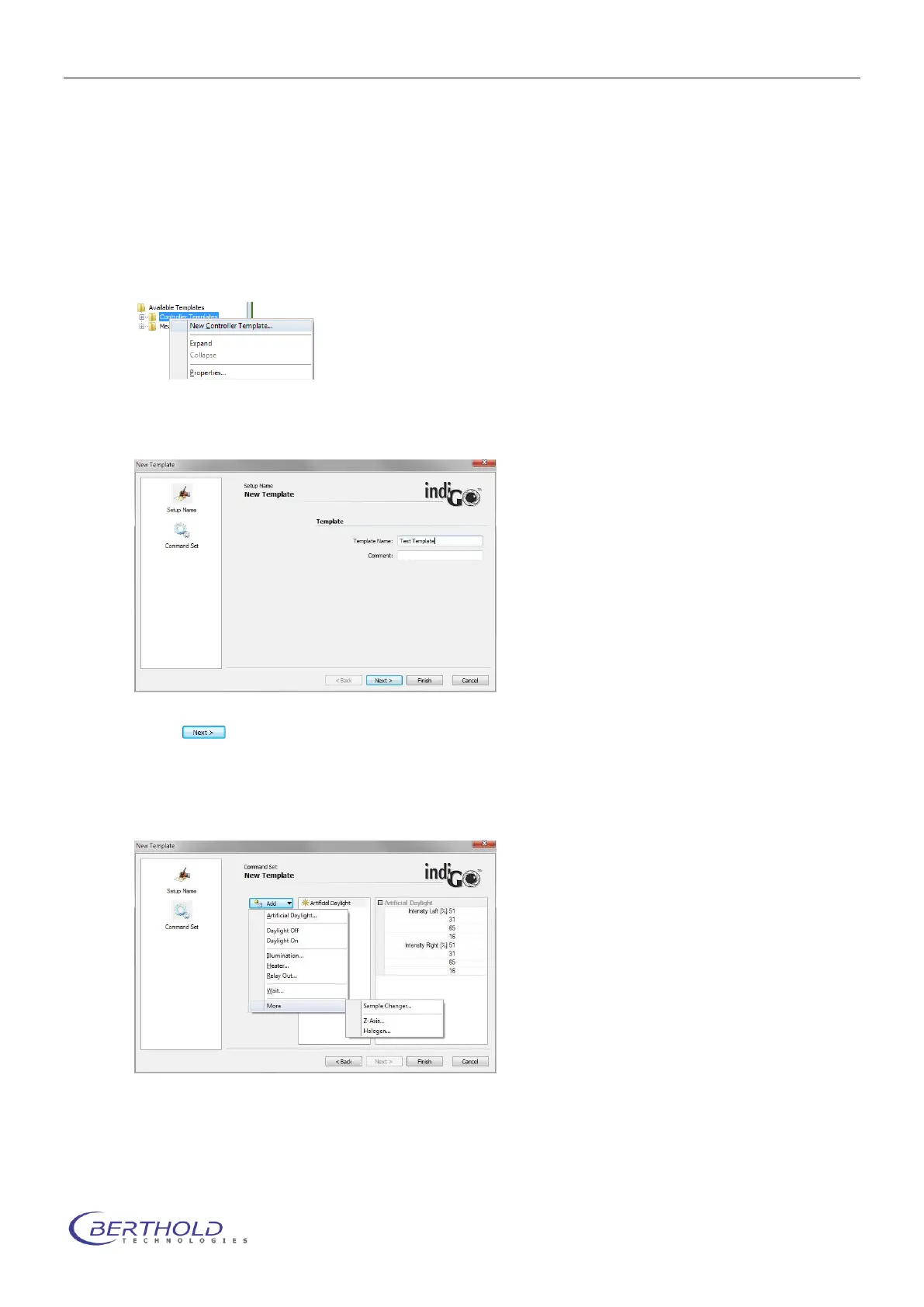
Select <New Controller Template> from the <Controller Templates> context menu.
indiGO starts the wizard and you first have to enter a name for the controller template you want
to define. You can also add a descriptive comment.
Select to define the control workflow.
Different kinds of control actions can be performed. Please note that depending on the system
configuration some of the selections might not be possible (e.g. due to a missing LED illumina-
tion).
To turn on the LED illumination select <Artificial Daylight> from the list. The dialog box to ad-
just the intensities of the different wavelength channels will pop up.



 To Next Page