Home
Besta
Laptop
CD-326PRO
Page 109 (Index)
Besta CD-326PRO - Index; To Do List
155 pages
Manual
Save Page as PDF
To Next Page
To Next Page
To Previous Page
To Previous Page
Loading...
PIM
102
3.2 Index
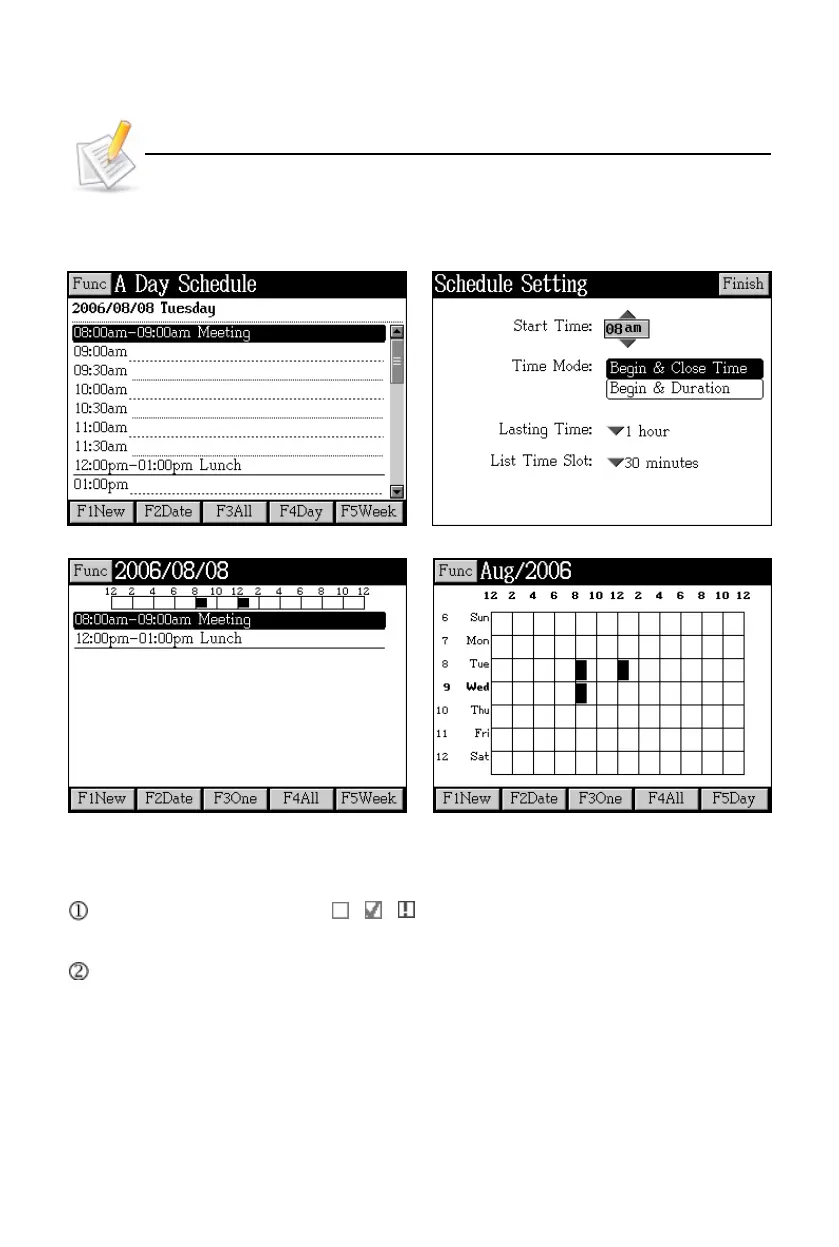
Data index
Schedule setting
View day chart
View week chart
4. T
o Do List
In index screen, the icons
/
/
in front of data indicate that the job is
“unfinished, finished, or overdue”.
Y
ou can search data by date.
T
o Do
List
108
110
Table of Contents
Main Page
Table of Contents
2
Default Chapter
8
Attention
8
Preface
9
Layout
9
Keyboard
11
Key Description
21
Touch Panel
21
Indicator
22
Hot Key Functions
22
The Stylus
23
The Panel
23
User's Guide
24
Power Source
24
Battery Replacing
24
Battery Power Checking
25
Battery Recharging
25
Card Inserting/Removing
26
Main Menu
27
Input Methods
28
English Keyboard Input Method
28
Chinese Keyboard Input Methods
29
Special Symbols Keyboard Input Method
29
Japanese Input Method
34
Korean Input Method
34
Handwriting Recognition
35
Improving the Recognition Rate
36
On-Screen English Keyboard
36
On-Screen Symbol Keyboard
36
Tips for Handwriting Input
36
Writing Chinese with Standard Strokes
36
Data Editing
37
Data Search
38
Date Selecting
39
Numeric Inputting
39
Initializing
40
Reset the Device
40
Time Setting
40
USB Disk
41
Menu Management
42
Dictionary Features
44
Sentence Translation
47
Data Index
50
Index Screen
50
Item Index
51
History
52
Language Selection
52
Explanation
52
Explanation Screen
53
Font Size
54
Syllable Pronunciation
54
Read after the Device
55
Repetition
55
Other Data
56
Data Storing
58
Pronunciation
58
Data Search
59
Smart Input Search
59
Wildcard Search
60
Cross Search
61
Secondary Search
62
Multi-Layered Search
64
Other Data Search
65
Special Data Search
65
Professional Use Dictionary
66
Word Search
67
Extended Card
68
Study Features
70
Word Component
71
Review and Test
73
Animated Grammar
74
Animated Phrases
76
General English Proficiency Test
79
Mock Exam
79
Practice Room
79
Interactive English
81
Content
81
Situation
81
All
82
Role Play
83
Listening&Speaking Classroom
83
Reading Studio
84
Audio Studio
85
Baby American English
86
Vocal Studio
86
Words Studio
87
Words Browse
87
Recite Word
88
Word Component
89
Synonym-Antonym Dictionary
90
Travel Dialogue
91
Dialogue
91
Search
92
Slang Dictionary
93
Extension Dictionary
94
DIY Dictionary
94
New Data
94
Review and Test
96
Review
96
Test
96
Word Browser
97
Sentence Making
98
Sentence Review
99
PIM Features
100
Paint Brush
101
Data Input
102
Input Data in Field
102
Custom Category
103
Edit Category
103
Data Index
104
Detail View
105
Name Card
106
Portrait
106
Lock/Unlock Data
107
Memorandum
107
Schedule
108
Period
108
Index
109
To Do List
109
World Time
110
Calendar
111
Anniversary
112
Class Schedule
112
Paint Brush
113
Calculator
113
Conversion
114
Private Information
115
System Features
117
Communication with PC
119
Memory
119
Password Setting
120
Power Management
120
LCD Setting
121
Music Setting
121
Menu Setting
122
Startup Picture
122
Input Setting
123
Phonetic Repeat
123
Handwriting Setting
124
After Service
124
Multi Features
125
File Management
126
Data Retrieve from Folder
127
Mp3
127
Video Learning
128
Key Function
128
Play List
128
Digital Recorder
129
Ebook
130
Flash Sprite
131
Text Browser
131
Games World
132
My Album
132
Create New Folder
133
File Management
133
Format
134
Put Folders in Order
134
Rename
134
Pclink
135
Default Chapter
135
Pclink Contents
135
Pclink Operation Guide
136
Content of CD
136
1 Installing USB Driver Program
137
2 PC Service Home Installation
140
S/W&H/W Requirements before Installation
140
Opening the Program
145
Communication
146
Backup and Restore
149
Personal Information Management
150
Custom Field
150
Data Editing
150
Category Editing
151
Import/Export
152
Import Data
152
Help
153
Maintanence
154
Fcc Notice
155



 To Next Page