Dictionary
57
4.5 Multi-layered Search
When you encounter unfamiliar words/characters, you can cross search in cor-
responding dictionaries or cards up to 20 layers. The number of the layer will be
displayed at the top right corner.
In the explanation screen, highlight the Chinese character(s)/English word(s)
to be looked up.
* by the stylus:
Use the stylus to highlight and drag the words. Press or tap anywhere in
the screen except the highlighted area to cancel the highlight.
* by the keyboard:
Press to locate the cursor. Move the cursor to the word, tap [F3Mark] to
fix the cursor, and then press direction key to set the range. Tap [F3Relax]
to cancel.
Press to search or press [F1], [F2], [F5] to search in corresponding
dictionaries.
* [F1] and [F2] provide search in commonly used dictionaries. [F5] is the word
bank. At this time, [F1] is the same as .
Press to return to the previous screen.
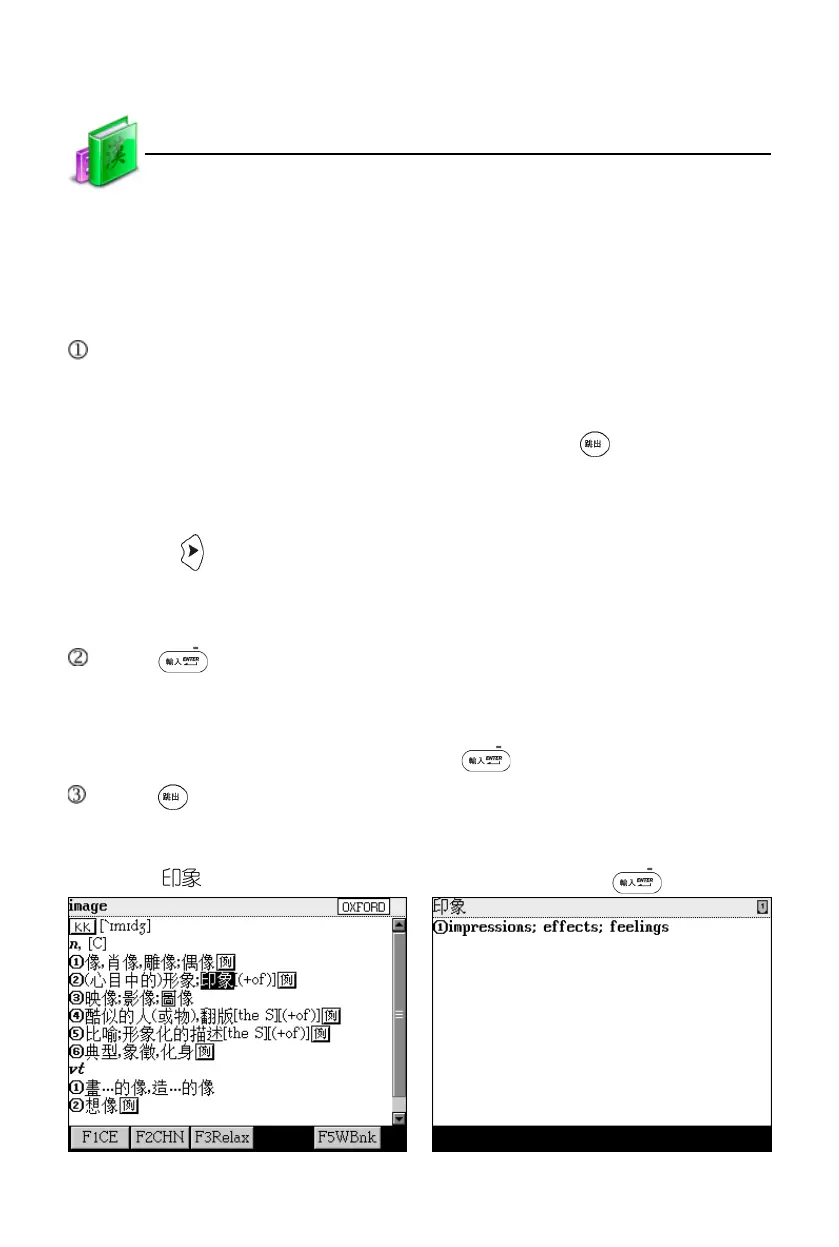
Take cross search “image” for example:
Highlight “ ” Tap [F1CE] or press
Data Search



 To Next Page