Instruction manual NSF VSI / VSI W / VSI T / VSI
TW Operation
38065447002 en-US 49 / 101
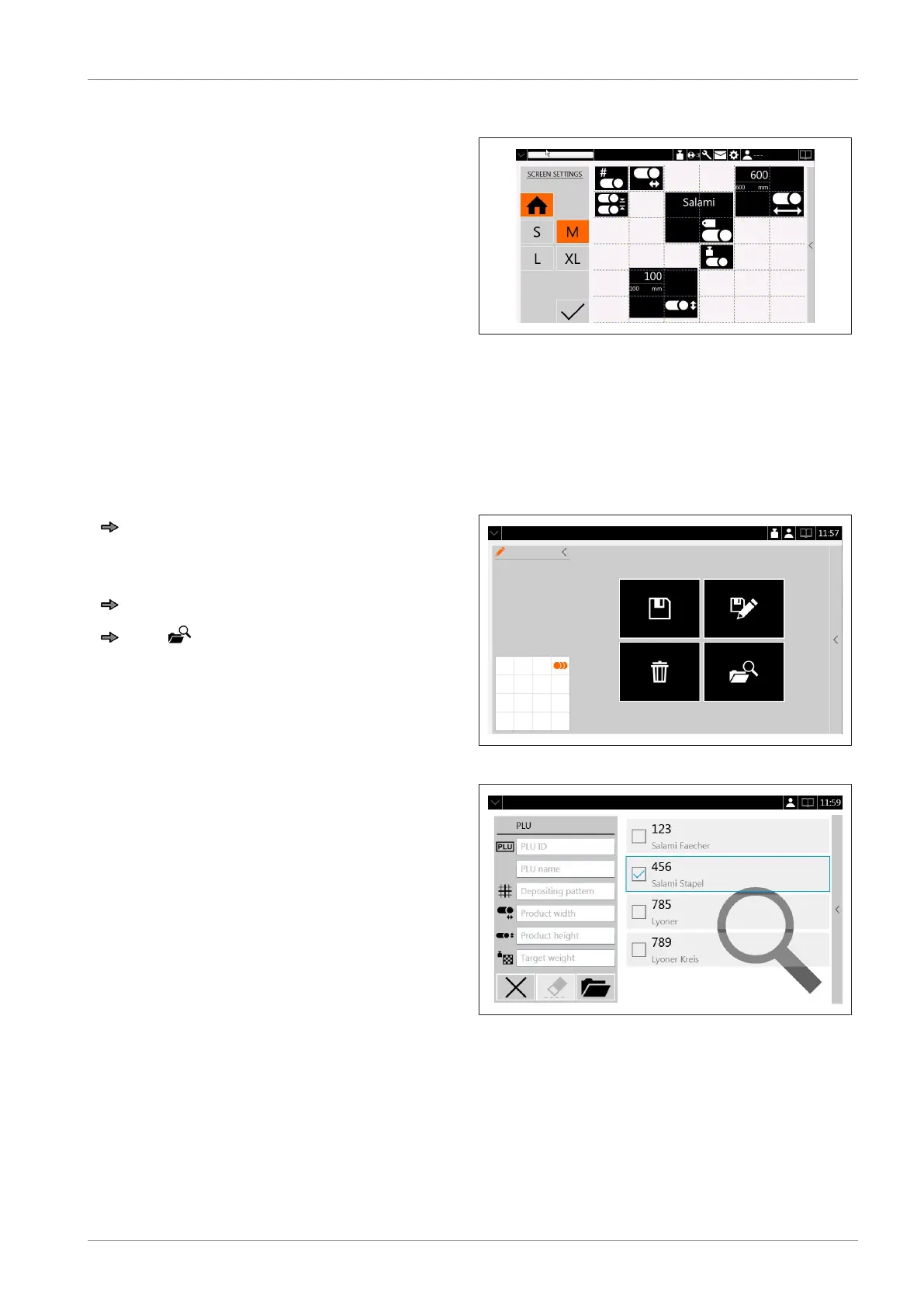
On the parameter page, the size of the tile may be changed.
Tile sizes S+M+L+XL may be selected for.
The tile is created around the symbol.
Parameters on top of the list displace the
ones that are below.
The operator can freely place the tiles.
The settings must be confirmed.
Fig.31: Tile manager
6.6 Search mask
All PLUs stored can be searched if you want to call up a particular PLU.
Using the filters of the search mask the number of the selectable PLUs displayed can be lim-
ited.
To open PLU menu tap the arrow on the
information bar.
or
Wipe in arrow direction.
Tap
The search mask opens.
Fig.32: PLU management
Saved PLUs can be filtered according to:
1. PLU No.
2. PLU name
3. Product width
4. Product height
5. Depositing type
6. Target weight
Fig.33: Search mask


 To Next Page
 Loading...