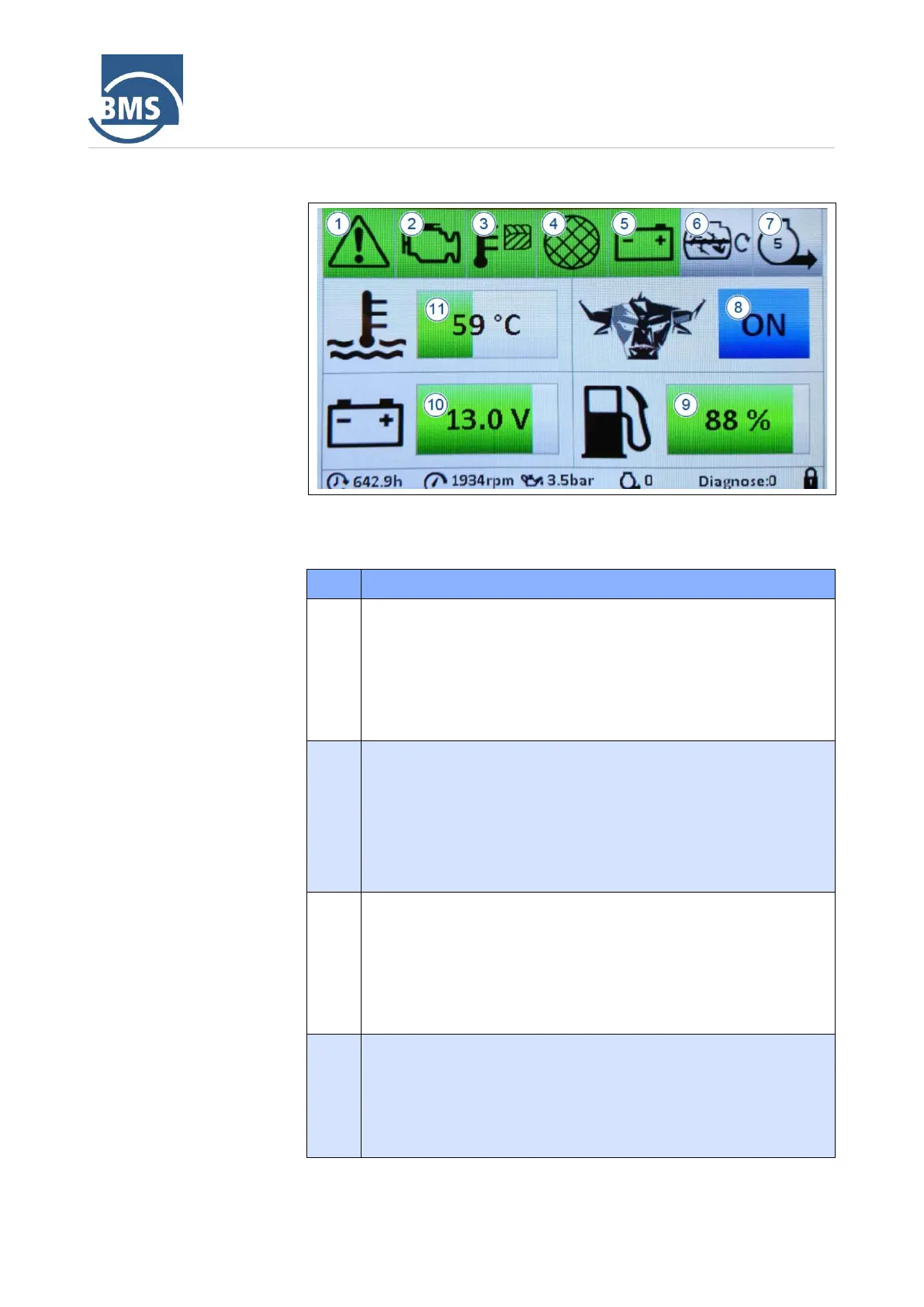
The displays in the main menu have the following meaning:
Emergency stop control display
− Green: The emergency stop button (see Section 4.6.1) was not
pressed.
− Red: The emergency stop switch was pressed The machine
stops and starting is only possible after unlocking the
emergency stop button.
Engine control display
− Green: The motor runs smoothly.
− Yellow: A warning message is present which does not lead to
the motor being switched off.
− Red: An motor fault is present which prevents the motor from
starting or causes the motor to be switched off.
Compressor temperature check display
− Green: The temperature of the compressor is within the
permissible range.
− Red: The compressor is too hot (over 120 °C). The machine
switches off and starting is possible only after the fault has
been rectified.
Control display dome screen
− Green: The safety switch on the dome screen is closed.
− Red: The safety switch on the dome screen is open (unlocked).
The machine switches off and starting is only possible after the
safety switch on the dome screen has been closed.



 To Next Page