124
Automated Playback (Slide Show)
Slide show image settings are based on DPOF standards (p. 134).
Starting a Slide Show
All images or a selection of images on a CF card can be displayed one-by-one in an
automated slide show.
1
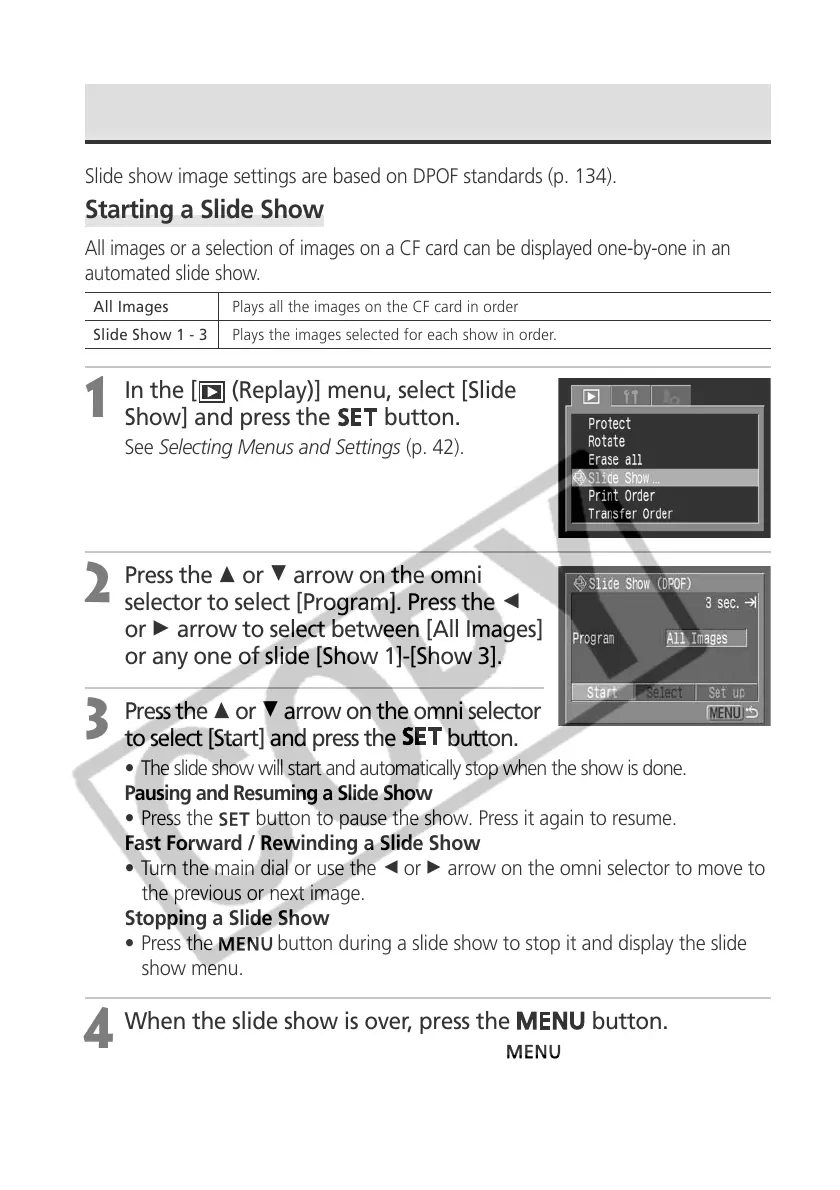
In the [ (Replay)] menu, select [Slide
Show] and press the
button.
See Selecting Menus and Settings (p. 42).
2
Press the C or D arrow on the omni
selector to select [Program]. Press the B
or A arrow to select between [All Images]
or any one of slide [Show 1]-[Show 3].
3
Press the C or D arrow on the omni selector
to select [Start] and press the
button.
• The slide show will start and automatically stop when the show is done.
Pausing and Resuming a Slide Show
• Press the
button to pause the show. Press it again to resume.
Fast Forward / Rewinding a Slide Show
• Turn the main dial or use the B or A arrow on the omni selector to move to
the previous or next image.
Stopping a Slide Show
• Press the
button during a slide show to stop it and display the slide
show menu.
4
When the slide show is over, press the
button.
The slide show menu appears again. Press the
button again to close
the menu.
All Images Plays all the images on the CF card in order
Slide Show 1 - 3 Plays the images selected for each show in order.



 To Next Page