89
Shooting - Selecting Particular Effects
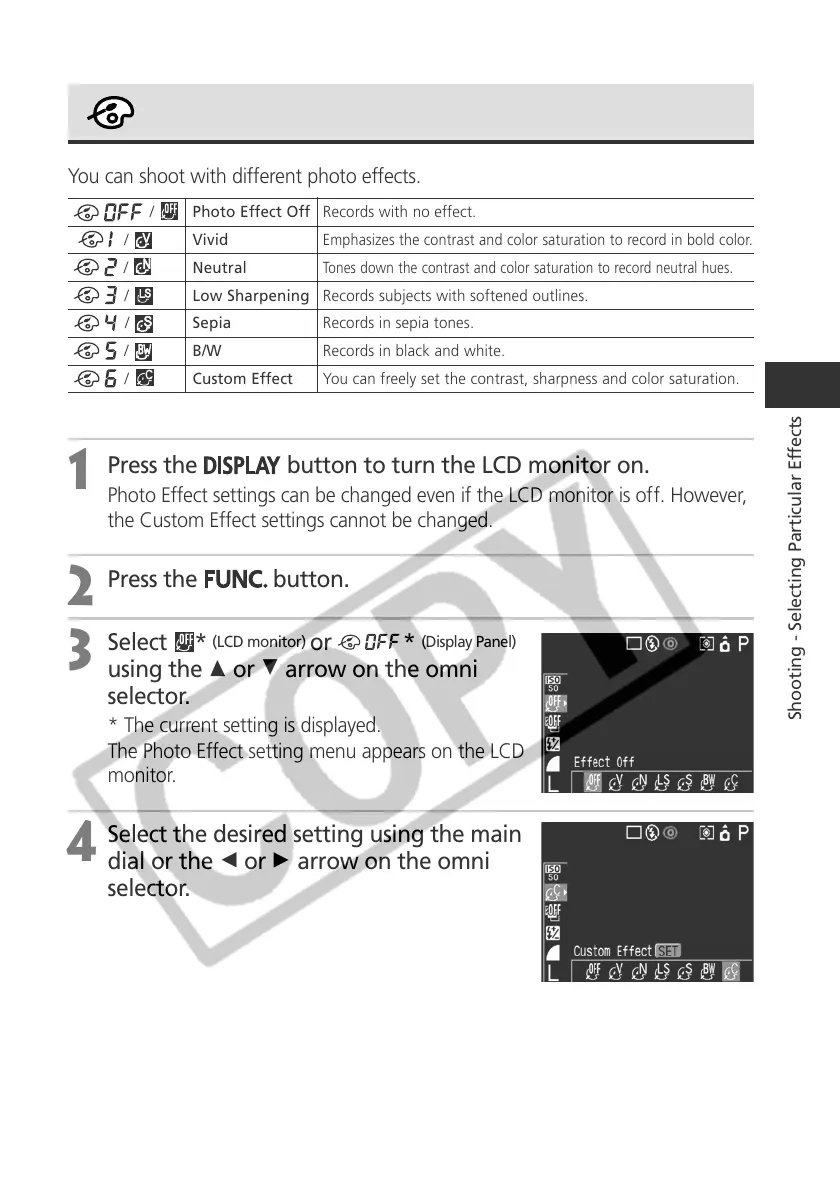
Changing the Photo Effect
You can shoot with different photo effects.
1
Press the
button to turn the LCD monitor on.
Photo Effect settings can be changed even if the LCD monitor is off. However,
the Custom Effect settings cannot be changed.
2
Press the
button.
3
Select *
(LCD monitor)
or *
(Display Panel)
using the C or D arrow on the omni
selector.
* The current setting is displayed.
The Photo Effect setting menu appears on the LCD
monitor.
4
Select the desired setting using the main
dial or the B or A arrow on the omni
selector.
/ Photo Effect Off Records with no effect.
/
Vivid
Emphasizes the contrast and color saturation to record in bold color.
/ Neutral
Tones down the contrast and color saturation to record neutral hues.
/
Low Sharpening Records subjects with softened outlines.
/
Sepia Records in sepia tones.
/
B/W Records in black and white.
/ Custom Effect You can freely set the contrast, sharpness and color saturation.



 To Next Page